Loading
Get Brickstreet Insurance Bi-309 2014-2026
How it works
-

Open form follow the instructions
-

Easily sign the form with your finger
-

Send filled & signed form or save
How to fill out the BrickStreet Insurance BI-309 online
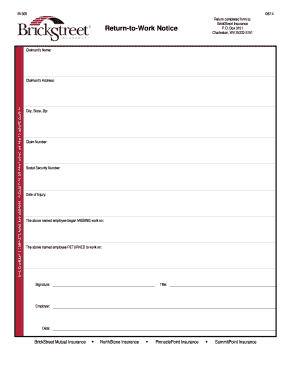
Completing the BrickStreet Insurance BI-309 form is a vital step in the claims process. This guide will provide you with clear instructions on how to fill out the form accurately and efficiently.
Follow the steps to complete the BrickStreet Insurance BI-309 form online.
- Click ‘Get Form’ button to obtain the form and open it in your preferred editor.
- Enter the claimant’s complete name and address in the designated fields. It is important to type or print using an ink pen for clarity.
- Fill in the city, state, and zip code associated with the claimant’s address in the appropriate sections.
- Locate the claim number field and enter the relevant claim number.
- Provide the social security number of the claimant in the designated area.
- Indicate the date of injury by entering the specific date when the injury occurred.
- Document the date the employee began missing work. This is crucial for tracking the absence period.
- Specify the date the employee returned to work in the corresponding field.
- The authorized individual should sign the document in the signature field provided.
- Enter the title of the person signing the form to validate the submission.
- Record the employer's name in the designated space.
- Finally, write the date when the form is filled out and signed.
- After completing all sections, remember to save your changes, download, print, or share the form as needed.
Complete your BrickStreet Insurance BI-309 form online for a swift claims process.
In most cases, you should start by contacting your insurance provider to report the incident. They can guide you on whether you need to reach out to the other party's insurance. Using BrickStreet Insurance BI-309 can clarify the steps and ensure you choose the best course of action for your situation.