Loading
Form preview
  • US Legal Forms
  • Other Templates
  • Industry Forms
  • Industry Insurance & Medical Forms
  • Banner Pediatric Specialists Medical Records Release Form

Get Banner Pediatric Specialists Medical Records Release Form

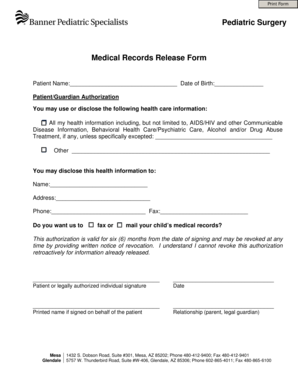
Print Form Pediatric Surgery Medical Records Release Form Patient Name: Date of Birth: Patient/Guardian Authorization You may use or disclose the following health care information: All my health information.

How it works

  1. Open form

    Open form follow the instructions

  2. Easily sign form

    Easily sign the form with your finger

  3. Share form

    Send filled & signed form or save

How to fill out the Banner Pediatric Specialists Medical Records Release Form online

Filling out the Banner Pediatric Specialists Medical Records Release Form online can simplify the process of obtaining necessary medical records. This guide provides clear, step-by-step instructions to ensure users can accurately complete the form.

Follow the steps to complete the form effortlessly.

  1. Click ‘Get Form’ button to access the form and open it in the editor.
  2. Begin by filling in the patient’s name in the designated field along with their date of birth. Ensure this information is accurate as it is essential for proper identification.
  3. In the patient/guardian authorization section, select the types of health care information that may be disclosed. If needed, additional specifics can be indicated in the blank space provided.
  4. In the section to disclose health information, enter the recipient's name, address, phone number, and fax number where the medical records should be sent.
  5. Indicate whether you would prefer the medical records to be faxed or mailed by checking the appropriate option.
  6. Review the authorization validity statement which mentions that this authorization lasts for six months and can be revoked anytime by written notice. Understanding this clause is important for both the user and the provider.
  7. Sign and date the form as the patient or a legally authorized individual. If signing on behalf of the patient, ensure to print the name and relationship to the patient in the provided fields.
  8. Once you have completed all sections, you can save changes, download, print, or share the form as necessary.

Complete your medical records release form online today for a seamless experience.

Get form

Experience a faster way to fill out and sign forms on the web. Access the most extensive library of templates available.
Get form

Related content

Access Records | Medical Board of California...
Physicians will require a patient to sign a records release form to transfer records. If...
Learn more
How Do I Get Access to My Medical Records?
Download Authorization to Release Medical Information form (PDF) · Download directions on...
Learn more
A Matter of Record (301) 890-4188 ...
Sep 16, 2016 — Our goal is that today's meeting will be a fair and. 5 open forum for...
Learn more

Related links form

Dwc Cover Sheet QME Form 109 QME Notice Of Unavailability - California Department ... - Dir Ca DLSE-PW-Form 1 - English - California Department Of Industrial ... - Dir Ca JUS-TOB9, Waiver Of Tribal Sovereign Immunity By Native American ... - Ag Ca

Questions & Answers

Get answers to your most pressing questions about US Legal Forms API.

Contact support

Filling out authorization to release information involves providing your personal details, specifying what information you are authorizing for release, and signing the form. It is crucial to also utilize the Banner Pediatric Specialists Medical Records Release Form to ensure your authorization is aligned with your healthcare provider's requirements. Make sure to verify all information before submitting.

To keep track of family medical history, create a shared document that outlines health conditions, surgeries, and relevant medical data for each family member. Use this information to fill out the Banner Pediatric Specialists Medical Records Release Form when necessary, making it easier to share vital data with healthcare professionals. Regularly update this document as new information arises.

When filling out a release of medical records form, start by providing your details and the specifics of the medical records being requested. Always include the Banner Pediatric Specialists Medical Records Release Form to facilitate access. Ensure to review all completed entries before submitting the form to your healthcare provider.

The DD Form is typically used within military settings for authorization to release medical records. If you are looking to gather your family's health information, filling out the Banner Pediatric Specialists Medical Records Release Form is more suitable for civilian healthcare needs. Always ensure you understand the specific requirements for your context.

To organize your child's medical records, start by creating a dedicated folder that includes immunization records, doctor’s notes, and other health-related documents. Incorporate the Banner Pediatric Specialists Medical Records Release Form when obtaining or sharing information. Regularly update this folder to keep it current and accessible for future medical visits.

The five basic filing steps for medical records include gathering documents, categorizing them, labeling each file clearly, storing files in a safe location, and regularly updating them. Incorporating the Banner Pediatric Specialists Medical Records Release Form in your process will help maintain compliance with privacy regulations. This routine makes your records accessible when necessary.

To fill out a release of medical information form, carefully input your details, the recipient's information, and specific medical records you are requesting. Ensure to include the Banner Pediatric Specialists Medical Records Release Form to legally share information. Double-check that all required sections are complete for a smoother processing experience.

The best way to organize medical records is to keep them categorized and easily accessible. You can use folders for different family members, date them, and include the Banner Pediatric Specialists Medical Records Release Form whenever records are requested. This method simplifies tracking and retrieving essential information during medical visits.

Filling out a medical consent form involves entering basic personal information, specifying the type of treatment or information being authorized, and signing the document. Additionally, make sure you include the Banner Pediatric Specialists Medical Records Release Form when necessary to access specific medical records. This helps your healthcare provider act in your best interest.

The release of medical information is typically authorized by the patient or their legal guardian. For minors, parents or guardians need to complete the Banner Pediatric Specialists Medical Records Release Form. This ensures that the applicable laws regarding privacy and consent are followed.

Get This Form Now!

Use professional pre-built templates to fill in and sign documents online faster. Get access to thousands of forms.
Get form
If you believe that this page should be taken down, please follow our DMCA take down processhere.
Get Banner Pediatric Specialists Medical Records Release Form
Get form
  • Adoption
  • Bankruptcy
  • Contractors
  • Divorce
  • Home Sales
  • Employment
  • Identity Theft
  • Incorporation
  • Landlord Tenant
  • Living Trust
  • Name Change
  • Personal Planning
  • Small Business
  • Wills & Estates
  • Packages A-Z
  • Affidavits
  • Bankruptcy
  • Bill of Sale
  • Corporate - LLC
  • Divorce
  • Employment
  • Identity Theft
  • Internet Technology
  • Landlord Tenant
  • Living Wills
  • Name Change
  • Power of Attorney
  • Real Estate
  • Small Estates
  • Wills
  • All Forms
  • Forms A-Z
  • Other Templates
  • Legal Hub
  • About Us
  • Help Portal
  • Legal Resources
  • Blog
  • Affiliates
  • Contact Us
  • Delete My Account
  • Site Map
  • Industries
  • Forms in Spanish
  • Localized Forms
  • State-specific Forms
  • Forms Kit
  • Real Estate Handbook
  • All Guides
  • Notarize
  • Incorporation services
  • For Consumers
  • For Small Business
  • For Attorneys
  • USLegal
  • FormsPass
  • pdfFiller
  • signNow
  • altaFlow
  • DocHub
  • Instapage
Form Packages
  • Adoption
  • Bankruptcy
  • Contractors
  • Divorce
  • Home Sales
  • Employment
  • Identity Theft
  • Incorporation
  • Landlord Tenant
  • Living Trust
  • Name Change
  • Personal Planning
  • Small Business
  • Wills & Estates
  • Packages A-Z
Form Categories
  • Affidavits
  • Bankruptcy
  • Bill of Sale
  • Corporate - LLC
  • Divorce
  • Employment
  • Identity Theft
  • Internet Technology
  • Landlord Tenant
  • Living Wills
  • Name Change
  • Power of Attorney
  • Real Estate
  • Small Estates
  • Wills
  • All Forms
  • Forms A-Z
  • Other Templates
Customer Service
  • Legal Hub
  • About Us
  • Help Portal
  • Legal Resources
  • Blog
  • Affiliates
  • Contact Us
  • Delete My Account
  • Site Map
  • Industries
  • Forms in Spanish
  • Localized Forms
  • State-specific Forms
  • Forms Kit
Legal Guides
  • Real Estate Handbook
  • All Guides
Prepared for you
  • Notarize
  • Incorporation services
Our Customers
  • For Consumers
  • For Small Business
  • For Attorneys
Our Sites
  • USLegal
  • FormsPass
  • pdfFiller
  • signNow
  • altaFlow
  • DocHub
  • Instapage
Social Media
Call us now toll free:
+1 833 426 79 33
As seen in:
© Copyright 1999-2026 airSlate Legal Forms, Inc. 17 Station Street, Ste. 203, Brookline, MA 02445
  • Your Privacy Choices
  • Terms of Service
  • Privacy Notice
  • Content Takedown Policy
  • Bug Bounty Program