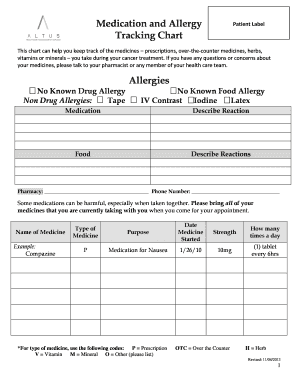
Medication and Allergy Tracking Chart Patient Label This chart can help you keep track of the medicines prescriptions, overthecounter medicines, herbs, vitamins or minerals you take during your cancer.

How it works
  • Open form

    Open form follow the instructions

  • Easily sign form

    Easily sign the form with your finger

  • Share form

    Send filled & signed form or save

How to fill out the Altus Medication and Allergy Tracking Chart online

The Altus Medication and Allergy Tracking Chart is an essential tool to help users track their medications and allergies during cancer treatment. This guide provides clear, step-by-step instructions on how to effectively fill out the chart online.

Follow the steps to complete your tracking chart online.

  1. Click ‘Get Form’ button to obtain the form and open it in the editor.
  2. Begin by filling out the Patient Label section at the top of the chart with your name and any other identifying information as required.
  3. Review the Allergies section. Indicate any known drug allergies by checking 'No Known Drug Allergy' if applicable or listing non-drug allergies such as tape, IV contrast, iodine, or latex.
  4. In the Medication section, list each medication you are currently taking. Provide the name of the medicine, type of medicine (using the code provided, such as P for prescription), and the purpose of the medication.
  5. Record the date the medicine was started, the strength of the medicine, and how many times a day you take it in the appropriate fields.
  6. If applicable, provide details of any reactions you have experienced from the medications or foods by describing these in the designated areas.
  7. Complete the form by entering your pharmacy's name and phone number to ensure your healthcare team can contact them if necessary.
  8. Once all information is filled out accurately, save your changes. You can then download, print, or share the completed form as needed.

Start filling out your Altus Medication and Allergy Tracking Chart online today for better management of your health.

Get form

Experience a faster way to fill out and sign forms on the web. Access the most extensive library of templates available.

Related content

Study Details | NCT05064553 | ALTUS: Performance...

The study will include participants aged 18 years and older who are at increased risk for...

Learn more
Updates to Greenhouse Pesticides

Mar 6, 2024 — In this guide, we delve into the realm of the latest advancements in...

Learn more
Questions & Answers

Get answers to your most pressing questions about US Legal Forms API.

Contact support

Where is patient allergy information located in EMR Meditech?

In Meditech's EMR system, patient allergy information can typically be found in the allergy module or summary section. This area may display lists of allergies with categorization for easy reference. Ensure that your use of the Altus Medication and Allergy Tracking Chart is integrated into Meditech for real-time updates and accurate information sharing among healthcare teams.

When documenting a suspected medication allergy, detail the medication involved, the symptoms exhibited, and any actions taken to address the issue. Record this information in the Altus Medication and Allergy Tracking Chart, allowing for future reference and ensuring healthcare providers have a clear understanding of the patient's allergies. Such thorough documentation is crucial for patient safety.

In an electronic medical record (EMR) system, patient allergy information is typically found under the allergy section. This section may include details about known allergens, reactions, and any relevant notes. For a comprehensive overview, ensure that the Altus Medication and Allergy Tracking Chart is connected to your EMR, providing seamless access to allergy information.

Coded allergies use standardized codes for easy identification and tracking within medical records. Uncoded allergies, however, rely on descriptive terms that may vary between different systems. By utilizing the Altus Medication and Allergy Tracking Chart, you can efficiently convert uncoded allergies into coded forms, enhancing communication among healthcare providers.

To indicate no known drug allergies, simply record this statement clearly in the Altus Medication and Allergy Tracking Chart. Consistently using standardized phrasing helps maintain clarity across various healthcare records. Make sure to review this information regularly, as patient conditions may change over time.

When documenting a patient’s allergy, focus on the allergen, the type of reaction, and the severity of that reaction. Using the Altus Medication and Allergy Tracking Chart, categorize each allergen to facilitate quick access for medical professionals. This helps in developing an effective and safe treatment plan tailored to the patient’s needs.

To document a patient with allergies effectively, use the Altus Medication and Allergy Tracking Chart to record all pertinent details. Begin by listing the specific allergies, along with any reactions experienced by the patient. Regularly update this chart during patient visits to ensure accurate and accessible information for healthcare providers.

Get This Form Now!

Use professional pre-built templates to fill in and sign documents online faster. Get access to thousands of forms.

If you believe that this page should be taken down, please follow our DMCA take down process here.

Get Altus Medication and Allergy Tracking Chart