Loading
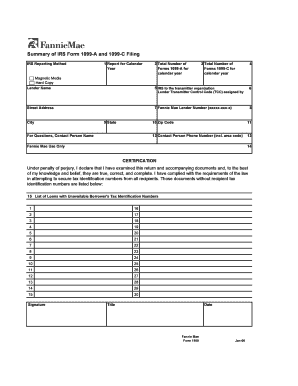
Get Fannie Mae 1100 2006-2026
How it works
-

Open form follow the instructions
-

Easily sign the form with your finger
-

Send filled & signed form or save
How to fill out the Fannie Mae 1100 online
The Fannie Mae 1100 form is essential for servicers to report their submissions of IRS Forms 1099-A and 1099-C. This guide provides a clear and structured approach to completing this form online, ensuring you adhere to all necessary requirements.
Follow the steps to complete the Fannie Mae 1100 form.
- Click ‘Get Form’ button to obtain the form and open it in the editor.
- Fill in the 'Calendar Year' field with the appropriate year for your submission of Forms 1099-A and 1099-C.
- Enter the total number of Forms 1099-A you have submitted for the calendar year.
- Input the total number of Forms 1099-C that were submitted for the same year.
- Provide the lender's name in the designated field.
- Enter your lender transmitter control code (TCC) assigned by the IRS.
- Fill in your lender's street address, city, state, and zip code accurately.
- Include the name of the contact person for any questions, along with their phone number.
- In the certification section, confirm that you have examined the return and attest to its accuracy by signing, entering your title, and the date.
- List any loans without available tax identification numbers in Block 15. Ensure you have enough space for all necessary loan numbers.
- Once you have completed all sections of the form, you can save any changes, download, print, or share the document as needed.
Complete your Fannie Mae 1100 form online to ensure compliance and accuracy in your reporting.
Fannie Mae 1100 generally requires that your debt-to-income ratio does not exceed 43%. This ratio examines the total monthly debts against your gross monthly income. Keeping this ratio in check helps ensure you can manage your mortgage payments alongside other financial obligations.