Loading
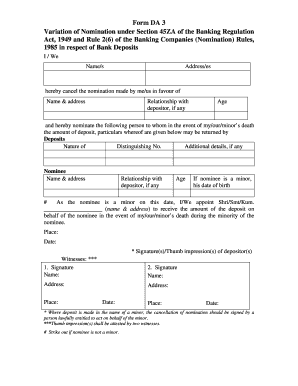
Get Axis Bank Form Da 3
How it works
-

Open form follow the instructions
-

Easily sign the form with your finger
-

Send filled & signed form or save
How to fill out the Axis Bank Form DA 3 online
Filling out the Axis Bank Form DA 3 online is a straightforward process that allows users to manage their nominations for bank deposits. This guide provides step-by-step instructions to assist you in accurately completing the form.
Follow the steps to fill out the Axis Bank Form DA 3 online.
- Click ‘Get Form’ button to obtain the form and open it in your preferred editor.
- Begin by filling in 'I / We Name/s' with the full names of the depositor(s). This information is crucial, as it identifies who is making the nomination.
- Proceed to the section that requires the details of the previously nominated person. Fill in 'Name & address' of the individual whose nomination is being canceled.
- Indicate the age of the canceled nominee in the 'Age' field to provide complete information.
- Fill in the 'Relationship with depositor, if any' section for the new nominee, similar to the previous step.
- If the new nominee is a minor, enter their date of birth in the applicable field, ensuring full compliance with the requirements.
- Finally, after filling out the form, specify the 'Place' and 'Date' of submission.
- If required, ensure that the thumb impression(s) are attested by two witnesses and their names and addresses are duly recorded.
Complete your forms online to manage your banking easily and effectively.
To fill the service request form for Axis Bank, begin by entering your account information and the type of service you require. Next, provide clear details about your request or issue. Double-check your entries to avoid errors, as this will facilitate prompt handling by the bank. For additional help, the US Legal Forms platform has templates available, including the Axis Bank Form DA 3, to make your experience smoother.