Loading
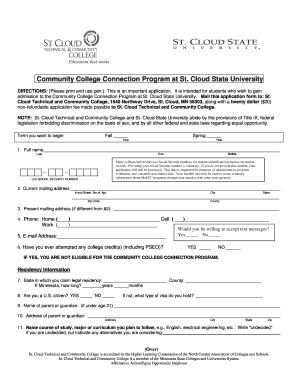
Get St. Cloud State University Application For Admission
How it works
-

Open form follow the instructions
-

Easily sign the form with your finger
-

Send filled & signed form or save
How to fill out the St. Cloud State University Application For Admission online
This guide provides detailed instructions for filling out the St. Cloud State University Application for Admission online. By following these steps, you will navigate the application process efficiently and effectively.
Follow the steps to complete your application accurately.
- Click ‘Get Form’ button to begin and open the application for admission in your browser. This will allow you to access the form electronically and fill it out comfortably.
- Enter your full name in the designated fields, including your last name, first name, and middle name as applicable. Ensure that the spelling is correct as this will be used in your application records.
- Provide your current mailing address, including street number, city, state, zip code, and county information. If your mailing address changes at any point, keep it updated in your application.
- Fill in your phone numbers in the provided sections for home, cell, and work. Indicate if you would be willing to receive text messages regarding your application.
- Enter your email address, ensuring it is one that you check regularly for important updates and communications regarding your application.
- Respond to the question about whether you have attempted any college credits, marking 'YES' or 'NO' as applicable. Remember that if you select 'YES', you will be ineligible for the community college connection program.
- Indicate your residency information by detailing the state you claim legal residency and the county. If you reside in Minnesota, specify how long you have been a resident.
- Answer whether you are a U.S. citizen. If you are not, specify the type of visa you hold.
- If you are under the age of 21, provide the name and address of your parent or guardian to ensure that the application meets necessary criteria.
- Specify your intended course of study or major. If undecided, indicate that along with any alternatives you are considering.
- Complete the educational record section with information about the secondary schools you have attended, including the state, town or city, dates of attendance, and degrees received.
- Address immunization requirements as outlined in the document, confirming whether you are exempt or must provide immunization data.
- Optionally provide demographic information to assist in evaluating recruitment and retention policies. This information helps institutions better understand their student population.
- Certify that all provided information is accurate by signing and dating the application, ensuring that you take responsibility for the information submitted.
- Once all fields are complete, review your application for accuracy. After confirming that all information is correct, you may save changes, download, print, or share the form as necessary.
Complete your application for admission online today and take the first step towards your academic journey!
While there is no specific GPA requirement for admission to St. Cloud State University, maintaining a GPA that reflects academic readiness can boost your application. Typically, a GPA of around 2.5 or higher is competitive, but each case is evaluated individually. Ensure that your application is comprehensive when submitting your St. Cloud State University Application for Admission to maximize your admission potential.