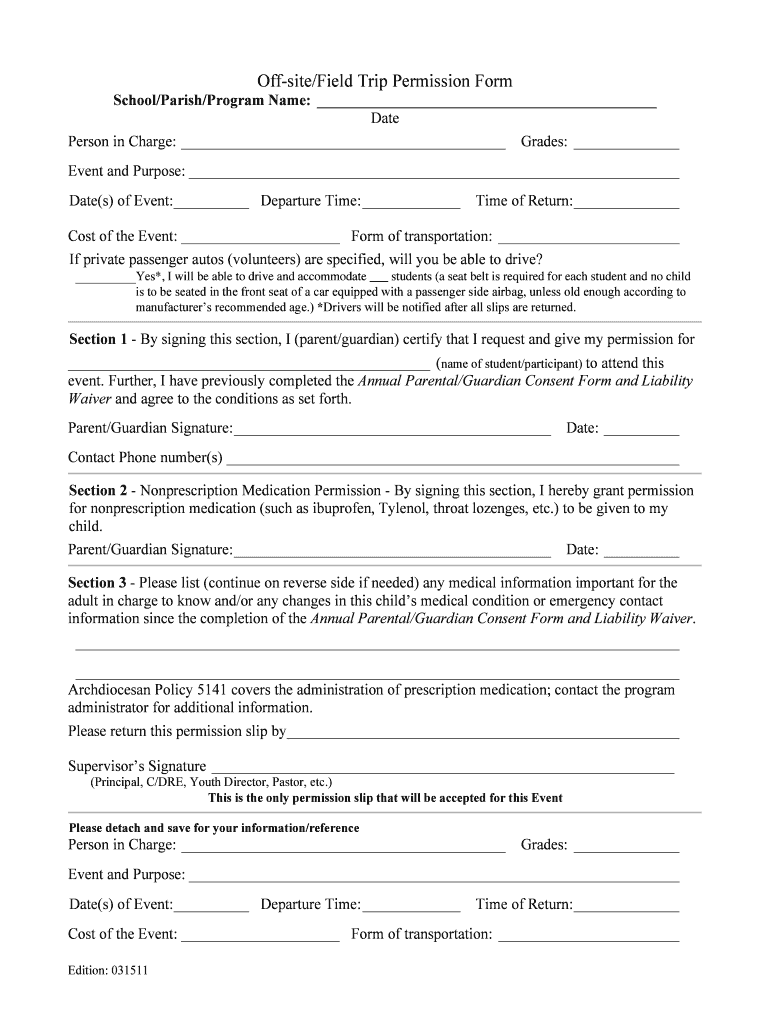
And Purpose: Date(s) of Event: Departure Time: Time of Return: Cost of the Event: Form of transportation: If private passenger autos (volunteers) are specified, will you be able to drive? Yes*, I will be able to drive and accommodate students (a seat belt is required for each student and no child is to be seated in the front seat of a.
Loading

Open form follow the instructions

Easily sign the form with your finger

Send filled & signed form or save
How to fill out the Off-site/Field Trip Permission Form online
Filling out the Off-site/Field Trip Permission Form online is a straightforward process that ensures your child's participation in school events is properly documented. This guide will provide clear, comprehensive instructions to help you complete each section of the form with confidence.
Follow the steps to fill out the form accurately.
- Click the ‘Get Form’ button to access the Off-site/Field Trip Permission Form and open it for editing.
- In the first section, enter the name of the school, parish, or program at the top of the form. Then, fill in the date of the event.
- Provide the name of the person in charge, the grades involved, and a brief description of the event and its purpose.
- Indicate the date(s) of the event, departure time, and anticipated time of return in the respective fields.
- Under cost of the event, specify any fees that may be associated with participation. Include details about the form of transportation being used.
- If volunteer drivers are involved, confirm whether you can drive and how many students you can accommodate, keeping safety guidelines in mind.
- Move to Section 1, where the parent or guardian must sign to give permission for their child to attend the event. Include the name of the student or participant.
- Fill in the parent or guardian's signature and date, along with contact phone number(s) in the designated areas.
- Proceed to Section 2, where permission for administering nonprescription medication can be granted by signing and dating the section.
- In Section 3, list any important medical information about the child or any changes in medical condition or emergency contact since the last consent form was completed.
- Ensure to read any additional notes provided, including information related to prescription medication policies, and confirm the supervisor's signature at the end of the form.
- Finally, save your changes, download, print, or share the completed form as necessary, ensuring it is returned by the specified deadline.
Complete the Off-site/Field Trip Permission Form online today to ensure all necessary information is submitted for your child's event.
Experience a faster way to fill out and sign forms on the web. Access the most extensive library of templates available.
Related content
OFF SITE ACTIVITIES PERMISSION FORM. Section 1 - Program completes prior to parental...
Despite the potential risks and hazards associated with the Field Trip, I wish to proceed...
The Heart of Darkness is the third quest in the Twilight Emissaries series, where players...
Get answers to your most pressing questions about US Legal Forms API.
How do I ask for permission for a field trip?
To ask for permission for a field trip, you can draft an Off-site/Field Trip Permission Form that outlines all necessary details about the trip. Include information such as date, time, purpose, and safety measures. Distributing this form to parents or guardians will allow them to provide their consent formally.
What does permission slip mean?
A permission slip, specifically an Off-site/Field Trip Permission Form, is a document that allows parents or guardians to authorize their child’s participation in a school activity away from the regular facility. It outlines essential information, including the event’s purpose, date, and any relevant guidelines or requirements. Understanding this term is crucial for both parents and educators.
How do I write a permission slip example?
To write a permission slip example for an Off-site/Field Trip Permission Form, begin with a clear title and include sections for event details, participant information, and parental signatures. You can use commonly accepted formats and language to make the form straightforward and user-friendly. This clarity ensures parents understand what they are signing.
How to fill a consent form for a field trip?
Filling out a consent form for an Off-site/Field Trip Permission Form involves similar steps as filling a standard permission slip. Start by providing the necessary participant information, event details, and any required medical or emergency information. After reviewing the content, sign and date the form to confirm your approval.
Is a permission slip a legal document?
Yes, an Off-site/Field Trip Permission Form is considered a legal document. By signing this form, parents or guardians grant permission for their child to participate in a specific activity, which can help protect the school and the organizers from liability. It is important to read the form carefully before signing.
How to make a permission form?
Creating an Off-site/Field Trip Permission Form can be simple. You can download a template from a reliable source, such as UsLegalForms, or create one using a word processor. Ensure you include essential details like the event information, parent/guardian contact, and a section for signatures.
How to fill out a permission slip?
To fill out an Off-site/Field Trip Permission Form, start by entering the student's name and details about the event, including date and destination. Next, provide your contact information and any necessary medical information about the student. Finally, sign and date the form to give authorization for your child to participate.
How to fill consent form for field trip?
Filling out a consent form for a field trip involves gathering the necessary information about the child, such as name, grade, and special needs. Ensure that parents provide emergency contact information and sign their consent. The Off-site/Field Trip Permission Form facilitates this process by offering a straightforward structure for completion.
How to make a field trip permission slip?
To create a field trip permission slip, start by listing the event details, including destination, date, and activities planned. Incorporate a clear consent statement along with spaces for parent signatures and emergency contacts. Consider using the Off-site/Field Trip Permission Form for a professional layout that ensures you cover all necessary sections.
How to write a consent letter for a field trip?
When writing a consent letter for a field trip, include the trip details such as the itinerary, purpose, and any related costs. Be clear about what you need from parents, such as health information or emergency contacts. Encourage parents to complete the Off-site/Field Trip Permission Form for formal consent.
Use professional pre-built templates to fill in and sign documents online faster. Get access to thousands of forms.
If you believe that this page should be taken down, please follow our DMCA take down process here.