Loading
Form preview
  • US Legal Forms
  • Other Templates
  • Industry Forms
  • Industry Academic Forms
  • Memorial Baptist Church Medical Release Form 2012

Get Memorial Baptist Church Medical Release Form 2012-2026

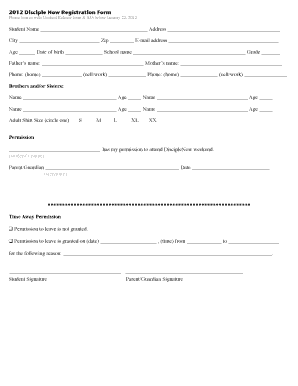
City Zip E-mail address Age Date of birth School name Grade Father s name: Mother s name: Phone: (home) (cell/work) Phone: (home) (cell/work) Brothers and/or Sisters: Name.

How it works

  1. Open form

    Open form follow the instructions

  2. Easily sign form

    Easily sign the form with your finger

  3. Share form

    Send filled & signed form or save

How to fill out the Memorial Baptist Church Medical Release Form online

Filling out the Memorial Baptist Church Medical Release Form online is a straightforward process that ensures your child is prepared for participation in youth activities. This guide will walk you through each section of the form to ensure that you provide all necessary information accurately.

Follow the steps to complete the form effectively.

  1. Click ‘Get Form’ button to obtain the Memorial Baptist Church Medical Release Form and open it in the editor.
  2. Fill in the student's name, address, city, zip code, email address, age, date of birth, school name, and grade. Ensure all personal details are accurate for identification purposes.
  3. Provide parent or guardian names and contact numbers, including home, cell, and work phones to facilitate communication in case of emergencies.
  4. List siblings along with their names and ages, which helps in understanding the family structure.
  5. Select the adult shirt size your child will need, circling the appropriate size — Small, Medium, Large, XL, or XXL.
  6. Grant permission for your child to attend by writing their name in the designated field and signing your name as a parent or guardian along with the date.
  7. Specify whether permission to leave is granted, if applicable. If granted, include the date, time, and reason for leaving.
  8. Complete the medical release section by providing the child's name, date of birth, age, sex, home address, guardian information, and contact numbers.
  9. List any allergies, medications, past medical history, and conditions that may affect participation. This ensures proper medical care if needed.
  10. Sign the treatment authorization section, verifying that the information provided is accurate and that you consent to any necessary medical treatment.
  11. Complete the photo release section if you consent to your child being photographed or videotaped, and sign the form.
  12. Once all sections are filled, save your changes. You may then download, print, or share the form as needed.

Complete the Memorial Baptist Church Medical Release Form online today to ensure your child's safe participation in youth activities.

Get form

Experience a faster way to fill out and sign forms on the web. Access the most extensive library of templates available.
Get form

Related content

Assessment of US Hospital Compliance With...
by CT Lye · 2018 · Cited by 54 — By federal regulation, medical record requests must...
Learn more
Tennessee State Governor's School for...
... form must be signed by a medical provider. • The Medical Release Form must be...
Learn more
ONE HUNDRED
2016 LifeWay Press. Permission is granted to photocopy this resource. Free downloadable...
Learn more

Related links form

Northeast Feeder System1 - Anne Arundel County - Aacounty Msp 97 Form LOBBYING ACTIVITY REPORT - Anne Arundel County - Aacounty Official Use Only - Anne Arundel County - Aacounty

Questions & Answers

Get answers to your most pressing questions about US Legal Forms API.

Contact support

A medical release form, like the Memorial Baptist Church Medical Release Form, is a legal document that allows you to authorize the sharing of your medical records with certain individuals or healthcare entities. It specifies what information can be shared and with whom, providing clear consent for the release. This form is essential for protecting your privacy while ensuring that necessary medical data is accessible when needed.

A notarized medical release form is a document, such as the Memorial Baptist Church Medical Release Form, that has been signed and verified by a notary public. This notarization process confirms the identities of those who sign the document and ensures that they did so willingly. Notarization can enhance the form's credibility, especially when sensitive patient information needs to be shared with healthcare providers.

Release forms may or may not need notarization based on the situation. For instance, the Memorial Baptist Church Medical Release Form usually does not require a notary unless specified by the receiving agency. When in doubt, consult the institution or entity to which you are submitting the form for their specific requirements. This can save time and ensure smooth processing of your request.

Medical release forms, including the Memorial Baptist Church Medical Release Form, do not always need notarization. It usually depends on the requirements of the receiving party. While some providers may request a notarized signature to validate the release, others may accept the form without it. Always check specific conditions to avoid delays in processing your medical records.

Filling out a medical release form, such as the Memorial Baptist Church Medical Release Form, involves a few key steps. First, provide your personal information and the details of the healthcare provider. Next, specify what records you authorize to be released and to whom. Finally, sign and date the form before submitting it as instructed, ensuring that all required fields are complete for clarity.

Yes, a notary can notarize medical records, including a Memorial Baptist Church Medical Release Form. Notarization adds a layer of authenticity and helps ensure the document's integrity. However, the notary does not evaluate the content of the records; they simply verify the identities of the signers. If you need assistance, consider using US Legal Forms for a straightforward notarization process.

Filling out a medical release form involves providing accurate information about the patient, the medical provider, and the individuals or entities authorized to receive the medical information. Ensure you clearly state the purpose of the release and specify which records you wish to share. When using the Memorial Baptist Church Medical Release Form, follow the provided instructions carefully to complete it correctly. Taking your time with the details can lead to smoother communication later on.

To create a medical release form, start by including relevant personal information and specify what medical records you wish to access. You can utilize the Memorial Baptist Church Medical Release Form as a template, which is structured to comply with legal standards. Additionally, you can find customizable versions on platforms like uslegalforms, making the process easier.

Writing a HIPAA release letter involves including essential elements such as your name, the recipient’s name, and details about the information to be released. You can reference the Memorial Baptist Church Medical Release Form as a guide to structure your letter appropriately. Make sure to specify the purpose of the release and sign the letter to ensure it is valid.

Yes, you can create your own medical release form, but it must meet legal requirements to be effective. The Memorial Baptist Church Medical Release Form provides a reliable template to ensure all necessary elements are included. Using established forms can save time and prevent legal issues, so it is often best to use forms like those available through uslegalforms.

Get This Form Now!

Use professional pre-built templates to fill in and sign documents online faster. Get access to thousands of forms.
Get form
If you believe that this page should be taken down, please follow our DMCA take down processhere.
Get Memorial Baptist Church Medical Release Form
Get form
  • Adoption
  • Bankruptcy
  • Contractors
  • Divorce
  • Home Sales
  • Employment
  • Identity Theft
  • Incorporation
  • Landlord Tenant
  • Living Trust
  • Name Change
  • Personal Planning
  • Small Business
  • Wills & Estates
  • Packages A-Z
  • Affidavits
  • Bankruptcy
  • Bill of Sale
  • Corporate - LLC
  • Divorce
  • Employment
  • Identity Theft
  • Internet Technology
  • Landlord Tenant
  • Living Wills
  • Name Change
  • Power of Attorney
  • Real Estate
  • Small Estates
  • Wills
  • All Forms
  • Forms A-Z
  • Other Templates
  • Legal Hub
  • About Us
  • Help Portal
  • Legal Resources
  • Blog
  • Affiliates
  • Contact Us
  • Delete My Account
  • Site Map
  • Industries
  • Forms in Spanish
  • Localized Forms
  • State-specific Forms
  • Forms Kit
  • Real Estate Handbook
  • All Guides
  • Notarize
  • Incorporation services
  • For Consumers
  • For Small Business
  • For Attorneys
  • USLegal
  • FormsPass
  • pdfFiller
  • signNow
  • altaFlow
  • DocHub
  • Instapage
Form Packages
  • Adoption
  • Bankruptcy
  • Contractors
  • Divorce
  • Home Sales
  • Employment
  • Identity Theft
  • Incorporation
  • Landlord Tenant
  • Living Trust
  • Name Change
  • Personal Planning
  • Small Business
  • Wills & Estates
  • Packages A-Z
Form Categories
  • Affidavits
  • Bankruptcy
  • Bill of Sale
  • Corporate - LLC
  • Divorce
  • Employment
  • Identity Theft
  • Internet Technology
  • Landlord Tenant
  • Living Wills
  • Name Change
  • Power of Attorney
  • Real Estate
  • Small Estates
  • Wills
  • All Forms
  • Forms A-Z
  • Other Templates
Customer Service
  • Legal Hub
  • About Us
  • Help Portal
  • Legal Resources
  • Blog
  • Affiliates
  • Contact Us
  • Delete My Account
  • Site Map
  • Industries
  • Forms in Spanish
  • Localized Forms
  • State-specific Forms
  • Forms Kit
Legal Guides
  • Real Estate Handbook
  • All Guides
Prepared for you
  • Notarize
  • Incorporation services
Our Customers
  • For Consumers
  • For Small Business
  • For Attorneys
Our Sites
  • USLegal
  • FormsPass
  • pdfFiller
  • signNow
  • altaFlow
  • DocHub
  • Instapage
Social Media
Call us now toll free:
+1 833 426 79 33
As seen in:
© Copyright 1999-2026 airSlate Legal Forms, Inc. 17 Station Street, Ste. 203, Brookline, MA 02445
  • Your Privacy Choices
  • Terms of Service
  • Privacy Notice
  • Content Takedown Policy
  • Bug Bounty Program