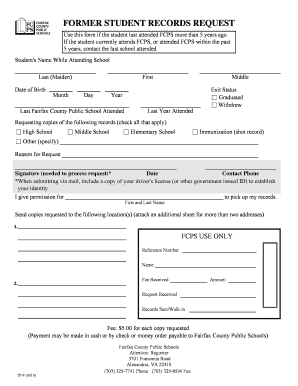
Get Fcps It-9 2013-2026
How it works
-

Open form follow the instructions
-

Easily sign the form with your finger
-

Send filled & signed form or save
How to fill out the FCPS IT-9 online
Filling out the FCPS IT-9 form is a crucial step for individuals requesting former student records from Fairfax County Public Schools. This guide provides a clear and supportive approach to help you complete the online form accurately and efficiently.
Follow the steps to successfully complete the FCPS IT-9 online.
- Click the 'Get Form' button to obtain the FCPS IT-9 form and open it in your preferred digital editor.
- Enter the student's name while attending school, including their last (maiden) name. This helps to identify the correct records.
- Fill in the date of birth for the student. Input the month, day, and year accurately to avoid processing delays.
- Indicate the last Fairfax County Public School attended by the student, along with the last year they attended. This information is essential for locating records.
- Choose the exit status by selecting either 'Graduated' or 'Withdrew.' This helps clarify the student's standing when they left the school.
- Check the boxes for the types of records you are requesting, such as High School, Middle School, Elementary School, Immunization records, or Other, if applicable.
- Provide a reason for the request in the designated field, ensuring it reflects the purpose of obtaining these records.
- Fill in the date of the request and your contact phone number, making it easier for the registrar to reach you if necessary.
- Sign the form to authorize processing of your request. If you are submitting by mail, remember to include a copy of your driver's license or another government-issued ID to verify your identity.
- If someone else is authorized to pick up the records, fill in their first and last name in the section provided.
- Provide the addresses where you want the copies sent. If you need to include more than two addresses, attach an additional sheet.
- Review the form for accuracy and completeness before proceeding. You may then save your changes, download the form, print it, or share it as needed.
Complete and submit your FCPS IT-9 form online to ensure your records are processed efficiently.
The largest middle school in FCPS is South County Middle School, which serves a substantial number of students and is recognized for its diverse programs. This school's size reflects the growing need for educational facilities that cater to a large population, similar to how FCPS IT-9 addresses the modern challenges within school environments. With its extensive resources, South County Middle supports students in various academic pursuits.