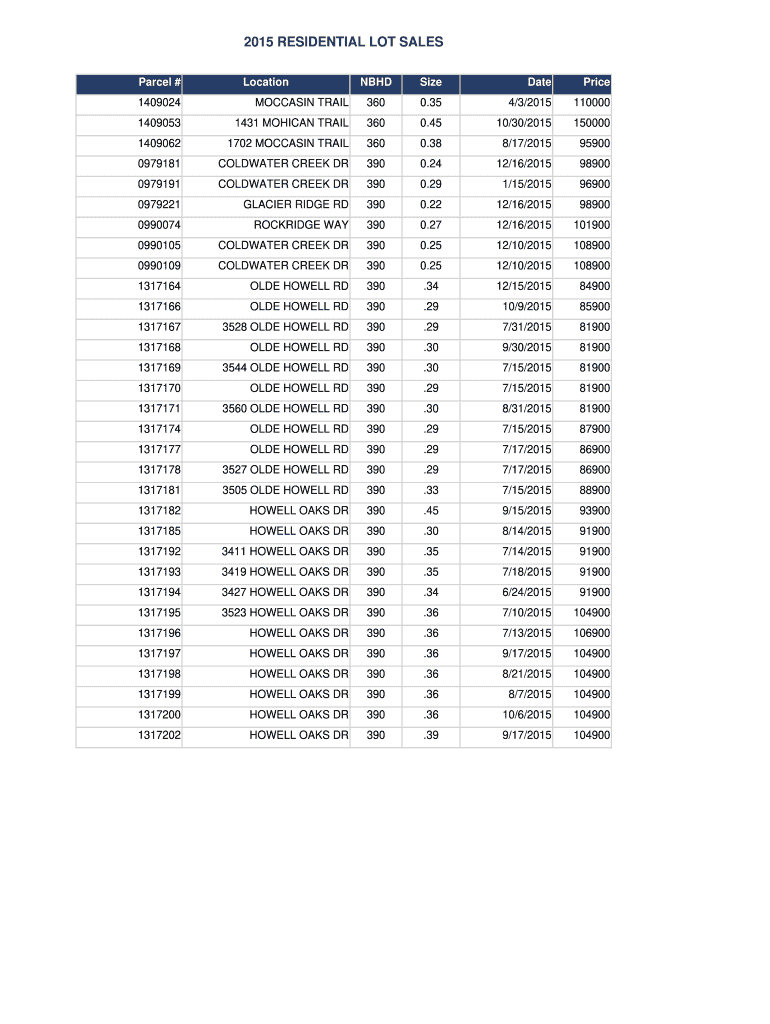
ROCKRIDGE WAY 390 0.27 12/16/2015 101900 0990105 COLDWATER CREEK DR 390 0.25 12/10/2015 108900 0990109 COLDWATER CREEK DR 390 0.25 12/10/2015 108900 1317164 OLDE HOWELL RD 390 .34 12/15/2015 84900 1317166 OLDE HOWELL RD 390 .29 10/9/2015 85900 1317167 3528 OLDE HOWELL RD 390 .29 7/31/2015 81900 1317168 OLDE HOWELL RD 390 .30 9/30/2015 81900 1317169 3544 OLDE HOWELL RD 390 .30 7/15/2015 81900 1317170 OLDE HOWELL RD 390 .29 7/15/2015 81900 13171.
Loading

Open form follow the instructions

Easily sign the form with your finger

Send filled & signed form or save
How to fill out the WI Residential Lot Sales online
This guide provides clear and concise instructions for completing the WI Residential Lot Sales form online. It is designed to assist users with varying levels of experience in navigating the details of this important document.
Follow the steps to complete the form effectively.
- Press the ‘Get Form’ button to access the residential lot sales form online.
- In the first section, you will need to enter the 'Parcel #' which refers to the unique identifier for the lot being sold.
- Next, fill in the 'Location' field with the specific address of the property.
- Proceed to enter the 'NBHD' which stands for neighborhood, reflecting the subdivision or area name associated with the property.
- Fill out the 'Size' section, indicating the total area of the lot in acres.
- Enter the 'Date' of the sale in the appropriate format, ensuring clarity for record-keeping.
- Fill in the 'Price' section to designate the sale price of the lot.
- Review all entries for accuracy and completeness before proceeding.
- Once you have confirmed that all information is correct, save your changes, download the form, and print or share it as needed.
Complete your documents online for a smooth filing experience.
Experience a faster way to fill out and sign forms on the web. Access the most extensive library of templates available.
Related content
Subscribe to DNR Land Sales if you are interested in registering for email notifications...
State-level overview. The average price of agricultural land sold in Wisconsin between...
Jan 30, 2018 — For example, if you move a mobile home to a new lot and sell the old lot...
Get answers to your most pressing questions about US Legal Forms API.
How do I sell my residential lot?
To sell your residential lot, start by securing a thorough understanding of the local real estate market. You can benefit from a strategic marketing plan that highlights the unique features of your property, which can boost WI Residential Lot Sales. Platforms like USLegalForms can help you navigate the legal paperwork necessary for a smooth sale.
How much is 1 acre of land worth in Wisconsin?
The worth of 1 acre of land in Wisconsin generally falls between $3,000 and $10,000, depending on various factors like location and zoning restrictions. When looking at WI Residential Lot Sales, it's essential to consider the property's potential uses and any improvements made over the years. Discussing these aspects with local real estate experts can provide further insights.
Are property records public in Wisconsin?
Yes, property records are public in Wisconsin, allowing you to access important details about land ownership, sales history, and tax assessments. These records can be beneficial when researching WI Residential Lot Sales. You can typically find them through local county offices or online databases.
Does the state of Wisconsin sell land?
Yes, the state of Wisconsin does sell land, including various parcels for residential and recreational purposes. State-managed lands can often be found at public auctions or through direct sales. The state aims to encourage responsible ownership and development, so keep an eye out for opportunities in WI Residential Lot Sales that are facilitated by state offerings.
How to sell land by owner in Wisconsin?
Selling land by owner in Wisconsin requires strategic planning and effective marketing. First, gather pertinent information about your property to make it attractive to buyers. Promote the land through various channels, including online listings. For managing the paperwork efficiently during your WI Residential Lot Sales, consider using US Legal Forms to ensure all legal aspects are covered.
What is the process of selling a piece of land?
The process of selling land involves several clear steps. First, you should determine the value through assessment and market analysis. Next, you will want to list your land and market it to potential buyers. Finally, upon receiving an offer, completing the legal paperwork becomes crucial, and tools from US Legal Forms can assist in this process.
How do you fill out a residential contract of sale?
Filling out a residential contract of sale can feel daunting, but it is manageable. You must provide details about the buyer, seller, property description, and terms of sale. To make this process smoother, consider using templates available through platforms like US Legal Forms that are specifically designed for WI Residential Lot Sales.
How to sell a house for sale by owner in Wisconsin?
To sell your house by owner in Wisconsin, it’s essential to understand the local real estate market. Begin by preparing your home and promoting it using online listings and social media. Additionally, ensure you are familiar with legal requirements for home sales. Utilizing US Legal Forms can help you access the necessary documents for a successful sale.
How to report sales tax collected?
Reporting sales tax collected in Wisconsin involves filing a sales and use tax return with the Department of Revenue, typically done on a quarterly or annual basis depending on your sales volume. Ensure you keep thorough records of all transactions related to WI Residential Lot Sales, as this can simplify your reporting process. Utilizing online resources or services like uslegalforms can assist you in meeting compliance requirements efficiently.
What is sales tax exempt in Wisconsin?
Sales tax exemptions in Wisconsin primarily include items like groceries, prescription medications, and some agricultural goods. If you are dealing with WI Residential Lot Sales, it’s important to identify which aspects of your property transaction may be eligible for exemption to save on costs. Regularly consult the Wisconsin Department of Revenue for updated exemption listings.
Use professional pre-built templates to fill in and sign documents online faster. Get access to thousands of forms.
If you believe that this page should be taken down, please follow our DMCA take down process here.