Get Navy Cyp Cniccyp 1700/04 2012
How it works
-

Open form follow the instructions
-

Easily sign the form with your finger
-

Send filled & signed form or save
How to fill out the Navy CYP CNICCYP 1700/04 online
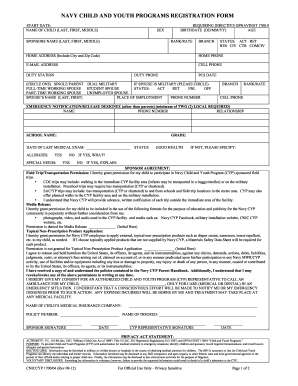
Completing the Navy Child and Youth Programs CNICCYP 1700/04 form online is essential for ensuring the proper registration of children in Navy programs. This guide provides a clear and supportive approach to help you navigate through each section of the form efficiently.
Follow the steps to successfully fill out the form online.
- Click ‘Get Form’ button to obtain the form and open it in the online editor.
- Fill in the start date for the enrollment. This will indicate when you wish for your child to begin participating in the program.
- Provide the name of the child in the format of last name, first name, and middle name. Ensure all names are spelled correctly.
- Enter the child’s birthdate in the specified format (DD/MM/YY) and calculate their age based on this information.
- Indicate the child's sex by selecting the appropriate option.
- Enter the sponsor’s name, including last name, first name, and middle name. This identifies the primary guardian.
- Specify the rank/rate of the sponsor to help categorize their military status.
- Select the branch of the military in which the sponsor serves.
- Choose the status of the sponsor by circling one area: Active Duty (ACT), Retired (RET), Reservist (RES), DoD Civilian (CIV), DoD Contractor (CTR), or Community Civilian (COM CIV).
- Provide the home address including the city and zip code for contact purposes.
- Fill out the home phone number to facilitate communication.
- Include an email address for correspondence regarding the Child and Youth Programs.
- Enter the cell phone number of the sponsor to ensure prompt contact when necessary.
- Indicate the duty station and provide the duty phone number, if applicable.
- Enter the date of Permanent Change of Station (PCS) if relevant.
- Circle the appropriate option for family structure: Single Parent or Dual Military.
- If the spouse is military, circle the applicable status: Full-time working spouse, Student spouse, Part-time working spouse, or Unemployed spouse.
- Fill in the spouse's name, place of employment, and phone number, and provide their branch and rank/rate as applicable.
- Add emergency notification information by listing at least two local contacts with names, phone numbers, and their relationship to the child.
- Indicate the school name and grade for your child. This is important for educational alignment.
- Record the date of the last medical exam and outline any allergies the child has, stating 'Yes' or 'No' as appropriate.
- Indicate if there are any special needs and provide specifics if applicable. Use 'Please specify' fields to clarify any 'No' selections.
- Review and complete the sponsor agreement regarding permissions for field trips and other media releases, initializing where necessary.
- Ensure that you and a CYP representative sign and date the form in the appropriate sections to validate the information provided.
- Once all fields are completed and verified, save your changes, and choose to download, print, or share the form as required.
Complete your Navy CYP CNICCYP 1700/04 form online today to ensure a smooth registration process.
Get form
The benefits of the Navy Child and Youth Program are substantial for both children and families. The program offers educational activities that enhance learning and personal development, while also providing safe environments for children. By following the Navy CYP CNICCYP 1700/04 guidelines, families can trust that their children receive the best possible care, giving service members peace of mind.