Loading
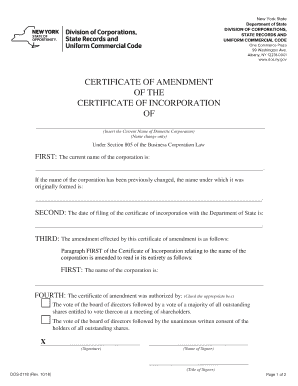
Get Ny Dos-2118 2018-2026
How it works
-

Open form follow the instructions
-

Easily sign the form with your finger
-

Send filled & signed form or save
How to fill out the NY DOS-2118 online
Filing the NY DOS-2118 form is an essential step for a domestic corporation looking to amend its certificate of incorporation and change its name. This guide provides a comprehensive, step-by-step approach to filling out the form online, ensuring that users can complete their filing with confidence.
Follow the steps to successfully complete the NY DOS-2118 form.
- Click ‘Get Form’ button to obtain the form and open it in the editor.
- In the first section, enter the current name of the corporation in the designated field. This name should match the records held by the Department of State.
- Enter the date of filing of the certificate of incorporation with the Department of State. Ensure this date is accurate to avoid delays.
- Provide the signature of the authorized individual, followed by their printed name and title in the designated fields.
- Review all entries thoroughly for accuracy. Once confirmed, save the changes, and the form will be ready for submission.
Complete your documents online efficiently and confidently.
To find your DOS ID number in New York, check the New York Department of State's online business search tool. You will need your business name or other identifying details to retrieve your information. Keep the NY DOS-2118 in mind as it pertains to this identification process, guiding you through the search efficiently.