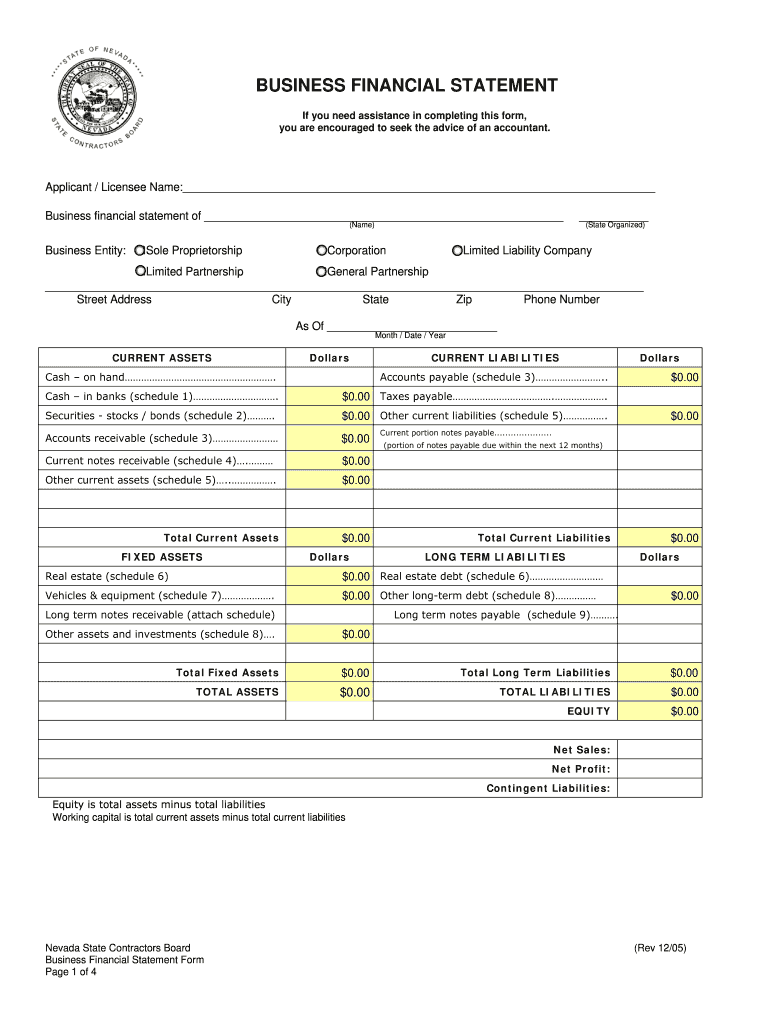
/ Licensee Name:___________________________________________________________________________ Business financial statement of _________________________________________________________ (Name) Business Entity: Sole Proprietorship Corporation ___________ (State Organized) Limited Liability Company Limited Partnership General Partnership _______________________________________________________________________________________________ Street Address City State Zip Phone Number As Of _____.

Open form follow the instructions

Easily sign the form with your finger

Send filled & signed form or save
How to fill out the NV Business Financial Statement online
The NV Business Financial Statement is a crucial document for businesses in Nevada, providing an overview of financial status to ensure compliance with state regulations. This guide will help users navigate through the process of completing the form online with clear and supportive instructions.
Follow the steps to complete your business financial statement effectively.
- Click ‘Get Form’ button to access the online version of the NV Business Financial Statement and open it in an editable format.
- Identify the applicant or licensee name field at the top of the form. Enter the full name of the person or entity submitting the financial statement.
- Next, indicate the name of the business associated with the financial statement. This should match the official registration of the business.
- Select the type of business entity from the options provided, such as sole proprietorship, corporation, limited liability company, limited partnership, or general partnership. Be sure to also enter the state where the business is organized.
- Fill in the street address, city, state, and zip code of your business location, along with the phone number for contact purposes.
- In the 'As Of' section, provide the date for which the financial statement is relevant using the specified format (month/date/year).
- Proceed to the current assets section. Enter values for cash on hand, cash in banks, securities, accounts receivable, and any other current assets. Ensure values are accurate and reflect recent financial records.
- Move on to the current liabilities section. Input values for accounts payable, taxes payable, and any other current obligations that the business has.
- Complete the fixed assets section by providing the values for real estate, vehicles, equipment, and any other long-term investments. Use the corresponding schedules for detailed information.
- In the long-term liabilities section, list any debts or obligations that extend beyond twelve months, including long-term notes payable.
- Calculate total assets by summing the current and fixed assets, and total liabilities by adding current and long-term liabilities. Enter these totals in the specified fields.
- Fill in the supplementary schedules as necessary, itemizing additional information such as bank accounts or accounts receivable in the designated sections.
- Verify all entries for accuracy. If necessary, attach any additional sheets of information if the provided space is insufficient.
- On completion, users can save their changes, download a copy for their records, print the form, or share it as needed.
Complete your NV Business Financial Statement online to ensure compliance and maintain good standing in Nevada.
Experience a faster way to fill out and sign forms on the web. Access the most extensive library of templates available.
Related content
Sep 26, 2025 — If you need Financial Reports from previous years, please request them by...
This video is about all of the financial statements. There are 3 financial statements: the...
Feb 12, 2021 — The Company prepares consolidated financial statements using Japanese...
Get answers to your most pressing questions about US Legal Forms API.
What is a current business financial statement?
A current business financial statement reflects your company's financial position at a specific moment. It includes updated figures for assets, liabilities, and equity, capturing the most recent data. Regularly preparing your NV Business Financial Statement ensures you have the latest insights into your business's finances, enabling you to make timely and informed decisions.
How to read a balance sheet for dummies?
Reading a balance sheet involves understanding its three main components: assets, liabilities, and equity. Start by reviewing total assets, then compare them to total liabilities to understand your financial obligations. A well-organized balance sheet, like your NV Business Financial Statement, will help you grasp your business's financial standing effortlessly.
Can you look up a company's financial statements?
Yes, you can look up a company's financial statements through various public databases and company websites. Many businesses are required to file their financial data with government agencies, making this information accessible. However, if you prefer a structured format for your own documents, consider using US Legal Forms to create your own NV Business Financial Statement.
What is an example of a financial statement?
An example of a financial statement is the balance sheet, which shows your company's assets, liabilities, and equity at a specific point in time. This document helps investors and stakeholders assess the financial position of your business. When you prepare your NV Business Financial Statement, including a balance sheet can enhance your ability to communicate your business's status.
How to fill out a business financial statement?
To fill out a business financial statement, gather all your financial documents and categorize them. Input your total assets, liabilities, revenues, and expenses in their respective sections. Using platforms like US Legal Forms can help streamline this process, providing guidance on how to accurately complete your NV Business Financial Statement.
How do you fill out a business financial statement?
Filling out a business financial statement involves collecting your financial data and entering it into the appropriate sections. Start by listing your assets and liabilities, followed by revenues and expenses to calculate your net income. Tools like US Legal Forms offer templates to simplify the process, ensuring your NV Business Financial Statement is accurate and compliant.
Do I have to renew my LLC every year in Nevada?
Yes, renewing your LLC annually in Nevada is necessary to maintain your business status. This process typically involves filing your annual report and paying the associated fees. Using an NV Business Financial Statement can streamline this process by ensuring your financial records are up to date.
How do I file an annual report for an LLC in Nevada?
To file an annual report for your LLC in Nevada, visit the Secretary of State's website. You can complete the filing online, making sure to include details about your registered agent and business status. Utilizing the NV Business Financial Statement will help provide clarity and accuracy in the information you submit.
Does Nevada LLC need to file a tax return?
Yes, a Nevada LLC is required to file a tax return if it has generated income during the year. While Nevada does not have a corporate income tax, it does require federal tax filings. Keep in mind that proper documentation, including the NV Business Financial Statement, is essential to ensure compliance with all regulations.
Do I have to file an annual report for my LLC in Nevada?
Yes, if you operate an LLC in Nevada, you must file an annual report. This report includes details about your business and confirms its ongoing good standing. By staying compliant, you ensure that your NV Business Financial Statement reflects the true state of your business.
Use professional pre-built templates to fill in and sign documents online faster. Get access to thousands of forms.
If you believe that this page should be taken down, please follow our DMCA take down process here.