Loading
Form preview
  • US Legal Forms
  • Form Library
  • Business Forms
  • California Business Forms
  • Ca Pc.str.mod42 2017

Get Ca Pc.str.mod42 2017-2026

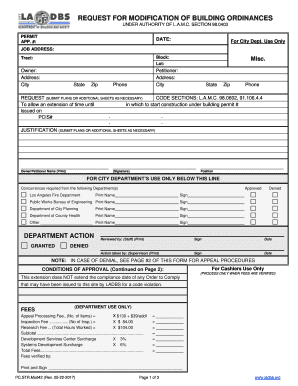
Dress: City JOB ADDRESS: State Zip Phone State Zip Phone REQUEST (SUBMIT PLANS OR ADDITIONAL SHEETS AS NECESSARY) CODE SECTIONS: L.A.M.C. 98.0602, 91.106.4.4 To allow an extension of time until in which to start construction under building permit # issued on PCIS# JUSTIFICATION (SUBMIT PLANS OR ADDITIONAL SHEETS AS NECESSARY) Owner/Petitioner Name (Print) (Signature) Position FOR CITY DEPARTMENT’S USE ONLY BELOW THIS LINE Concurrences required from the following Department(s) Los A.

How it works

  1. Open form

    Open form follow the instructions

  2. Easily sign form

    Easily sign the form with your finger

  3. Share form

    Send filled & signed form or save

How to fill out the CA PC.STR.Mod42 online

This guide provides clear instructions on completing the CA PC.STR.Mod42 form for requesting modifications to building ordinances. Follow these steps to ensure accurate and timely submission of your request.

Follow the steps to complete your request effectively.

  1. Press the ‘Get Form’ button to obtain the CA PC.STR.Mod42 and open it in your preferred editor.
  2. Fill in the permit application number in the designated field. This number is crucial for tracking your request.
  3. Enter the date of submission. Ensure it is the current date to establish a timeline for processing.
  4. Specify the tract, block, and lot numbers associated with your property. These identifiers help in locating your building within city records.
  5. Provide the owner's name and address details. Ensure accuracy as this identifies the person responsible for the property.
  6. Indicate the name and address of the petitioner, if different from the owner. This informs the department who is formally requesting the modification.
  7. Complete the job address with the specific location where the proposed modification applies.
  8. Detail the request for modification in the provided space. This may include submitting plans or additional sheets as necessary.
  9. State the relevant code sections that support your request. Familiarity with these regulations may bolster your justification.
  10. In the justification section, clearly explain the reasons for the proposed modification. If needed, submit additional supporting documents.
  11. Sign the form where indicated, and print your name below the signature. If the petitioner is a corporation, ensure two officers’ signatures are obtained.
  12. Complete any additional sections related to city department approvals, as required.
  13. Save any changes made to the form, and prepare to either download, print, or share your completed document as needed.

Take the next step and complete your CA PC.STR.Mod42 request online today.

Get form

Experience a faster way to fill out and sign forms on the web. Access the most extensive library of templates available.
Get form

Related content

Building Research Section (BRS) | LADBS
The BRS approves alternate building materials or products that are at least equivalent to...
Learn more
Solving the Multimessenger Puzzle of the...
by B Eichmann · 2022 · Cited by 79 — In this work, a homogeneous, steady-state...
Learn more

Related links form

Cross Border Form Master Instructor Application - Reef Divers Online Collegesa Form Matrix Topcover

Questions & Answers

Get answers to your most pressing questions about US Legal Forms API.

Contact support

Pursuant to Los Angeles Municipal Code (LAMC) Section 91.109, the Department of Building and Safety is required to issue a Certificate of Occupancy for every building or structure (with exceptions where the occupancy of the original building permit has not changed, where Group A or E occupancies constructed prior to ...

A Certificate of Occupancy (CofO) is a document issued by the Building Division which certifies that a commercial space or newly constructed residential building has been inspected for compliance with the California Building Standards Code and local ordinances which govern construction and occupancy.

How to Obtain a Certificate of Occupancy in Los Angeles? If you want to obtain a Certificate of Occupancy in Los Angeles, you will need to do so through the LADBS website, which is a simple and straightforward way to register. Keep in mind that you can also visit a LADBS location to apply for one of these certificates.

Where can I find Certificates of Occupancy? You can search for Los Angeles certificates of occupancy online. If you want the physical records checked you can hire the permit report to pull the permits for your property or you can go down to the permit counter in the building department and order them yourself.

It shall be unlawful for any person to occupy any building, structure, trailer, coach, or manufactured housing unit until the final inspection has been approved and, where applicable, a Certificate of Occupancy issued by the building inspection division.

Get This Form Now!

Use professional pre-built templates to fill in and sign documents online faster. Get access to thousands of forms.
Get form
If you believe that this page should be taken down, please follow our DMCA take down processhere.

Industry-leading security and compliance

US Legal Forms protects your data by complying with industry-specific security standards.
  • In businnes since 1997
    25+ years providing professional legal documents.
  • Accredited business
    Guarantees that a business meets BBB accreditation standards in the US and Canada.
  • Secured by Braintree
    Validated Level 1 PCI DSS compliant payment gateway that accepts most major credit and debit card brands from across the globe.
Get CA PC.STR.Mod42
Get form
  • Adoption
  • Bankruptcy
  • Contractors
  • Divorce
  • Home Sales
  • Employment
  • Identity Theft
  • Incorporation
  • Landlord Tenant
  • Living Trust
  • Name Change
  • Personal Planning
  • Small Business
  • Wills & Estates
  • Packages A-Z
  • Affidavits
  • Bankruptcy
  • Bill of Sale
  • Corporate - LLC
  • Divorce
  • Employment
  • Identity Theft
  • Internet Technology
  • Landlord Tenant
  • Living Wills
  • Name Change
  • Power of Attorney
  • Real Estate
  • Small Estates
  • Wills
  • All Forms
  • Forms A-Z
  • Form Library
  • Legal Hub
  • About Us
  • Help Portal
  • Legal Resources
  • Blog
  • Affiliates
  • Contact Us
  • Delete My Account
  • Site Map
  • Industries
  • Forms in Spanish
  • Localized Forms
  • State-specific Forms
  • Forms Kit
  • Real Estate Handbook
  • All Guides
  • Notarize
  • Incorporation services
  • For Consumers
  • For Small Business
  • For Attorneys
  • USLegal
  • FormsPass
  • pdfFiller
  • signNow
  • altaFlow
  • DocHub
  • Instapage
Form Packages
  • Adoption
  • Bankruptcy
  • Contractors
  • Divorce
  • Home Sales
  • Employment
  • Identity Theft
  • Incorporation
  • Landlord Tenant
  • Living Trust
  • Name Change
  • Personal Planning
  • Small Business
  • Wills & Estates
  • Packages A-Z
Form Categories
  • Affidavits
  • Bankruptcy
  • Bill of Sale
  • Corporate - LLC
  • Divorce
  • Employment
  • Identity Theft
  • Internet Technology
  • Landlord Tenant
  • Living Wills
  • Name Change
  • Power of Attorney
  • Real Estate
  • Small Estates
  • Wills
  • All Forms
  • Forms A-Z
  • Form Library
Customer Service
  • Legal Hub
  • About Us
  • Help Portal
  • Legal Resources
  • Blog
  • Affiliates
  • Contact Us
  • Delete My Account
  • Site Map
  • Industries
  • Forms in Spanish
  • Localized Forms
  • State-specific Forms
  • Forms Kit
Legal Guides
  • Real Estate Handbook
  • All Guides
Prepared for you
  • Notarize
  • Incorporation services
Our Customers
  • For Consumers
  • For Small Business
  • For Attorneys
Our Sites
  • USLegal
  • FormsPass
  • pdfFiller
  • signNow
  • altaFlow
  • DocHub
  • Instapage
Social Media
Call us now toll free:
+1 833 426 79 33
As seen in:
© Copyright 1999-2026 airSlate Legal Forms, Inc. 3720 Flowood Dr, Flowood, Mississippi 39232
  • Your Privacy Choices
  • Terms of Service
  • Privacy Notice
  • Content Takedown Policy
  • Bug Bounty Program