Loading
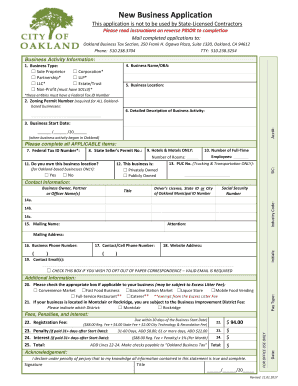
Get Ca New Business Application - Oakland 2017
How it works
-

Open form follow the instructions
-

Easily sign the form with your finger
-

Send filled & signed form or save
How to fill out the CA New Business Application - Oakland online
Filling out the CA New Business Application for Oakland is a vital step in establishing your business legally. This guide will walk you through each section of the application, providing clear instructions to ensure a smooth and successful submission.
Follow the steps to complete your application accurately.
- Click ‘Get Form’ button to obtain the application form and open it in the editor.
- Identify your business type by checking the appropriate box. Options include Sole Proprietor, Corporation, Partnership, LLP, LLC, Estate/Trust, or Non-Profit. Remember that some entities will require a Federal Tax ID Number.
- Enter your Business Name or DBA (Doing Business As). If you do not have a business name, you may use your full name in this section.
- Provide your Business Location by entering the street address. Note that PO Boxes are not acceptable.
- Fill in the Zoning Permit Number, which is mandatory for all businesses in Oakland. Ensure you have completed a zoning clearance application and obtained your zoning permit first.
- Describe your Business Activity in detail. Use clear and concise language to explain what your business will do.
- Indicate your Business Start Date by entering the date your business commenced operations in Oakland.
- If your business is a Corporation, Partnership, LLC, or LLP, input your Federal Tax ID Number.
- For businesses engaged in buying and selling, please enter your State Seller’s Permit Number.
- Indicate the number of Full-Time Employees in your business but exclude any owners or officers from this count.
- If applicable, enter the number of rooms your business has, specifically for hotels and motels.
- Select whether the business location is privately owned or publicly owned by marking the appropriate box.
- For trucking and transportation businesses, enter the PUC Number if relevant.
- List the Business Owner, Partner, or Officer Names, along with their Social Security Numbers and identification numbers.
- Complete the Mailing Name and Address section, including attention details if necessary for correspondence.
- Record your Business Phone Number.
- Provide a Contact or Cell Phone Number for reachability.
- If applicable, you may enter your Website Address.
- Enter your Email Address(es). You can also opt out of paper correspondence by checking the respective box.
- Determine if your business is subject to the Excess Litter Fee based on your business classification.
- Specify if your business is located in the Montclair or Rockridge area to assess the Business Improvement District Fee.
- Calculate the total registration fee including the standard fee, any penalties, or interest if applicable.
- Sign and date the form to declare that all provided information is accurate.
- Submit your completed application by mailing it to the Oakland Business Tax Section, ensuring that payment is included.
- Once completed, you can save your changes, download, print the form, or share it as needed.
Take the first step towards establishing your business by completing the CA New Business Application online today.
Get form
Experience a faster way to fill out and sign forms on the web. Access the most extensive library of templates available.
Related links form
The speed at which you can get a business license in California depends on your local government's processing times. In some cases, if you apply online, you may receive your license within a few business days. For a successful CA New Business Application - Oakland, ensure that all required documents are completed and submitted correctly to avoid delays.
Get This Form Now!
Use professional pre-built templates to fill in and sign documents online faster. Get access to thousands of forms.