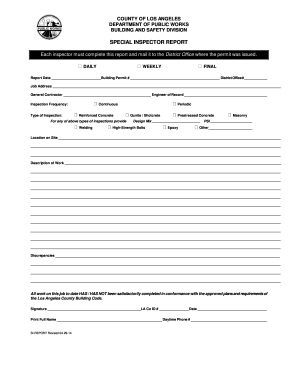
As issued. DAILY WEEKLY FINAL Report Date _________________________Building Permit # _____________________________________________ District Office#_____________ Job Address ___________________________________________________________________________________________________________________ General Contractor ____________________________________________ Engineer of Record ___________________________________________ Continuous Inspection Frequency: Type of Inspection: Rein.
Open form follow the instructions
Easily sign the form with your finger
Send filled & signed form or save
How to fill out the CA SI-REPORT - Los Angeles County online
Navigating the CA SI-REPORT for Los Angeles County may seem daunting, but this guide will provide you with clear instructions to complete the form online effectively. By following these steps, you will ensure that all necessary information is submitted accurately and promptly.
Follow the steps to fill out the form online.
- Press the ‘Get Form’ button to access the CA SI-REPORT and open it in an online editor.
- Complete the report date and the associated building permit number, ensuring that both fields are filled out correctly.
- Provide the job address where the inspection takes place. Double-check its accuracy to avoid any processing issues.
- Input the name of the general contractor and the engineer of record associated with the project in the designated fields.
- Select the appropriate inspection frequency by checking either 'Daily', 'Weekly', or 'Final' based on your inspection schedule.
- Indicate the type of inspection by checking the relevant boxes such as 'Reinforced Concrete', 'Gunite / Shotcrete', or any other applicable type.
- If applicable, fill in the design mix details and PSI (pounds per square inch) for concrete work to provide specific information on the materials used.
- Describe the exact location on the job site where the inspection is being conducted to ensure clarity.
- Detail the nature of the work performed in the designated section, ensuring you provide enough context.
- Clearly note any discrepancies found during the inspection in the specified area to maintain thorough documentation.
- Complete the final section by indicating whether the work to date has been satisfactorily completed in conformance with the approved plans.
- Sign the report, providing your LA County ID number and the date of signing, along with your printed full name and daytime phone number.
- Finally, save your changes, download the completed report, print it for physical mailing, or share it as required.
Start your document preparation today by filling out the CA SI-REPORT online.
Experience a faster way to fill out and sign forms on the web. Access the most extensive library of templates available.
Related content
File online: bizfile Banner, Limited Liability Company, LLC Formation, LLC Statement of...
Welcome to the California Independent System Operator (ISO). We manage the flow of...
by JS Zogorski — Three-dimensional molecular configuration and composition of some of...
Get answers to your most pressing questions about US Legal Forms API.
How to file California corporate disclosure statement online?
To file a California corporate disclosure statement online, visit the California Secretary of State's website. There, you can find the relevant forms and provide the required details about your corporation. After filling out the necessary information, you can submit your disclosure statement electronically. For a seamless experience, explore the CA SI-REPORT - Los Angeles County solution on uslegalforms, which offers straightforward instructions and tips for online filing.
Can you file CA statement of Information online?
Yes, you can file the CA statement of Information online through the California Secretary of State's website. This online process is convenient and allows you to complete your filing efficiently from any location. Ensure that you have the necessary details ready, such as your business entity information. Using the CA SI-REPORT - Los Angeles County section on uslegalforms can make this process even easier and guide you through online filing.
How to file form SI 100 in California?
To file form SI 100 in California, begin by obtaining the form from the California Secretary of State's website. Complete the form with accurate information about your business, including its name, address, and type of entity. Once filled out, you can submit the form by mail or in person to the appropriate office. For assistance, consider using the CA SI-REPORT - Los Angeles County feature on the uslegalforms platform, which simplifies the filing process.
How to file a statement of Information online in California?
Filing a statement of Information online in California is straightforward and efficient. Start by visiting the official California Secretary of State's website and navigate to the CA SI-REPORT - Los Angeles County section. You can complete the form and submit it electronically, saving time and effort. Using platforms like uslegalforms can simplify this process further by providing user-friendly templates and guidance.
Who is authorized to file a statement of Information in California?
In California, the statement of Information can be filed by any authorized person within the business entity, including owners and directors. The CA SI-REPORT - Los Angeles County requires designated individuals to ensure accurate representation and compliance. It is crucial that the person filing has access to the necessary business information. This helps maintain the integrity of your filings.
How long do I have to file a statement of Information in California?
In California, you have 90 days from the date of your initial article filing to submit your first statement of Information. Additionally, for subsequent filings, you typically need to file by the end of your corporation's or LLC's anniversary month. The CA SI-REPORT - Los Angeles County helps you remember these timelines. Missing deadlines can result in penalties, so plan ahead.
How often does a statement of Information need to be filed?
In California, a statement of Information must be filed annually for LLCs and corporations. Specifically, the CA SI-REPORT - Los Angeles County requires this filing to ensure that your business remains compliant with state laws. Timely filing helps maintain active status and avoids penalties. Keep track of your due dates to stay ahead.
How do I get a California entity ID?
You can get a California entity ID by registering your business with the California Secretary of State. Once your registration is approved, you will be assigned an entity ID, which is essential for various business transactions. This ID is crucial for businesses operating in Los Angeles County, ensuring compliance with state regulations. USLegalForms can simplify the registration process, making it easier for you to obtain your entity ID.
Is SOS entity number the same as EIN?
No, a SOS entity number is not the same as an EIN (Employer Identification Number). The SOS entity number identifies your business at the state level, while an EIN is issued by the IRS for tax purposes. Both numbers serve different functions, and it's important to understand their roles in your business operations, especially in Los Angeles County. At USLegalForms, we can help clarify the differences and provide assistance in obtaining both numbers.
How do I get a copy of my California statement of Information?
To get a copy of your California Statement of Information, you must request it from the California Secretary of State's office. You can do this online through their official website or by mail. Be prepared to provide your entity name or number to facilitate the request. USLegalForms provides guidance on how to complete this process smoothly, ensuring you access your documents without hassle.
Use professional pre-built templates to fill in and sign documents online faster. Get access to thousands of forms.
If you believe that this page should be taken down, please follow our DMCA take down process here.