Loading
Form preview
  • US Legal Forms
  • Form Library
  • Labor Forms
  • California Labor Forms
  • Ca De 8714a 2015

Get Ca De 8714a 2015-2026

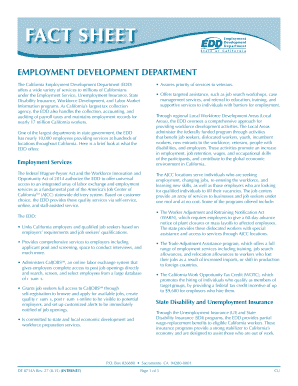
State Disability Insurance, Workforce Development, and Labor Market Information programs. As California’s largest tax collection agency, the EDD also handles the collection, accounting, and auditing of payroll taxes and maintains employment records for nearly 17 million California workers. • Assures priority of services to veterans. • Offers targeted assistance, such as job search workshops, case management services, and referral to education, training, and supportive services to indiv.

How it works

  1. Open form

    Open form follow the instructions

  2. Easily sign form

    Easily sign the form with your finger

  3. Share form

    Send filled & signed form or save

How to fill out the CA DE 8714A online

Filling out the CA DE 8714A online can be a straightforward process when you have clear instructions. This guide aims to equip you with step-by-step details to assist you in completing the form accurately and efficiently.

Follow the steps to successfully complete the CA DE 8714A form online.

  1. Click the ‘Get Form’ button to obtain the form and open it in the editor.
  2. Review the personal information section. Enter your full name, address, and any identification numbers as required. Ensure the accuracy of your details.
  3. Complete the eligibility section by indicating your status in relation to employment, such as if you are currently unemployed or on a leave of absence. Provide any necessary supporting details.
  4. Fill in the income information section, where you report your previous earnings, specifying the amounts accurately to reflect your circumstances.
  5. Continue to the signature field. Read the declaration statement carefully, and then sign electronically as confirmation that the information provided is correct.
  6. After completing all sections of the form, review it to check for any missing information or errors.
  7. Save your changes, then choose to download, print, or share the completed form as needed.

Complete your CA DE 8714A form online today for a more efficient process.

Get form

Experience a faster way to fill out and sign forms on the web. Access the most extensive library of templates available.
Get form

Related content

Fact Sheet: Employment Development Department (DE...
As California's largest tax collection agency, the EDD also handles the collection...
Learn more
Fact Sheet: California Paid Family Leave - EDD
What does PFL Cover? • Bonding with a new child entering the family through birth...
Learn more
Russellstoll Catalog
The electronic control circuit will be de-energized while the green lights are off...
Learn more

Related links form

Reservation Confirmation Blank Transportation Request Form Rccl Idaho Companion Animal Documents Qualification Certificate Application

Questions & Answers

Get answers to your most pressing questions about US Legal Forms API.

Contact support

If your EDD certification states disqualification, it indicates that your claim did not meet the necessary criteria for payment for that certification period. This could arise from various reasons, such as incorrect reporting or not fulfilling work search obligations. Reviewing the details of your case and the CA DE 8714A guidelines can provide clarity and help you address the issues.

To reopen your EDD claim after disqualification, you will need to provide updated information that demonstrates your eligibility for benefits. This process often includes completing a new application or certification for benefits. Familiarizing yourself with the CA DE 8714A protocol can streamline your efforts in re-establishing your claim.

Several actions can disqualify you from receiving unemployment benefits in California, including voluntarily leaving your job without good cause, being fired for misconduct, or failing to meet work search requirements. Each case is evaluated based on individual circumstances. To better understand how disqualifying acts relate to CA DE 8714A, consider seeking advice from a professional.

If you make $1,000 a week in California, your unemployment benefits will generally be calculated as a percentage of your previous earnings. This amount can vary based on your work history and specific circumstances. Utilizing tools related to CA DE 8714A can provide you with a better estimate tailored to your unique situation.

When your EDD status indicates disqualification, it means you are temporarily ineligible for unemployment benefits. This could be due to not meeting the criteria set by the state or failing to comply with reporting requirements. It's important to review your situation closely and consider the resources available through CA DE 8714A for further guidance.

Your EDD status may show disqualification for several reasons, including failure to meet eligibility requirements or not reporting earnings correctly. Additionally, if you do not actively seek work or refuse suitable job offers, this could lead to disqualification. Understanding the nuances of the CA DE 8714A can help you navigate these issues effectively.

The unemployment benefit amount in California depends on your highest earning quarters. Generally, if you made $1500 a week, you can expect weekly benefits to range from approximately $450 to $900. It is advisable to use the California unemployment calculator for a more specific benefit estimate to understand your entitlements better.

An Employer Identification Number (EIN) is not the same as a resale number. The EIN is issued by the IRS to identify a business for tax purposes, while a resale number is assigned by your state to allow you to make tax-exempt purchases for resale. Understanding the distinction between these numbers is essential for compliance and effective business management.

To fill out a Notice of Non Responsibility in California, clearly state the property address and the owner’s information. You need to describe the nature of the work being done and assert that the property owner is not responsible for the labor or materials supplied. After completing the form, file it with the local county recorder to formally protect your interests.

To fill out the California resale certificate, start by entering your business information, including your seller's permit number. Clearly state the type of merchandise you will be purchasing for resale. Don’t forget to sign and date the certificate, which is essential for validating your tax-exempt status during purchases. Referencing the CA DE 8714A can provide you with additional insights.

Get This Form Now!

Use professional pre-built templates to fill in and sign documents online faster. Get access to thousands of forms.
Get form
If you believe that this page should be taken down, please follow our DMCA take down processhere.

Industry-leading security and compliance

US Legal Forms protects your data by complying with industry-specific security standards.
  • In businnes since 1997
    25+ years providing professional legal documents.
  • Accredited business
    Guarantees that a business meets BBB accreditation standards in the US and Canada.
  • Secured by Braintree
    Validated Level 1 PCI DSS compliant payment gateway that accepts most major credit and debit card brands from across the globe.
Get CA DE 8714A
Get form
  • Adoption
  • Bankruptcy
  • Contractors
  • Divorce
  • Home Sales
  • Employment
  • Identity Theft
  • Incorporation
  • Landlord Tenant
  • Living Trust
  • Name Change
  • Personal Planning
  • Small Business
  • Wills & Estates
  • Packages A-Z
  • Affidavits
  • Bankruptcy
  • Bill of Sale
  • Corporate - LLC
  • Divorce
  • Employment
  • Identity Theft
  • Internet Technology
  • Landlord Tenant
  • Living Wills
  • Name Change
  • Power of Attorney
  • Real Estate
  • Small Estates
  • Wills
  • All Forms
  • Forms A-Z
  • Form Library
  • Legal Hub
  • About Us
  • Help Portal
  • Legal Resources
  • Blog
  • Affiliates
  • Contact Us
  • Delete My Account
  • Site Map
  • Industries
  • Forms in Spanish
  • Localized Forms
  • State-specific Forms
  • Forms Kit
  • Real Estate Handbook
  • All Guides
  • Notarize
  • Incorporation services
  • For Consumers
  • For Small Business
  • For Attorneys
  • USLegal
  • FormsPass
  • pdfFiller
  • signNow
  • altaFlow
  • DocHub
  • Instapage
Form Packages
  • Adoption
  • Bankruptcy
  • Contractors
  • Divorce
  • Home Sales
  • Employment
  • Identity Theft
  • Incorporation
  • Landlord Tenant
  • Living Trust
  • Name Change
  • Personal Planning
  • Small Business
  • Wills & Estates
  • Packages A-Z
Form Categories
  • Affidavits
  • Bankruptcy
  • Bill of Sale
  • Corporate - LLC
  • Divorce
  • Employment
  • Identity Theft
  • Internet Technology
  • Landlord Tenant
  • Living Wills
  • Name Change
  • Power of Attorney
  • Real Estate
  • Small Estates
  • Wills
  • All Forms
  • Forms A-Z
  • Form Library
Customer Service
  • Legal Hub
  • About Us
  • Help Portal
  • Legal Resources
  • Blog
  • Affiliates
  • Contact Us
  • Delete My Account
  • Site Map
  • Industries
  • Forms in Spanish
  • Localized Forms
  • State-specific Forms
  • Forms Kit
Legal Guides
  • Real Estate Handbook
  • All Guides
Prepared for you
  • Notarize
  • Incorporation services
Our Customers
  • For Consumers
  • For Small Business
  • For Attorneys
Our Sites
  • USLegal
  • FormsPass
  • pdfFiller
  • signNow
  • altaFlow
  • DocHub
  • Instapage
Social Media
Call us now toll free:
+1 833 426 79 33
As seen in:
© Copyright 1999-2026 airSlate Legal Forms, Inc. 3720 Flowood Dr, Flowood, Mississippi 39232
  • Your Privacy Choices
  • Terms of Service
  • Privacy Notice
  • Content Takedown Policy
  • Bug Bounty Program