Loading
Form preview
  • US Legal Forms
  • Other Templates
  • Other Forms
  • Wisconsin Other Forms
  • Wi Wdnr Wram

Get Wi Wdnr Wram

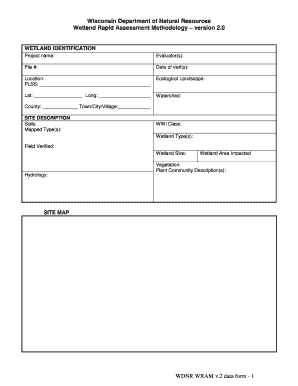
_____________________________ Ecological Landscape: Lat: __________________ Long: ___________________ Watershed: County: _____________ Town/City/Village:____________ SITE DESCRIPTION Soils: Mapped Type(s): WWI Class: Wetland Type(s): Field Verified: Wetland Size: Wetland Area Impacted Vegetation: Plant Community Description(s): Hydrology: SITE MAP WDNR WRAM v.2 data form - 1 HU 1 2 3 4 5 6 7 WH 1 2 3 4 5 6 7 8 9 10 11 12 FA 1 2 3 4 SP 1 2 3 ST 1 2 3 4 5 6 7 8 WQ 1 2 3 4 5 6 7 8 9 GW .

How it works

  1. Open form

    Open form follow the instructions

  2. Easily sign form

    Easily sign the form with your finger

  3. Share form

    Send filled & signed form or save

How to fill out the WI WDNR WRAM online

The Wetland Rapid Assessment Methodology (WRAM) is an essential tool for evaluating wetland conditions and impacts. This guide will help users navigate the process of filling out the WI WDNR WRAM form online, ensuring that all necessary information is accurately provided.

Follow the steps to complete the WI WDNR WRAM form

  1. Press the ‘Get Form’ button to access the WRAM document and open it in the online editor.
  2. In the Wetland Identification section, enter the project name, evaluator(s), file number, date of visits, location details including PLSS, ecological landscape, latitude, longitude, watershed, and county information.
  3. For the Site Description section, provide detailed information about soils, mapped types, WWI class, wetland types, field verified status, wetland size, and impacted area.
  4. Complete the Vegetation section by describing the plant community, its hydrology, and provide any necessary ecological data.
  5. In Section 1: Functional Value Assessment, evaluate potential human use values, wildlife habitat, and aquatic life habitat. Make sure to list any pertinent observations and details.
  6. Proceed to Section 2: Floristic Integrity and circle the appropriate integrity level based on invasive species presence and cover. Attach a list of significant plant species observed.
  7. Fill out Section 3: Condition Assessment by evaluating the assessment area and buffer. Identify historic impacts and level of stressors affecting the wetlands.
  8. Summarize the functional values assessment, indicating the significance levels for various functions including floristic integrity and wildlife habitat.
  9. In Section 4: Project Impact Assessment, provide a brief project description and detail the expected impacts, including direct, secondary, and cumulative effects.
  10. Once all sections are completed, review the form for accuracy. Users can then save changes, download, print, or share the form as needed.

Start completing your WI WDNR WRAM form online today.

Get form

Experience a faster way to fill out and sign forms on the web. Access the most extensive library of templates available.
Get form

Related content

Wisconsin wetlands: assessment methods and tools
WETLAND FUNCTION · Level 1: Wetlands by Design Decision Support Tool · Level 2: DNR WI...
Learn more
Water Resources Working Group
The Water Resources Working Group assesses and synthesizes climate change impacts to...
Learn more
Groundwater Sampling and Monitoring with Direct...
Ground Water Sampling Desk Reference. Wisconsin Department of Natural. Resources...
Learn more

Related links form

Criminal Background Check Form Isbe 6 Day Enrollment Form Is Louisiana File Online Form Field Trip Permission Form - St. Rita School

Questions & Answers

Get answers to your most pressing questions about US Legal Forms API.

Contact support

Filling in wetlands in Wisconsin is regulated and often restricted to protect vital ecological functions. The WI WDNR WRAM helps determine the impact of potential fill projects on wetland health. If you are considering any alterations to wetlands, it is essential to consult the DNR and follow the appropriate permitting process to ensure compliance with state and federal regulations.

The rapid habitat assessment method offers a quick evaluation of habitat quality and ecological integrity in various environments. This method, frequently used alongside the WI WDNR WRAM, focuses on assessing key elements that support diverse wildlife habitats. It serves as a valuable tool for land managers, conservationists, and researchers to monitor and enhance habitat conditions effectively.

To report a violation to the WI DNR, you need to gather as much information as possible about the incident. You can contact the DNR by phone, email, or through their online reporting system. Providing clear and concise details helps the WI WDNR take appropriate action to investigate and address the issue, ensuring the protection of Wisconsin's natural resources.

A wetland function assessment evaluates how well a wetland performs ecological roles such as water filtration, habitat provision, and flood protection. The WI WDNR WRAM provides a framework for determining these functions, facilitating informed decision-making regarding wetland conservation and restoration efforts. Understanding wetland functions is crucial for effective land-use planning and environmental stewardship.

The wetland rapid assessment method involves a systematic approach to evaluate wetlands quickly. The WI WDNR WRAM simplifies assessments by focusing on key indicators of wetland function, such as vegetation, hydrology, and soil characteristics. This method aids stakeholders in determining environmental impacts and managing wetland resources more effectively.

The Wetland Rapid Assessment Procedure (WRAP) is a structured process used by the WI WDNR to evaluate wetland conditions. It helps assess the ecological function of wetlands efficiently and effectively. By employing WRAP, users can gain insights into wetland health and management needs, ultimately contributing to better environmental decision-making.

The Wisconsin Floristic Quality Assessment measures the quality of plant communities in wetlands and other natural areas. This assessment complements the WI WDNR WRAM by focusing on plant diversity and health. It combines scientific data with practical applications, helping land managers and conservationists understand and protect Wisconsin's unique ecosystems.

Building a house on wetlands in Wisconsin is generally prohibited due to the protections aimed at preserving these crucial ecosystems. The Wisconsin Department of Natural Resources, through the WI WDNR WRAM, implements rules to safeguard wetland areas from development. If you're considering a construction project near wetlands, consulting uslegalforms can provide the legal guidance needed to navigate these regulations.

Mowing wetlands in Wisconsin is subject to strict regulations to protect the delicate ecosystems. The Wisconsin Department of Natural Resources emphasizes that any activity, including mowing, should consider the potential impact on wetland health. If you have questions about mowing in specific areas, consider using resources from uslegalforms to ensure compliance with local laws.

DNR violations in Wisconsin can include unauthorized land use, pollution, and destruction of protected habitats, which adversely affect the environment. Engaging in activities that harm wetland areas, especially those assessed by the WI WDNR WRAM, can lead to significant penalties. It is vital to stay informed about local regulations and report any observed violations to ensure proper enforcement.

Get This Form Now!

Use professional pre-built templates to fill in and sign documents online faster. Get access to thousands of forms.
Get form
If you believe that this page should be taken down, please follow our DMCA take down processhere.
Get WI WDNR WRAM
Get form
  • Adoption
  • Bankruptcy
  • Contractors
  • Divorce
  • Home Sales
  • Employment
  • Identity Theft
  • Incorporation
  • Landlord Tenant
  • Living Trust
  • Name Change
  • Personal Planning
  • Small Business
  • Wills & Estates
  • Packages A-Z
  • Affidavits
  • Bankruptcy
  • Bill of Sale
  • Corporate - LLC
  • Divorce
  • Employment
  • Identity Theft
  • Internet Technology
  • Landlord Tenant
  • Living Wills
  • Name Change
  • Power of Attorney
  • Real Estate
  • Small Estates
  • Wills
  • All Forms
  • Forms A-Z
  • Other Templates
  • Legal Hub
  • About Us
  • Help Portal
  • Legal Resources
  • Blog
  • Affiliates
  • Contact Us
  • Delete My Account
  • Site Map
  • Industries
  • Forms in Spanish
  • Localized Forms
  • State-specific Forms
  • Forms Kit
  • Real Estate Handbook
  • All Guides
  • Notarize
  • Incorporation services
  • For Consumers
  • For Small Business
  • For Attorneys
  • USLegal
  • FormsPass
  • pdfFiller
  • signNow
  • altaFlow
  • DocHub
  • Instapage
Form Packages
  • Adoption
  • Bankruptcy
  • Contractors
  • Divorce
  • Home Sales
  • Employment
  • Identity Theft
  • Incorporation
  • Landlord Tenant
  • Living Trust
  • Name Change
  • Personal Planning
  • Small Business
  • Wills & Estates
  • Packages A-Z
Form Categories
  • Affidavits
  • Bankruptcy
  • Bill of Sale
  • Corporate - LLC
  • Divorce
  • Employment
  • Identity Theft
  • Internet Technology
  • Landlord Tenant
  • Living Wills
  • Name Change
  • Power of Attorney
  • Real Estate
  • Small Estates
  • Wills
  • All Forms
  • Forms A-Z
  • Other Templates
Customer Service
  • Legal Hub
  • About Us
  • Help Portal
  • Legal Resources
  • Blog
  • Affiliates
  • Contact Us
  • Delete My Account
  • Site Map
  • Industries
  • Forms in Spanish
  • Localized Forms
  • State-specific Forms
  • Forms Kit
Legal Guides
  • Real Estate Handbook
  • All Guides
Prepared for you
  • Notarize
  • Incorporation services
Our Customers
  • For Consumers
  • For Small Business
  • For Attorneys
Our Sites
  • USLegal
  • FormsPass
  • pdfFiller
  • signNow
  • altaFlow
  • DocHub
  • Instapage
Social Media
Call us now toll free:
+1 833 426 79 33
As seen in:
© Copyright 1999-2026 airSlate Legal Forms, Inc. 17 Station Street, Suite 303, Brookline, MA 02445
  • Your Privacy Choices
  • Terms of Service
  • Privacy Notice
  • Content Takedown Policy
  • Bug Bounty Program