Loading
Get Sd Seasonal/temporary Application
How it works
-

Open form follow the instructions
-

Easily sign the form with your finger
-

Send filled & signed form or save
How to fill out the SD Seasonal/Temporary Application online
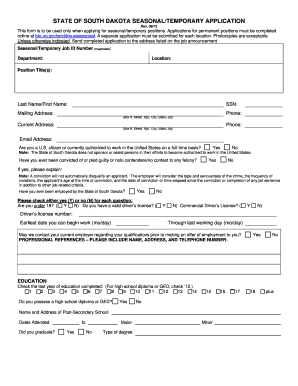
This guide provides clear instructions on completing the SD Seasonal/Temporary Application for users applying for seasonal or temporary positions. Follow these steps to accurately fill out the application and enhance your chances of securing a position.
Follow the steps to successfully complete your application.
- Click the 'Get Form' button to access the application and open it in the editing interface.
- Begin by entering the seasonal/temporary job ID number, if applicable, followed by the department and location of the position you are applying for.
- Fill in your position title(s), last name, first name, and social security number (SSN) accurately.
- Provide your mailing address, including box number, street, apartment number, city, state, and zip code. Include a current phone number.
- Enter your current address, along with a second phone contact if it differs from your mailing address.
- Include your email address, as this may be used for communication regarding your application.
- Indicate whether you are a U.S. citizen or authorized to work full-time in the United States by checking yes or no.
- Answer whether you have ever been convicted of or pled guilty to a felony. Provide additional information if applicable, noting that such a conviction does not automatically disqualify you.
- State whether you have previously been employed by the State of South Dakota.
- Answer a series of questions, including your age, possession of a valid driver’s license, and commercial driver’s license.
- Specify the earliest date you are available to begin work and indicate the last working day for this position.
- Decide if your current employer may be contacted regarding your qualifications.
- List professional references, ensuring to include their name, address, and telephone number.
- Complete the education section by indicating the last year of education you completed and if you possess a high school diploma or GED.
- Provide details about post-secondary education, including the name and address of the institution, dates attended, graduation status, major, and degree type.
- List any relevant licenses, certificates, or registrations you hold, including their expiration dates and issuing state.
- Detail your work history, starting with your most recent job and moving backward. Include employer details, job titles, dates, supervisor information, reasons for leaving, final salary, and duties performed.
- Indicate your skill level with various equipment and office tools as required.
- Review your application for accuracy and completeness before submitting.
- After filling out the entire application, save your changes, download the form, print it, or share it as necessary.
Complete your SD Seasonal/Temporary Application online today to take the next step in your job search.
To fill out an availability form, list your available days and the specific hours you can work. Be honest about your commitments, so it is easier for employers to schedule you. While using the SD Seasonal/Temporary Application, you can attach or input your availability directly, ensuring all relevant information is easily accessible.