Loading
Form preview
  • US Legal Forms
  • Form Library
  • Other Forms
  • Pennsylvania Other Forms
  • Pa Psrs-696 2012

Get Pa Psrs-696 2012-2026

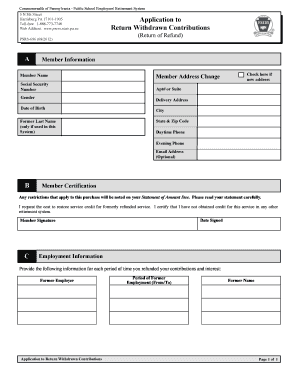
Nly be completed by members whose contributions were refunded by the Public School Employees’ Retirement System (PSERS). What is a Return of Withdrawn Contributions? A return of refund is defined as restoring service credit by repaying previously withdrawn contributions plus interest to PSERS. Who May Be Eligible? Active contributing members of the Public School Employees’ Retirement System (PSERS) or Multiple service members who are active members of the State Employees’ Retirement Syst.

How it works

  1. Open form

    Open form follow the instructions

  2. Easily sign form

    Easily sign the form with your finger

  3. Share form

    Send filled & signed form or save

How to fill out the PA PSRS-696 online

The PA PSRS-696 is an essential form for members of the Public School Employees' Retirement System (PSERS) looking to apply for a return of withdrawn contributions. This guide provides clear, step-by-step instructions to ensure that users can complete the form online with ease.

Follow the steps to accurately complete the PA PSRS-696 online

  1. Press the ‘Get Form’ button to access the PA PSRS-696 form and open it in your preferred editing tool.
  2. In the Member Information section, fill in your name, address, social security number, date of birth, and optional email address. If you have changed your address, check the box provided to indicate this.
  3. For Employment Information, list your former employer and provide the period of former employment (from and to). If your employment records include a different name, please provide it in the designated field.
  4. In the Member Certification section, ensure you read the certification statement and confirm that you have not obtained credit for the refunded service in any other retirement system. Then, sign and date the form.
  5. Once all sections are completed, review the form for accuracy, make any necessary corrections, and then save your changes. You can download, print, or share the completed form as required.

Complete the PA PSRS-696 online today to proceed with your application for returned contributions.

Get form

Experience a faster way to fill out and sign forms on the web. Access the most extensive library of templates available.
Get form

Related content

PSERS Health Insurance Program
PSRS-696 (07/2019). Commonwealth of Pennsylvania - Public School Employees' Retirement...
Learn more
March 1, 2008 (Pages 1031-1132)
by EH Board — report HAIs as Serious Events through PA-PSRS. Please note, not every...
Learn more
PSR-S550 Owner's Manual
This product utilizes batteries or an external power supply (adapter). DO NOT connect this...
Learn more

Related links form

What I Need To Fill Rezoning Application In Tampa Fl Form Cybersecurity For Small Business: Hiring A Web HostFederal Trade ... Sportsmith Application For Credit Form Verification Of Address Affidavit

Questions & Answers

Get answers to your most pressing questions about US Legal Forms API.

Contact support

To change your address on your Commonwealth of Pennsylvania registration credential, you need to complete the appropriate forms available through the Department of State. You can do this online or by visiting a local office. Keeping your address current is important, especially as it relates to your entitlements like your PA PSRS-696 pension benefits, ensuring you receive essential updates and documents.

Yes, the PSERS pension is designed to provide lifelong benefits, ensuring financial stability throughout your retirement. Once you are vested and begin receiving your pension, it continues for your lifetime, offering peace of mind. This reliability is a critical component of the PA PSRS-696 system, as it supports retirees in their years after service.

Requesting a retirement estimate from the Office of Personnel Management (OPM) involves submitting a request form. You can typically find the form on their official website, or you may contact OPM directly for assistance. This estimate will give you a clearer picture of your financial landscape regarding your PA PSRS-696 pension, allowing you to plan for retirement more effectively.

To change your address on your PA state ID, visit your local Department of Transportation (DOT) center. Bring necessary identification and proof of your new address. This update ensures that all your legal documents reflect your current information, which is crucial for maintaining accurate records related to your PA PSRS-696 pension benefits.

In order to be vested in PSERS, you need to serve for at least 5 years. This means that after 5 years of credited service, you qualify for a retirement benefit upon reaching retirement age. Being vested means you secure your rights to your PA PSRS-696 pension benefits, providing you with financial peace of mind for your future.

Substitute teaching does not generally count as full-time employment for the purposes of retirement benefits within the PA PSRS-696 framework. Instead, it is considered part-time work, and only full-time teachers accumulate credits toward their retirement. However, substitute teachers can still play an essential role in the educational system and may have opportunities to convert their time into retirement credits through specific avenues.

In Pennsylvania, retired teachers can typically substitute teach for up to 180 days per school year without impacting their retirement benefits. This provides an excellent way for retirees to stay involved while enjoying the flexibility of substitute teaching. Be sure to review the guidelines set forth by PA PSRS-696 to ensure compliance with any specific regulations regarding your substitute teaching role.

Substitute teachers do not automatically receive teacher retirement benefits in Pennsylvania. If you are a retired teacher, the PA PSRS-696 system allows certain conditions under which you may still have options. Understanding your eligibility for benefits and engaging with the specific requirements of the PA PSRS-696 can provide clarity on your retirement status.

Changing your address with the Pennsylvania Public School Employees' Retirement System (PSERS) is a straightforward process. You can update your contact information through their online member portal or by submitting a paper form. It's crucial to keep your address up to date to receive important information regarding your retirement benefits under PA PSRS-696.

In Pennsylvania, substitute teaching does not typically count towards retirement credit within the PA PSRS-696 system. While you can still earn income from substitute teaching, it is essential to understand how it fits into your overall retirement plan. Consulting with a retirement advisor familiar with PA PSRS-696 may help clarify how to manage your retirement benefits effectively.

Get This Form Now!

Use professional pre-built templates to fill in and sign documents online faster. Get access to thousands of forms.
Get form
If you believe that this page should be taken down, please follow our DMCA take down processhere.

Industry-leading security and compliance

US Legal Forms protects your data by complying with industry-specific security standards.
  • In businnes since 1997
    25+ years providing professional legal documents.
  • Accredited business
    Guarantees that a business meets BBB accreditation standards in the US and Canada.
  • Secured by Braintree
    Validated Level 1 PCI DSS compliant payment gateway that accepts most major credit and debit card brands from across the globe.
Get PA PSRS-696
Get form
  • Adoption
  • Bankruptcy
  • Contractors
  • Divorce
  • Home Sales
  • Employment
  • Identity Theft
  • Incorporation
  • Landlord Tenant
  • Living Trust
  • Name Change
  • Personal Planning
  • Small Business
  • Wills & Estates
  • Packages A-Z
  • Affidavits
  • Bankruptcy
  • Bill of Sale
  • Corporate - LLC
  • Divorce
  • Employment
  • Identity Theft
  • Internet Technology
  • Landlord Tenant
  • Living Wills
  • Name Change
  • Power of Attorney
  • Real Estate
  • Small Estates
  • Wills
  • All Forms
  • Forms A-Z
  • Form Library
  • Legal Hub
  • About Us
  • Help Portal
  • Legal Resources
  • Blog
  • Affiliates
  • Contact Us
  • Delete My Account
  • Site Map
  • Industries
  • Forms in Spanish
  • Localized Forms
  • State-specific Forms
  • Forms Kit
  • Real Estate Handbook
  • All Guides
  • Notarize
  • Incorporation services
  • For Consumers
  • For Small Business
  • For Attorneys
  • USLegal
  • FormsPass
  • pdfFiller
  • signNow
  • altaFlow
  • DocHub
  • Instapage
Form Packages
  • Adoption
  • Bankruptcy
  • Contractors
  • Divorce
  • Home Sales
  • Employment
  • Identity Theft
  • Incorporation
  • Landlord Tenant
  • Living Trust
  • Name Change
  • Personal Planning
  • Small Business
  • Wills & Estates
  • Packages A-Z
Form Categories
  • Affidavits
  • Bankruptcy
  • Bill of Sale
  • Corporate - LLC
  • Divorce
  • Employment
  • Identity Theft
  • Internet Technology
  • Landlord Tenant
  • Living Wills
  • Name Change
  • Power of Attorney
  • Real Estate
  • Small Estates
  • Wills
  • All Forms
  • Forms A-Z
  • Form Library
Customer Service
  • Legal Hub
  • About Us
  • Help Portal
  • Legal Resources
  • Blog
  • Affiliates
  • Contact Us
  • Delete My Account
  • Site Map
  • Industries
  • Forms in Spanish
  • Localized Forms
  • State-specific Forms
  • Forms Kit
Legal Guides
  • Real Estate Handbook
  • All Guides
Prepared for you
  • Notarize
  • Incorporation services
Our Customers
  • For Consumers
  • For Small Business
  • For Attorneys
Our Sites
  • USLegal
  • FormsPass
  • pdfFiller
  • signNow
  • altaFlow
  • DocHub
  • Instapage
Social Media
Call us now toll free:
+1 833 426 79 33
As seen in:
© Copyright 1999-2026 airSlate Legal Forms, Inc. 3720 Flowood Dr, Flowood, Mississippi 39232
  • Your Privacy Choices
  • Terms of Service
  • Privacy Notice
  • Content Takedown Policy
  • Bug Bounty Program