Loading
Form preview
  • US Legal Forms
  • Form Library
  • Other Forms
  • Pennsylvania Other Forms
  • Pa Psrs-1127 2016

Get Pa Psrs-1127 2016-2026

Y leave of absence is defined as a leave of absence or resignation required due to the pregnancy of an employee. Credit may not be obtained for leave taken due to the adoption of a child. To be eligible, your maternity leave of absence or resignation must have an effective date prior to November 1, 1978. You must have at least one full year of credited Pennsylvania school service following your maternity leave of absence. No more than two years of service credit may be purchased for each period .

How it works

  1. Open form

    Open form follow the instructions

  2. Easily sign form

    Easily sign the form with your finger

  3. Share form

    Send filled & signed form or save

How to fill out the PA PSRS-1127 online

This guide provides users with clear and comprehensive instructions on how to complete the PA PSRS-1127 form for purchasing a maternity leave of absence. Designed for a broad audience, this step-by-step approach ensures clarity and accessibility for all users, regardless of legal experience.

Follow the steps to complete the form effectively.

  1. Press the ‘Get Form’ button to access the PA PSRS-1127 form and open it for editing.
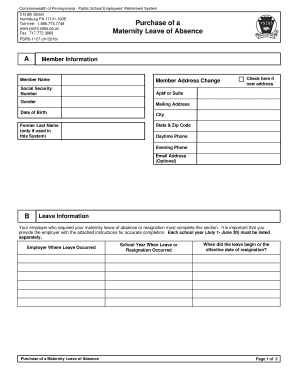
  2. In Section A, fill in your member information, including your name, address, Social Security number, date of birth, and contact information. If applicable, check the box for a new address.
  3. Proceed to Section B, where you will provide details about your maternity leave information. Make sure to include the employer where the leave occurred, the school year corresponding to the leave, and the effective dates.
  4. Move to Section C and enter the name and date of birth of each child for whom the leave was taken. Remember that only biological children can be listed; adoptive information is not applicable.
  5. In Section D, sign and date the form in the Member Certification area to validate your request for the cost to purchase service credit for your maternity leave.
  6. Once the form is completed, save your changes and you may download, print, or share the completed PA PSRS-1127 form as needed.

Complete your PA PSRS-1127 form online today to ensure a smooth process for your maternity leave purchase.

Get form

Experience a faster way to fill out and sign forms on the web. Access the most extensive library of templates available.
Get form

Related content

PSERS Health Insurance Program
Complete a Purchase of a Maternity Leave of Absence form. PSERS Health Insurance Program...
Learn more
March 1, 2008 (Pages 1031-1132)
by EH Board — or Braille) should contact the PA-PSRS help desk at (866). 316-1070...
Learn more

Related links form

Retention Of Name Nursing 2020 Dhmh Pamphets Form 1 Export License Data Submission Form Instructions - Fortinet Instructions For UCC Financing Statement Amendment (Form ... - CA.gov

Questions & Answers

Get answers to your most pressing questions about US Legal Forms API.

Contact support

The retirement multiplier for PA teachers under PA PSRS-1127 is essentially the same as the typical teacher pension multiplier, at 2.5% per year of service. This multiplier is crucial in determining the overall pension benefits you will receive upon retirement. Planning wisely using this information can pave the way for a comfortable retirement. Check US Legal Forms for valuable resources to support your planning.

The 2% at 62 formula refers to a specific pension calculation method within PA PSRS-1127, designed for eligible participants. Under this system, you earn 2% of your final average salary for each year of service, but only if you retire at age 62 or older. This formula can significantly impact your retirement savings strategy. Use US Legal Forms for tools that help clarify your pension options.

The class of service multiplier for PA PSRS-1127 is different based on the category of service you belong to, such as regular, hazardous, or other service types. Each class has distinct multipliers affecting your pension calculations. Understanding your specific class can help you maximize your benefits. If you’re unsure, turn to US Legal Forms for clarification on your class specifics.

The typical pension multiplier for the PA PSRS-1127 is commonly set at 2.5% for each year of service. This means that for every year you work, your pension benefit increases by 2.5% of your final average salary. Understanding this multiplier can help you estimate your retirement benefits accurately. For a deeper dive into your specific case, consider using US Legal Forms for detailed resources.

To find out if your pension is taxable in Pennsylvania, review your pension documentation and consult state tax guidelines. Under PA PSRS-1127, certain pensions may be partially or fully exempt from state taxes based on specific criteria. Engaging with a tax advisor can provide clarity and guide you through the tax implications.

Yes, your pension may be taxable in Pennsylvania, depending on various factors, such as the type of pension and your total income. Specifically, PA PSRS-1127 outlines how public employee pensions are taxed within the state. For detailed information applicable to your situation, it’s best to consult with a tax professional.

To minimize or avoid taxes on your pension, consider strategies such as rolling over your pension into a tax-deferred account or timing your withdrawals strategically. Under PA PSRS-1127, you might explore eligibility for tax exemptions based on your age and total income. It is wise to consult with a tax professional for tailored strategies that fit your financial goals.

Certain pensions, such as those from government employees and some non-profit organizations, may not be taxable. In Pennsylvania, under PA PSRS-1127, some retirement benefits for public school employees are exempt from state taxes. Always confirm with your pension administrator or a tax advisor to understand your specific situation.

You can determine the taxability of your pension by reviewing your pension plan details and tax regulations in your state. Specifically for PA PSRS-1127, Pennsylvania residents may find that a portion of their pension income is subject to state taxes, depending on various factors such as retirement age and additional income. It is helpful to consult with a tax professional for personalized advice.

In Pennsylvania, you must work as a teacher for at least five years to qualify for a pension under the PSERS plan. This five-year period ensures that you have a stable employment history before receiving retirement benefits. Once vested, the PA PSRS-1127 empowers you to secure your financial future with confidence.

Get This Form Now!

Use professional pre-built templates to fill in and sign documents online faster. Get access to thousands of forms.
Get form
If you believe that this page should be taken down, please follow our DMCA take down processhere.

Industry-leading security and compliance

US Legal Forms protects your data by complying with industry-specific security standards.
  • In businnes since 1997
    25+ years providing professional legal documents.
  • Accredited business
    Guarantees that a business meets BBB accreditation standards in the US and Canada.
  • Secured by Braintree
    Validated Level 1 PCI DSS compliant payment gateway that accepts most major credit and debit card brands from across the globe.
Get PA PSRS-1127
Get form
  • Adoption
  • Bankruptcy
  • Contractors
  • Divorce
  • Home Sales
  • Employment
  • Identity Theft
  • Incorporation
  • Landlord Tenant
  • Living Trust
  • Name Change
  • Personal Planning
  • Small Business
  • Wills & Estates
  • Packages A-Z
  • Affidavits
  • Bankruptcy
  • Bill of Sale
  • Corporate - LLC
  • Divorce
  • Employment
  • Identity Theft
  • Internet Technology
  • Landlord Tenant
  • Living Wills
  • Name Change
  • Power of Attorney
  • Real Estate
  • Small Estates
  • Wills
  • All Forms
  • Forms A-Z
  • Form Library
  • Legal Hub
  • About Us
  • Help Portal
  • Legal Resources
  • Blog
  • Affiliates
  • Contact Us
  • Delete My Account
  • Site Map
  • Industries
  • Forms in Spanish
  • Localized Forms
  • State-specific Forms
  • Forms Kit
  • Real Estate Handbook
  • All Guides
  • Notarize
  • Incorporation services
  • For Consumers
  • For Small Business
  • For Attorneys
  • USLegal
  • FormsPass
  • pdfFiller
  • signNow
  • altaFlow
  • DocHub
  • Instapage
Form Packages
  • Adoption
  • Bankruptcy
  • Contractors
  • Divorce
  • Home Sales
  • Employment
  • Identity Theft
  • Incorporation
  • Landlord Tenant
  • Living Trust
  • Name Change
  • Personal Planning
  • Small Business
  • Wills & Estates
  • Packages A-Z
Form Categories
  • Affidavits
  • Bankruptcy
  • Bill of Sale
  • Corporate - LLC
  • Divorce
  • Employment
  • Identity Theft
  • Internet Technology
  • Landlord Tenant
  • Living Wills
  • Name Change
  • Power of Attorney
  • Real Estate
  • Small Estates
  • Wills
  • All Forms
  • Forms A-Z
  • Form Library
Customer Service
  • Legal Hub
  • About Us
  • Help Portal
  • Legal Resources
  • Blog
  • Affiliates
  • Contact Us
  • Delete My Account
  • Site Map
  • Industries
  • Forms in Spanish
  • Localized Forms
  • State-specific Forms
  • Forms Kit
Legal Guides
  • Real Estate Handbook
  • All Guides
Prepared for you
  • Notarize
  • Incorporation services
Our Customers
  • For Consumers
  • For Small Business
  • For Attorneys
Our Sites
  • USLegal
  • FormsPass
  • pdfFiller
  • signNow
  • altaFlow
  • DocHub
  • Instapage
Social Media
Call us now toll free:
+1 833 426 79 33
As seen in:
© Copyright 1999-2026 airSlate Legal Forms, Inc. 3720 Flowood Dr, Flowood, Mississippi 39232
  • Your Privacy Choices
  • Terms of Service
  • Privacy Notice
  • Content Takedown Policy
  • Bug Bounty Program