Loading
Get Ny Irm-303 2009-2026
How it works
-

Open form follow the instructions
-

Easily sign the form with your finger
-

Send filled & signed form or save
How to fill out the NY IRM-303 online
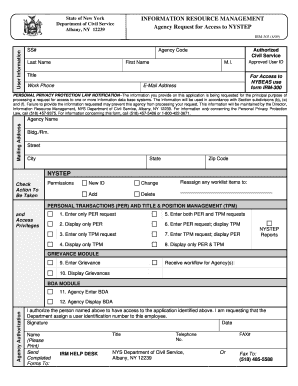
The NY IRM-303 form is essential for requesting access to the New York State Electronic Payroll System (NYSTEP). This guide will walk you through each step of completing the form online, ensuring that you provide all necessary information accurately.
Follow the steps to complete the NY IRM-303 form online.
- Click ‘Get Form’ button to obtain the NY IRM-303 form and open it in your editing environment.
- Fill in the user information section, which includes the Social Security Number (SS#), Agency Code, last name, first name, middle initial, and title. Ensure that you double-check all entries for accuracy.
- Provide your work phone number and email address. This information ensures that you can be contacted regarding your application.
- Enter your mailing address, including agency name, building/room, street, city, state, and ZIP code. This will be used for correspondence.
- Indicate the actions to be taken regarding permissions by checking the appropriate boxes for new ID, change, add, delete, or reassign worklist items.
- In the personal transactions section, choose the applicable options for entering or displaying requests related to personal and title management. Select all relevant checkboxes.
- In the grievance module, check the boxes that relate to grievances you want to enter or display.
- Once you have completed all sections, sign and date the form in the agency authorization area. Ensure the printed name and title are correct.
- Finally, save your changes, download, print, or share the completed form according to your needs, and ensure it is sent to the IRM Help Desk at the specified address or fax number.
Complete the NY IRM-303 form online today for efficient processing.