Loading
Form preview
  • US Legal Forms
  • Other Templates
  • Other Forms
  • New York Other Forms
  • Ny Db-130 2002

Get Ny Db-130 2002-2026

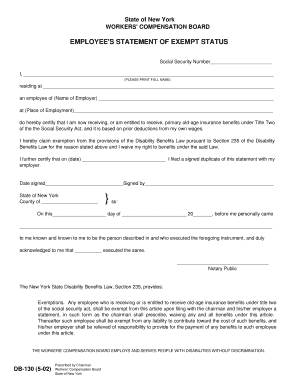
________________________________ (PLEASE PRINT FULL NAME) residing at ______________________________________________________________________________________ an employee of (Name of Employer) _________________________________________________________________ at (Place of Employment)__________________________________________________________________________ do hereby certify that I am now receiving, or am entitled to receive, primary old-age insurance benefits under Title Two of the the Social Secu.

How it works

  1. Open form

    Open form follow the instructions

  2. Easily sign form

    Easily sign the form with your finger

  3. Share form

    Send filled & signed form or save

How to fill out the NY DB-130 online

The New York DB-130 form, also known as the Employee's Statement of Exempt Status, is essential for employees seeking to claim an exemption from the Disability Benefits Law. This guide provides user-friendly, step-by-step instructions to help you accurately fill out the form online with ease.

Follow the steps to complete the NY DB-130 online.

  1. Press the ‘Get Form’ button to access the DB-130. This will allow you to open the document in an editable format.
  2. Complete the section for your Social Security Number. Ensure that the information is accurate to avoid any processing delays.
  3. In the provided space, print your full name clearly. This verifies your identity on the document.
  4. Next, enter your address in the designated field. This information provides your current place of residence.
  5. Indicate the name of your employer in the corresponding section, affirming your employment status.
  6. Provide the location of your place of employment. This is important for verifying your employment details.
  7. In the following section, affirm that you are currently receiving or entitled to receive primary old-age insurance benefits under Title Two of the Social Security Act.
  8. You must then check the statement claiming your exemption from the Disability Benefits Law as per Section 235. Review this for correctness.
  9. Enter the date on which you are filing this statement. This is necessary for record-keeping purposes.
  10. Affix your signature in the designated section to finalize your claim. This confirms that all provided information is accurate.
  11. Complete the notary section where you will need to have the document notarized by a public notary.
  12. Save your changes to the form once completed. You may also download, print, or share the form as necessary.

Complete your documents online today to ensure your exempt status is properly filed.

Get form

Experience a faster way to fill out and sign forms on the web. Access the most extensive library of templates available.
Get form

Related content

Employee's Statement of Exempt Status
Additionally, in order to maintain an exempt status if you change employment, an...
Learn more
A GUIDE TO NEW YORK CITY'S NOISE CODE
120 dB(A). Stereo/Boom Box .......................................... 110 – 120 dB(A)...
Learn more
Meredosia Power Station Bottom Ash Pond - Global...
Meredosia Power Station Bottom Ash Pond is a coal ash disposal site associated with...
Learn more

Related links form

Management Of Assaultive Behavior Certification Print Out Form Kroger Vendor Agreement Protecting Information Level 1 Application For A Dog License - Town Of Orangetown

Questions & Answers

Get answers to your most pressing questions about US Legal Forms API.

Contact support

Applying for temporary disability in New York requires you to complete an application form, which can be found through your employer or online resources. It's vital to include all medical documentation that verifies your inability to work. For additional support, consider using USLegalForms as your guide to navigate the application process efficiently, ensuring nothing is overlooked.

To file a NY DBL (Disability Benefits Law) claim, you need to complete the application form accurately. This includes providing medical documentation that supports your claim. You can also utilize resources from platforms like USLegalForms to ensure that you meet all requirements. Timeliness is important, so submit your completed claim as soon as possible.

To file a workers' compensation claim in New York, start by reporting your injury to your employer. Afterward, complete the required forms including the NY DB-130, which captures essential details about your injury and incident. Ensure to submit these documents promptly to avoid delays in receiving benefits. Organizations like USLegalForms can guide you in properly completing your claim.

Workers' compensation in New York provides financial assistance to employees injured on the job. It covers medical expenses and a portion of lost wages during recovery. The process involves submitting the appropriate forms, such as the NY DB-130, to your employer and the state. The goal is to facilitate quick support for injured workers while minimizing disputes.

To file for workers' compensation in New York, begin by notifying your employer about your injury. Your employer should provide you with the necessary forms, including the NY DB-130, to initiate your claim. You can also gather information and forms from resources like USLegalForms to help you through the filing process, ensuring every important detail is covered.

When a worker is injured, the first step is to seek medical attention. Getting prompt treatment ensures the worker's health and safety. Additionally, it's crucial to report the injury to your supervisor immediately. This report can play a significant role when filing for workers' compensation using the NY DB-130 form.

Filling out a bill of sale in New York requires including specific information such as seller and buyer details, a description of the item sold, and the sale date. Consider using the NY DB-130 for guidance on required elements and writing styles. Clearly state the terms of the transaction to prevent misunderstandings. After completing the bill, both parties should sign to formalize the agreement.

To fill out an affidavit of service in New York, start by stating the event you are serving documents for. Provide detailed information about the recipient and the method of service used. It’s helpful to reference the NY DB-130 in your documentation to ensure you comply with state rules. Ensure that you sign the affidavit in front of a notary to validate your statements.

Yes, both parties typically need to be present for a title transfer in New York. This ensures that all necessary documents are completed correctly, including the NY DB-130 if applicable. The presence of both parties can prevent future disputes and facilitate a smoother transaction. Make sure to bring valid identification and any necessary paperwork.

To fill out a New York state title, start by entering information about the vehicle and the registered owners. Follow the guidelines provided on the title, ensuring that you include relevant details clearly. You may also want to use the NY DB-130 to note any specific information about previous ownership if applicable. Completing this form accurately prevents complications during the transfer process.

Get This Form Now!

Use professional pre-built templates to fill in and sign documents online faster. Get access to thousands of forms.
Get form
If you believe that this page should be taken down, please follow our DMCA take down processhere.
Get NY DB-130
Get form
  • Adoption
  • Bankruptcy
  • Contractors
  • Divorce
  • Home Sales
  • Employment
  • Identity Theft
  • Incorporation
  • Landlord Tenant
  • Living Trust
  • Name Change
  • Personal Planning
  • Small Business
  • Wills & Estates
  • Packages A-Z
  • Affidavits
  • Bankruptcy
  • Bill of Sale
  • Corporate - LLC
  • Divorce
  • Employment
  • Identity Theft
  • Internet Technology
  • Landlord Tenant
  • Living Wills
  • Name Change
  • Power of Attorney
  • Real Estate
  • Small Estates
  • Wills
  • All Forms
  • Forms A-Z
  • Other Templates
  • Legal Hub
  • About Us
  • Help Portal
  • Legal Resources
  • Blog
  • Affiliates
  • Contact Us
  • Delete My Account
  • Site Map
  • Industries
  • Forms in Spanish
  • Localized Forms
  • State-specific Forms
  • Forms Kit
  • Real Estate Handbook
  • All Guides
  • Notarize
  • Incorporation services
  • For Consumers
  • For Small Business
  • For Attorneys
  • USLegal
  • FormsPass
  • pdfFiller
  • signNow
  • altaFlow
  • DocHub
  • Instapage
Form Packages
  • Adoption
  • Bankruptcy
  • Contractors
  • Divorce
  • Home Sales
  • Employment
  • Identity Theft
  • Incorporation
  • Landlord Tenant
  • Living Trust
  • Name Change
  • Personal Planning
  • Small Business
  • Wills & Estates
  • Packages A-Z
Form Categories
  • Affidavits
  • Bankruptcy
  • Bill of Sale
  • Corporate - LLC
  • Divorce
  • Employment
  • Identity Theft
  • Internet Technology
  • Landlord Tenant
  • Living Wills
  • Name Change
  • Power of Attorney
  • Real Estate
  • Small Estates
  • Wills
  • All Forms
  • Forms A-Z
  • Other Templates
Customer Service
  • Legal Hub
  • About Us
  • Help Portal
  • Legal Resources
  • Blog
  • Affiliates
  • Contact Us
  • Delete My Account
  • Site Map
  • Industries
  • Forms in Spanish
  • Localized Forms
  • State-specific Forms
  • Forms Kit
Legal Guides
  • Real Estate Handbook
  • All Guides
Prepared for you
  • Notarize
  • Incorporation services
Our Customers
  • For Consumers
  • For Small Business
  • For Attorneys
Our Sites
  • USLegal
  • FormsPass
  • pdfFiller
  • signNow
  • altaFlow
  • DocHub
  • Instapage
Social Media
Call us now toll free:
+1 833 426 79 33
As seen in:
© Copyright 1999-2026 airSlate Legal Forms, Inc. 17 Station Street, Suite 303, Brookline, MA 02445
  • Your Privacy Choices
  • Terms of Service
  • Privacy Notice
  • Content Takedown Policy
  • Bug Bounty Program