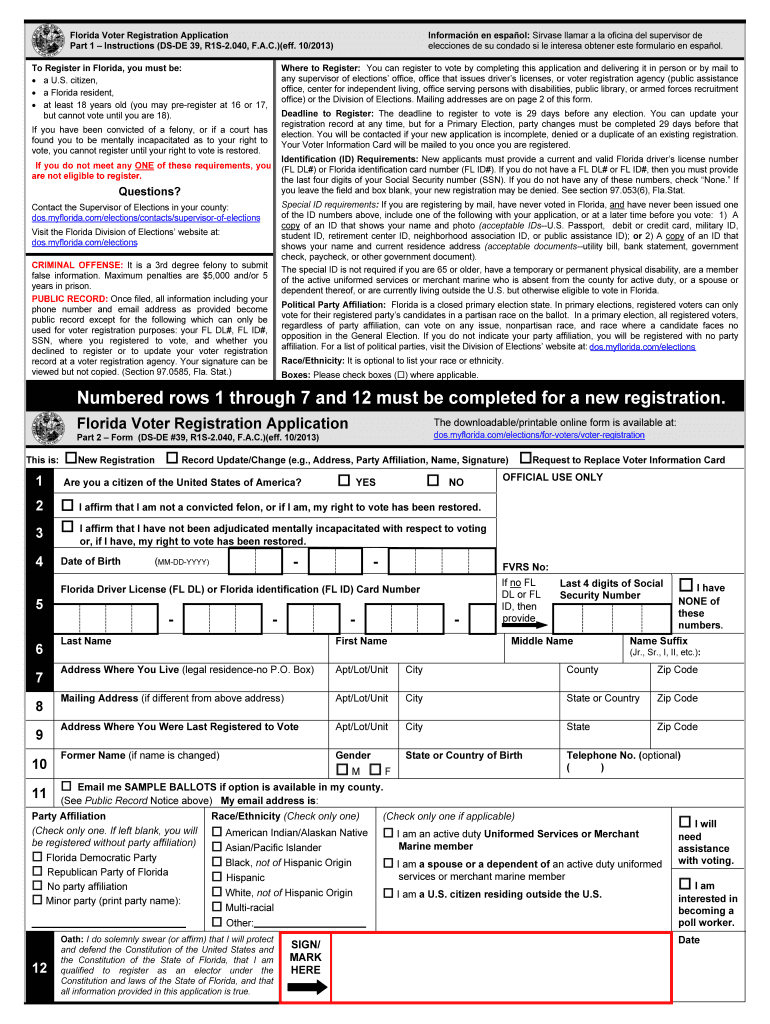
Florida Voter Registration Application Part 1 Instructions (DSDE 39, R1S2.040, F.A.C.)(eff. 10/2013) To Register in Florida, you must be: a U.S. citizen, a Florida resident, at least 18 years old.
Loading

Open form follow the instructions

Easily sign the form with your finger

Send filled & signed form or save
How to fill out the FL DS-DE 39 online
Filling out the FL DS-DE 39 is a vital step in registering to vote in Florida. This guide provides clear and user-friendly instructions to help you complete this form online with confidence, ensuring your voter registration process is smooth and efficient.
Follow the steps to fill out the FL DS-DE 39 online successfully.
- Click ‘Get Form’ button to obtain the FL DS-DE 39 form. This will allow you to access the document you need to start your voter registration process.
- Begin by indicating whether you are submitting a new registration, a record update/change, or a request to replace your voter information card by selecting the appropriate box.
- Answer the citizenship question by selecting ‘Yes’ or ‘No’ to confirm your status as a U.S. citizen.
- Affirm your voting eligibility regarding felony convictions or mental incapacitation by signing the relevant statements.
- Input your date of birth in the specified format (MM-DD-YYYY) to confirm your age.
- Provide your Florida driver license number or Florida ID card number. If you do not have either, enter the last four digits of your Social Security number and select ‘None’ if applicable.
- Fill out your personal details, including your first name, middle name (if applicable), last name, and name suffix, if any.
- Input your current residential address, ensuring the information is complete and accurate (legal residence — no P.O. Box). Include your apartment/lot/unit number, city, county, and zip code.
- If your mailing address differs from your residential address, fill in the required fields for the mailing address, including city, state or country, and zip code.
- Provide your former name if your name has changed, otherwise leave this field blank.
- Indicate your race/ethnicity if you choose, as this section is optional.
- Select your party affiliation by checking the box next to your chosen political party or the ‘No party affiliation’ option.
- Finally, review all the information you have entered for accuracy, then sign/date the form, affirming the truthfulness of your application before submitting it.
Complete your voter registration process online today for a timely and hassle-free experience.
Experience a faster way to fill out and sign forms on the web. Access the most extensive library of templates available.
Related content
Apr 24, 2024 — How to Register. • Complete and submit this form by mail or in person...
Political Party Affiliation: Florida is a closed primary election state. In primary...
by DS Team · 2004 · Cited by 1 — Regulatory status/approval: Florida Department of...
Get answers to your most pressing questions about US Legal Forms API.
Which party controls the Florida Senate?
The Senate Chamber is located in the State Capitol building. As of 2022, Republicans hold the majority in the Senate with 28 seats; Democrats are in the minority with 12 seats.
What is the political makeup of Florida?
Federal representation. Florida currently has 28 House districts In the 118th Congress, 8 of Florida's seats are held by Democrats and 20 are held by Republicans.
How much of fl is Republican?
Voter Registration - By Party Affiliation YearRepublican Party of FloridaTotal 2021 5,123,799 14,287,711 2020 5,218,739 14,565,738 2019 4,761,405 13,536,830 2018 4,718,720 13,396,6224 more rows • Apr 9, 2024
How many Republicans are in Florida?
Voter Registration - By Party Affiliation YearRepublican Party of FloridaNo Party Affiliation 2021 5,123,799 3,829,372 2020 5,218,739 3,799,799 2019 4,761,405 3,641,359 2018 4,718,720 3,588,5184 more rows • Apr 9, 2024
Is Florida state Democrat?
Following the 2022 elections, Florida is now considered a red state, with the Florida Republican Party holding supermajorities in both chambers of the Florida Legislature.
Does Florida have a super majority?
Legislative districts are drawn on the basis of population figures, provided by the federal decennial census. Representatives' terms begin immediately upon their election. The Republicans hold a supermajority in the State House with 84 seats; Democrats are in the minority with 36 seats.
Use professional pre-built templates to fill in and sign documents online faster. Get access to thousands of forms.
If you believe that this page should be taken down, please follow our DMCA take down process here.
This form is available in several versions. Select the version you need from the drop-down list below.