Loading
Form preview
  • US Legal Forms
  • Other Templates
  • Other Forms
  • California Other Forms
  • Ca Alarm Registration Form - Vacaville

Get Ca Alarm Registration Form - Vacaville

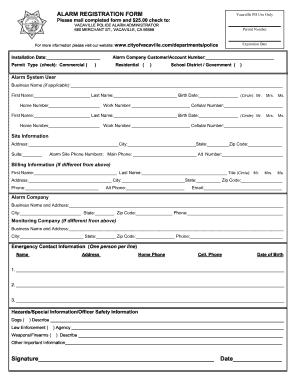
Ate For more information please visit our website: www.cityofvacaville.com/departments/police Installation Date: Permit Type (check): Commercial ( Alarm Company Customer/Account Number: ) Residential ( ) School District / Government ( ) Alarm System User Business Name (if applicable): First Name: Last Name:.

How it works

  1. Open form

    Open form follow the instructions

  2. Easily sign form

    Easily sign the form with your finger

  3. Share form

    Send filled & signed form or save

How to fill out the CA Alarm Registration Form - Vacaville online

Completing the CA Alarm Registration Form online is an essential step for residents and businesses in Vacaville wishing to register their alarm systems. This guide will provide you with clear, step-by-step instructions to ensure a smooth registration process.

Follow the steps to successfully complete the CA Alarm Registration Form online.

  1. Click ‘Get Form’ button to obtain the form and open it in the editor.
  2. Fill in the installation date of your alarm system in the designated field.
  3. Select your permit type by checking the appropriate box for either Commercial, Residential, or School District/Government.
  4. Provide your alarm company customer/account number if applicable in the specified section.
  5. Enter the alarm system user details. If applicable, include the business name, first name, last name, and birth date of the primary contact.
  6. Fill in the contact numbers: home number, work number, and cellular number for the alarm system user.
  7. Complete the site information section by entering the full address, city, state, and zip code for where the alarm is installed.
  8. Provide any alternate contact numbers and the main phone number associated with the alarm site.
  9. If the billing information is different from the site information, fill out the respective fields with the correct details.
  10. Fill in the alarm company details including the business name and address along with the phone number.
  11. If a monitoring company is used, provide its business name, address, and phone number.
  12. List emergency contacts with the required details, ensuring one person per line.
  13. Indicate any hazards or special information that may be relevant for law enforcement, such as dogs, weapons, or other concerns.
  14. Sign and date the form in the designated signature area.
  15. Once all fields are completed, save your changes. You can then download, print, or share the completed form as necessary.

Take the next step in securing your property by completing the CA Alarm Registration Form online today.

Get form

Experience a faster way to fill out and sign forms on the web. Access the most extensive library of templates available.
Get form

Related content

Alarm Permits | Vacaville, CA
Complete initial registrations, process renewals and pay for false alarm bills online. You...
Learn more
Emergency Procedures
If necessary, activate a fire alarm. Evacuate the building; Listen for instructions from...
Learn more
139647 R25 GF 370 DV II Manual_Eng.pdf
Your local Jøtul authorized dealer can assist you in determining what is required in your...
Learn more

Related links form

Photographic Condition SK 2 .xls 3gpp 35206 Pdf Form 3gpp Tr 23840 Form Hp X3000 Wireless Mouse Driver

Questions & Answers

Get answers to your most pressing questions about US Legal Forms API.

Contact support

Yes, you need a license to install or monitor alarm systems in California. This requirement ensures that individuals and companies adhere to industry standards and practices. To navigate this process, utilizing the CA Alarm Registration Form - Vacaville can be beneficial. Engaging with a licensed provider can help you meet legal obligations while ensuring the effectiveness of your alarm system.

Yes, you do need an alarm permit in California. This permit is essential for anyone operating an alarm system to comply with state and local laws. By completing the CA Alarm Registration Form - Vacaville, you not only fulfill legal requirements but also enhance the reliability of your security system. This proactive step can save you from future complications, such as fines associated with unregistered alarm systems.

To determine if you need an alarm permit, check your local laws and regulations regarding alarm systems, as requirements can vary by city. Generally, if you are installing an alarm system in California, you will most likely need to fill out the CA Alarm Registration Form - Vacaville. Reviewing your community's guidelines can help you avoid potential fines or issues. Consulting with your alarm provider can also clarify your permit needs.

If your alarm monitoring company requests a dispatch from LAPD, it is your responsibility to contact them directly to cancel the dispatch if necessary. This procedure ensures that law enforcement resources are used wisely and only when needed. Familiarizing yourself with the proper steps can prevent unnecessary incidents and maintain a good relationship with local authorities. Having the CA Alarm Registration Form - Vacaville can simplify your interactions with law enforcement during such instances.

Yes, in California, you typically need an alarm permit to operate an alarm system legally. The CA Alarm Registration Form - Vacaville serves as a necessary step to comply with local regulations. Obtaining this permit helps ensure that your alarm system is monitored and responds properly in emergencies. Without it, you may face fines or penalties.

In California, alarm companies must hold a state license to operate legally. However, homeowners are not required to have a license for their own alarm systems. Instead, you should ensure your system is registered via the CA Alarm Registration Form - Vacaville to avoid potential fines or issues.

Having an alarm system can significantly enhance your home insurance policy. Insurers often offer discounts to homeowners with monitored alarm systems, as they reduce the risk of theft and damage. Thus, while not mandatory, obtaining the CA Alarm Registration Form - Vacaville can be beneficial for lowering your insurance premiums.

Qualifications for installing an alarm system vary by location, but generally, a basic understanding of electronics and safety is essential. In California, working as a professional installer requires appropriate licensing. Completing the CA Alarm Registration Form - Vacaville may also be necessary for permits. Always seek training or hire a qualified professional to ensure safe and effective installation.

Yes, installing alarm systems in California requires a license. Only licensed technicians can install alarm systems legally, ensuring safety and adherence to local laws. If you're installing an alarm system yourself, check if a permit is required and complete the CA Alarm Registration Form - Vacaville appropriately. Staying informed will help you avoid future issues.

Yes, a house alarm installer company in California needs to have the proper licensing. This includes state-level licensing as well as meeting local requirements. A licensed installer can help you fill out your CA Alarm Registration Form - Vacaville correctly. Always choose licensed professionals for your safety and compliance.

Get This Form Now!

Use professional pre-built templates to fill in and sign documents online faster. Get access to thousands of forms.
Get form
If you believe that this page should be taken down, please follow our DMCA take down processhere.
Get CA Alarm Registration Form - Vacaville
Get form
  • Adoption
  • Bankruptcy
  • Contractors
  • Divorce
  • Home Sales
  • Employment
  • Identity Theft
  • Incorporation
  • Landlord Tenant
  • Living Trust
  • Name Change
  • Personal Planning
  • Small Business
  • Wills & Estates
  • Packages A-Z
  • Affidavits
  • Bankruptcy
  • Bill of Sale
  • Corporate - LLC
  • Divorce
  • Employment
  • Identity Theft
  • Internet Technology
  • Landlord Tenant
  • Living Wills
  • Name Change
  • Power of Attorney
  • Real Estate
  • Small Estates
  • Wills
  • All Forms
  • Forms A-Z
  • Other Templates
  • Legal Hub
  • About Us
  • Help Portal
  • Legal Resources
  • Blog
  • Affiliates
  • Contact Us
  • Delete My Account
  • Site Map
  • Industries
  • Forms in Spanish
  • Localized Forms
  • State-specific Forms
  • Forms Kit
  • Real Estate Handbook
  • All Guides
  • Notarize
  • Incorporation services
  • For Consumers
  • For Small Business
  • For Attorneys
  • USLegal
  • FormsPass
  • pdfFiller
  • signNow
  • altaFlow
  • DocHub
  • Instapage
Form Packages
  • Adoption
  • Bankruptcy
  • Contractors
  • Divorce
  • Home Sales
  • Employment
  • Identity Theft
  • Incorporation
  • Landlord Tenant
  • Living Trust
  • Name Change
  • Personal Planning
  • Small Business
  • Wills & Estates
  • Packages A-Z
Form Categories
  • Affidavits
  • Bankruptcy
  • Bill of Sale
  • Corporate - LLC
  • Divorce
  • Employment
  • Identity Theft
  • Internet Technology
  • Landlord Tenant
  • Living Wills
  • Name Change
  • Power of Attorney
  • Real Estate
  • Small Estates
  • Wills
  • All Forms
  • Forms A-Z
  • Other Templates
Customer Service
  • Legal Hub
  • About Us
  • Help Portal
  • Legal Resources
  • Blog
  • Affiliates
  • Contact Us
  • Delete My Account
  • Site Map
  • Industries
  • Forms in Spanish
  • Localized Forms
  • State-specific Forms
  • Forms Kit
Legal Guides
  • Real Estate Handbook
  • All Guides
Prepared for you
  • Notarize
  • Incorporation services
Our Customers
  • For Consumers
  • For Small Business
  • For Attorneys
Our Sites
  • USLegal
  • FormsPass
  • pdfFiller
  • signNow
  • altaFlow
  • DocHub
  • Instapage
Social Media
Call us now toll free:
+1 833 426 79 33
As seen in:
© Copyright 1999-2026 airSlate Legal Forms, Inc. 17 Station Street, Suite 303, Brookline, MA 02445
  • Your Privacy Choices
  • Terms of Service
  • Privacy Notice
  • Content Takedown Policy
  • Bug Bounty Program