Loading
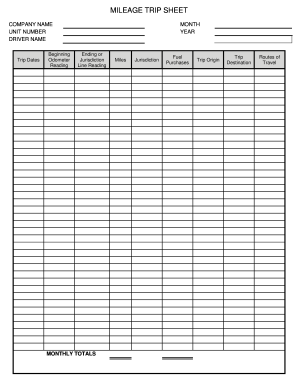
Get Ar Mileage Trip Sheet
How it works
-

Open form follow the instructions
-

Easily sign the form with your finger
-

Send filled & signed form or save
How to fill out the AR Mileage Trip Sheet online
The AR Mileage Trip Sheet is an essential document for documenting mileage and associated expenses during trips. This guide provides step-by-step instructions on how to accurately complete the form online.
Follow the steps to efficiently fill out the AR Mileage Trip Sheet online.
- Press the ‘Get Form’ button to access the AR Mileage Trip Sheet and open it in your preferred online editing tool.
- Begin by entering your company name in the designated field at the top of the form. This identifies the source of the mileage documentation.
- Fill in the unit number, which corresponds to the specific vehicle used during the trips.
- Provide the driver's name, ensuring you use the full name of the person responsible for operating the vehicle.
- Record the trip dates. Enter the beginning and ending odometer readings in the specified fields, completing the month and year sections as required.
- In the 'Monthly Totals' section, calculate and enter the total miles traveled for the period being documented.
- Document the jurisdiction where the trip took place in the respective field to indicate the region of travel.
- Clearly indicate the trip origin and destination to provide context for the mileage recorded.
- List the routes of travel, specifying the roads or highways taken during the trips for additional clarity.
- Review all entered information for accuracy and completeness before proceeding to save the document.
- Once confirmed, save your changes, then download, print, or share the AR Mileage Trip Sheet as needed.
Complete your mileage documentation by efficiently filling out the AR Mileage Trip Sheet online today.
To show proof of mileage, maintain a detailed AR Mileage Trip Sheet. List your trips consistently, noting the purpose and distances traveled. This documentation creates a dependable record that both helps with tax filings and demonstrates your professionalism.