Loading
Get Wa Woodinville Sport Fields Application 2015-2026
How it works
-

Open form follow the instructions
-

Easily sign the form with your finger
-

Send filled & signed form or save
How to fill out the WA Woodinville Sport Fields Application online
Filling out the WA Woodinville Sport Fields Application online is a straightforward process that allows users to reserve sports fields efficiently. This guide provides clear and detailed instructions to help you successfully complete each section of the application.
Follow the steps to complete your application with ease.
- Click ‘Get Form’ button to obtain the form and open it in the chosen editor.
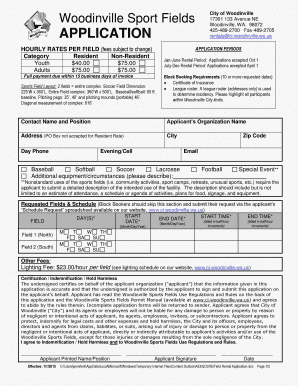
- Begin by entering your contact information. Fill in your name, position, organization name, address (note: PO Boxes are not accepted for resident rates), city, zip code, and phone numbers (day and evening/cell).
- Select the sport type for your rental by checking the appropriate box for baseball, softball, soccer, lacrosse, or football. If your activities involve other equipment or circumstances, please describe them in the provided space.
- Indicate your requested fields and the schedule. Fill in the start date and end date, along with the start time and end time (remember, time is billed in half-hour increments).
- If you are Block Booking (10 or more dates), ensure you provide a certificate of insurance and highlight participants residing within Woodinville City limits.
- Under 'Special Event,' if applicable, provide a detailed description of the intended use of the facility, including an attendance estimate, schedule of activities, and any plans for food or equipment.
- Review all filled sections to ensure accuracy. This is crucial, as incomplete forms will be returned to sender.
- Once completed, save your changes. You can then choose to download, print, or share the form as needed.
Complete your application online today and ensure your desired sports field is reserved!