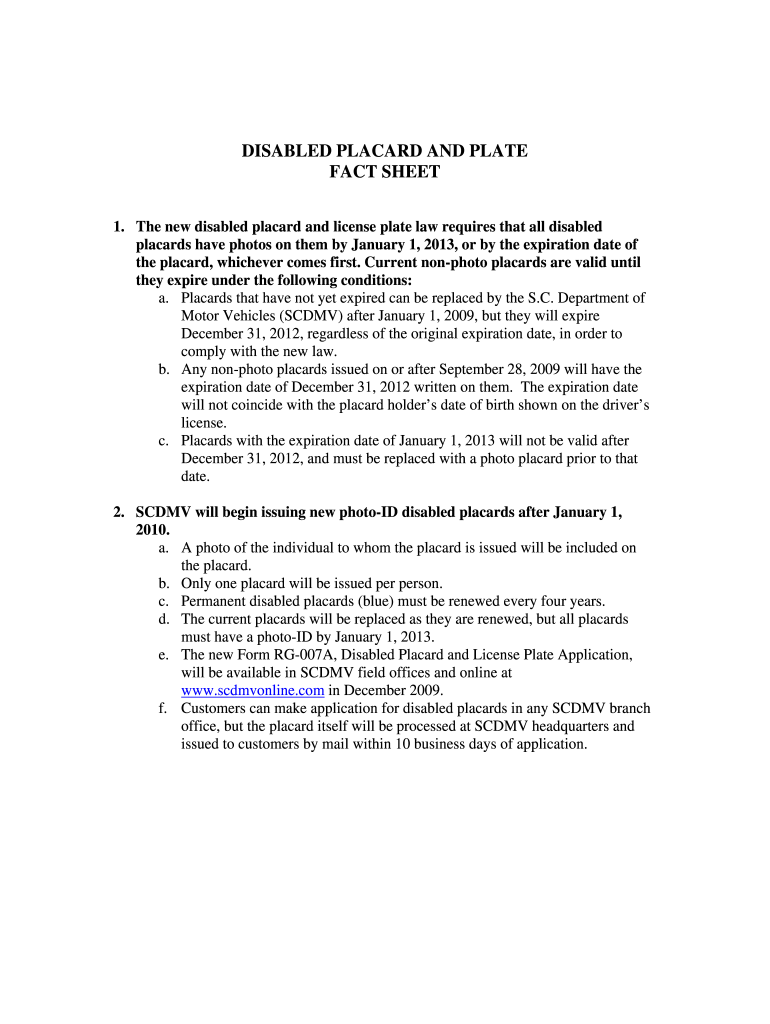
placard, whichever comes first. Current non-photo placards are valid until they expire under the following conditions: a. Placards that have not yet expired can be replaced by the S.C. Department of Motor Vehicles (SCDMV) after January 1, 2009, but they will expire December 31, 2012, regardless of the original expiration date, in order to comply with the new law. b. Any non-photo placards issued on or after September 28, 2009 will have the expiration date of December 31, 2012 written on them. T.

Open form follow the instructions

Easily sign the form with your finger

Send filled & signed form or save
How to fill out the SC Disabled Placard & Plate Fact Sheet online
Filling out the SC Disabled Placard & Plate Fact Sheet is an essential step for individuals seeking a disabled placard or license plate. This guide offers clear and detailed instructions on how to complete the form online, ensuring users can navigate the process with confidence.
Follow the steps to successfully complete the application
- Click the ‘Get Form’ button to access the SC Disabled Placard & Plate Fact Sheet and begin the application process.
- Review the eligibility criteria for obtaining a disabled placard or plate, ensuring that you meet the requirements outlined in the fact sheet.
- Enter your personal information in the designated fields, including your name, address, and contact information. Ensure accuracy to avoid any delays in processing.
- Provide your medical certification details if required, ensuring that the condition qualifies under the new definitions set forth by SCDMV.
- Attach a recent photo, if prompted, as it is a requirement for new placards.
- Review all the information you have provided to confirm its accuracy.
- Once you are satisfied with the form, save your changes, and proceed to download, print, or share the form following your needs.
Complete your SC Disabled Placard & Plate Fact Sheet online today and ensure access to necessary parking benefits.
Experience a faster way to fill out and sign forms on the web. Access the most extensive library of templates available.
Related content
1. The new disabled placard and license plate law requires that all disabled placards have...
Students and employees with state-issued ADA placards/hangtags or license plates are...
Hazardous materials placarding is identified by a four point-on-point placard located on...
Get answers to your most pressing questions about US Legal Forms API.
What is the easiest way to get a handicap placard?
The easiest way to obtain a handicap placard is to use an online resource that simplifies the application process. Platforms like uslegalforms offer user-friendly solutions to guide you through the required paperwork and requirements. For comprehensive assistance, refer to the SC Disabled Placard & Plate Fact Sheet, which outlines straightforward steps to help you secure your placard efficiently.
What does a red disabled person placard indicate?
A red disabled person placard indicates a temporary disability, meaning that the individual is experiencing a condition that is not permanent. This placard allows for accessibility while the individual recovers or rehabilitates. The SC Disabled Placard & Plate Fact Sheet explains this classification to ensure that users understand the importance of displaying the correct placard.
What is the difference between red and blue handicap placards in SC?
In South Carolina, blue handicap placards are for individuals with permanent disabilities, while red placards indicate temporary disabilities. This differentiation is essential for law enforcement and parking officials to ensure compliance and appropriate access. The SC Disabled Placard & Plate Fact Sheet provides a clear distinction, guiding individuals in understanding which placard they should apply for.
Can you get 2 handicap placards in SC?
Yes, South Carolina allows individuals to apply for two handicap placards under specific circumstances. This is beneficial for those who may require one for personal use and another for a caregiver or family member. To navigate this application process smoothly, refer to the SC Disabled Placard & Plate Fact Sheet for practical advice and solutions.
What is the blue handicap symbol?
The blue handicap symbol represents accessibility and designates parking spaces reserved for individuals with disabilities. This universally recognized emblem signifies that the designated area is available for those who possess a valid disabled placard. Familiarizing yourself with the SC Disabled Placard & Plate Fact Sheet will help you understand the importance of this symbol when seeking accessible parking.
How do I get a disabled placard in SC?
To obtain a disabled placard in South Carolina, you will need to fill out an application form and provide medical documentation that confirms your eligibility. You can apply through the Department of Motor Vehicles or utilize platforms like uslegalforms to streamline the process. The SC Disabled Placard & Plate Fact Sheet provides detailed guidance and necessary steps to help you successfully secure your placard.
Why are handicap placards different colors?
Handicap placards are designed in different colors to signify various types of disabilities. In South Carolina, the color coding helps law enforcement and parking officials quickly identify the nature of the disability. Understanding this system is crucial, especially for those who rely on the SC Disabled Placard & Plate Fact Sheet to navigate public spaces safely and effectively.
How do you qualify for a handicap placard in SC?
To qualify for a handicap placard in South Carolina, you must have a documented disability that significantly impairs your mobility. This includes conditions such as vision impairments, respiratory issues, or severe orthopedic conditions. The application must include a physician's certification confirming your disability. For assistance with this process, consider visiting the uslegalforms platform, where you can find the SC Disabled Placard & Plate Fact Sheet to guide you.
What are the rules for handicap parking in South Carolina?
Handicap parking rules in South Carolina require the display of a valid placard or license plate to park in designated spaces. These spots are typically located close to building entrances for easier access. The SC Disabled Placard & Plate Fact Sheet outlines the specific dimensions and requirements for these spaces, ensuring compliance and accessibility. Familiarizing yourself with these regulations helps promote a respectful environment for people with disabilities.
Is it illegal to park in a handicap spot if you're not handicapped?
Yes, it is illegal to park in a handicap spot if you do not have the proper credentials. Violating handicap parking laws can lead to fines and other penalties. The SC Disabled Placard & Plate Fact Sheet emphasizes the importance of respecting these regulations to ensure accessibility for those who truly need it. Always check your parking choices to avoid unnecessary trouble.
Use professional pre-built templates to fill in and sign documents online faster. Get access to thousands of forms.
If you believe that this page should be taken down, please follow our DMCA take down process here.