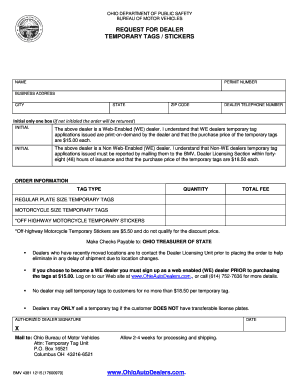
Nly Initial only one box (if not initialed the order will be returned) INITIAL The above dealer is a Web-Enabled (WE) dealer. I understand that WE dealers temporary tag applications issued are print-on-demand by the dealer and that the purchase price of the temporary tags are $15.00 each. INITIAL The above dealer is a Non Web-Enabled (WE) dealer. I understand that Non-WE dealers temporary tag applications issued must be reported by mailing them to the BMV, Dealer Licensing Section within fortye.
Open form follow the instructions
Easily sign the form with your finger
Send filled & signed form or save
How to fill out the OH BMV 4381 online
This guide provides a detailed walkthrough on completing the OH BMV 4381 form online. Designed for dealers requesting temporary tags or stickers, it ensures you understand each section of the form and can complete it accurately.
Follow the steps to successfully fill out the OH BMV 4381 form.
- Click the ‘Get Form’ button to access the document and open it in the online editor.
- In the 'Name' field, enter the name of the dealer or the business applying for the temporary tags.
- Input the 'Permit Number' associated with your dealership.
- Fill in the 'Business Address,' including street, city, state, and ZIP code.
- Provide the 'Dealer Telephone Number' to ensure the Bureau can reach you if necessary.
- Select the appropriate option by initialing one box to indicate if the dealer is a Web-Enabled (WE) dealer or a Non Web-Enabled dealer.
- In the 'Order Information' section, choose the 'Tag Type' you wish to order from the options provided.
- Indicate the 'Quantity' of temporary tags needed for your order.
- Calculate the 'Total Fee' based on the number of tags selected and the respective pricing.
- Obtain the 'Authorized Dealer Signature' and enter the date of signing the form.
- Review all entries for accuracy before submitting.
- Once all fields are completed, you can save changes, download the form, print it, or share it as needed.
Complete your documents online today for a streamlined application process.
Experience a faster way to fill out and sign forms on the web. Access the most extensive library of templates available.
Related content
Sep 30, 2025 — By Mail: Download the Request for Temporary Tags/Stickers (form BMV 4381)...
by S Maghsoudi · 2020 · Cited by 117 — Polymer nano blends are biocompatible...
4381 IOO-31. 5041 DP 2230 VIDEO m-96. 3481 IOO-32A/B COMA). 5051 DP 2260 m 64ch. 3485...
Get answers to your most pressing questions about US Legal Forms API.
Does Ohio accept electronic proof of insurance?
Yes, Ohio does accept electronic proof of insurance, provided it clearly shows your name, policy number, and vehicle information. You can display this document on your mobile device or may need to send it electronically to the BMV if required. Verify that the format complies with the standards set by OH BMV 4381 for valid documentation.
How to file a lost title in Ohio?
If you have lost your vehicle title in Ohio, you can file for a replacement title by completing the application form at your local BMV. You should present identification and any required documentation to facilitate the process. Be attentive to the instructions outlined in OH BMV 4381 to ensure a smooth application experience.
How do I show proof of insurance online?
To show proof of insurance online, you usually need to access your insurance company's website or mobile app. There, you can find an electronic version of your insurance card or documentation. This electronic proof is often acceptable by the Ohio BMV as long as it meets the specifications of OH BMV 4381.
How to fill out power of attorney for Ohio vehicle registration?
Filling out a power of attorney for Ohio vehicle registration is a straightforward process. You need to complete the designated form, which typically requires both parties' names, addresses, and signatures. This form allows someone else to act on your behalf solely for vehicle registration purposes, ensuring compliance with OH BMV 4381 guidelines.
Is there a grace period for expired temporary tags in Ohio?
In Ohio, there is generally no grace period for expired temporary tags. Once your temporary tags expire, you must refrain from driving until you obtain valid registration. It’s best to register your vehicle promptly to avoid potential fines related to expired temporary tags, as outlined by OH BMV 4381.
How do I provide proof of insurance to Ohio BMV?
To provide proof of insurance to the Ohio BMV, you need to present a valid insurance card that includes your name, the policy number, and vehicle information. You can either hand this document to a BMV representative in person or send it through the postal service. For convenience, check if your insurer can send proof directly to the OH BMV 4381.
How do I submit proof of insurance to Ohio BMV?
You can submit your proof of insurance to the Ohio BMV through several methods. Most commonly, you can bring your documents to a local BMV office in person. Alternatively, you might have the option to send the documentation via mail. Make sure your proof aligns with the requirements stated under OH BMV 4381.
Can I take my temps test online in Ohio?
Currently, you cannot take the temps test online in Ohio. However, you can prepare for the test through various resources available, including the OH BMV 4381 guidelines. It’s essential to study these materials to ensure you understand the rules of the road. Once you feel ready, you can schedule your test at a local BMV office.
Can I get a temp tag online in Ohio?
Yes, you can obtain a temporary tag online in Ohio using the OH BMV 4381 form. This online process simplifies the task by allowing you to submit necessary information and payment directly from your home. Having a temp tag online helps you drive legally while awaiting your permanent registration. It’s a convenient option that many drivers in Ohio appreciate.
How to fill out a vehicle power of attorney?
Filling out a vehicle power of attorney involves a few straightforward steps. Start by entering the vehicle owner’s name, the name of the person being granted authority, and the specific powers assigned. Be sure to include the VIN and any other relevant vehicle details. For additional assistance, the OH BMV 4381 is an excellent resource to navigate this process.
Use professional pre-built templates to fill in and sign documents online faster. Get access to thousands of forms.
If you believe that this page should be taken down, please follow our DMCA take down process here.
This form is available in several versions. Select the version you need from the drop-down list below.