Loading
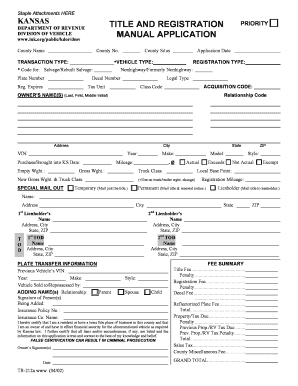
Get Ks Tr-212a 2002
How it works
-

Open form follow the instructions
-

Easily sign the form with your finger
-

Send filled & signed form or save
How to fill out the KS TR-212a online
Filling out the KS TR-212a can seem daunting, but this guide will walk you through each section and field of the form. By following these straightforward steps, you will be able to complete the application efficiently and accurately.
Follow the steps to complete the KS TR-212a online.
- Press the ‘Get Form’ button to access the document and open it in your preferred online editor.
- Begin by entering the county name and county number at the top of the form.
- Select your transaction type from the drop-down list provided. Ensure that you choose the correct type based on your application needs.
- Fill in the application date with the date you are submitting the form. This is required for processing your application.
- Indicate your vehicle type by checking the appropriate box. If applicable, provide the code for salvage or rebuilt salvage.
- Enter your vehicle's plate number for identification purposes.
- Select the registration type that fits your needs, and provide the decal number, registration expiration date, and legal type as required.
- Fill in the acquisition code and class code pertaining to the vehicle.
- Provide the owner's name(s) using the format last name, first name, and middle initial. Next, specify the relationship code if applicable.
- Enter the owner's address, city, and state information accurately.
- Document the vehicle identification number (VIN), year, make, model, and other specified details such as purchase date, empty weight, mileage, gross weight, and any additional information requested.
- Complete the lienholder's information if there are any liens on the vehicle. Fill in the required name and address details for the lienholder.
- If necessary, provide information about previous vehicle ownership, including the previous vehicle’s VIN and details of the sale or repossession.
- Certify the application by signing with your name(s) and including the date of submission to confirm all information is accurate and true.
- Review all entered information for accuracy. After confirming everything is correct, you can save your changes, download, print, or share the completed form as required.
Start completing the KS TR-212a online today to streamline your vehicle registration process.
Get form
Experience a faster way to fill out and sign forms on the web. Access the most extensive library of templates available.
The time it takes to file for a lost title in Kansas generally varies based on processing times. Once you submit the KS TR-212a form, it usually takes a few weeks to receive your new title. Factors like mail delivery and the volume of applications may affect this timeline. To ensure you have the correct forms and avoid delays, consider using US Legal Forms for efficient filing.
Get This Form Now!
Use professional pre-built templates to fill in and sign documents online faster. Get access to thousands of forms.