George Walker Bush (born July 6, 1946) is an American politician who served asthe 43rd President of the United States from 2001 to 2009. He was also the 46th Governor of Texas from 1995 to 2000. After.
Loading
Open form follow the instructions
Easily sign the form with your finger
Send filled & signed form or save
How to fill out the CT E-140 online
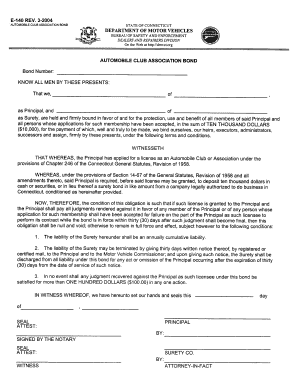
Filling out the CT E-140 form online can be a straightforward process when you follow the right steps. This guide provides clear instructions to help you navigate each section and field effectively, ensuring that your information is submitted accurately.
Follow the steps to complete the CT E-140 online
- Press the ‘Get Form’ button to access the CT E-140 form and open it in the designated online editor.
- Begin by entering your personal information in the provided fields. This may include your name, address, contact details, and any necessary identifying information.
- Next, move on to the specific sections of the form that request information related to your eligibility or qualifications. Carefully review each question and provide accurate responses.
- If applicable, include additional documentation or information as required by the form. Ensure that all necessary files are in the correct format to be uploaded easily.
- Review all the information entered to ensure it is complete and correct. Verification helps prevent delays in processing.
- Finally, save your changes, and then proceed to download, print, or share the completed form as needed.
Ready to complete your documents online? Start now!
Experience a faster way to fill out and sign forms on the web. Access the most extensive library of templates available.
Related content
THAT WHEREAS, the Principal has applied for a license as an Automobile Club or Association...
The increase in HU at 140 kV relative to that of 80 kV (i.e., 26 HU) means that relative...
May 2, 2020 — Use a standard for which the conductivity as a function of temperature is...
Get answers to your most pressing questions about US Legal Forms API.
How many points is unsafe passing in CT?
In Connecticut, unsafe passing typically results in a penalty of 2 points added to your driving record. This violation entails passing another vehicle in a dangerous manner, potentially endangering both drivers. It's essential to adhere to safe driving practices to avoid accumulating points, which can affect your insurance rates. For more information on traffic violations, consult the Connecticut DMV website.
How do I get my 1099g from CT?
To obtain your 1099g from Connecticut, visit the Connecticut Department of Labor’s website. You can request your 1099g online through their services portal. If you prefer, you can also contact them directly for assistance. Keeping track of your 1099g is important for accurate tax reporting, including when using forms like CT E-140.
What is a CT 1040?
The CT 1040 is the individual income tax return form used by residents of Connecticut. This form is essential for reporting income, claiming deductions, and determining your tax liability to the state. Completing the CT 1040 correctly ensures compliance with Connecticut tax laws. You can easily access it through the Connecticut Department of Revenue Services.
Where can I find my CT 1040 form?
You can find your CT 1040 form on the Connecticut Department of Revenue Services website. The form is available for download in a user-friendly format. If you prefer physical copies, check with your local tax office or library. Using resources like uslegalforms can also simplify your search for tax-related documents.
What is the statute 14 140 in CT?
Statute 14 140 in Connecticut pertains to the regulations surrounding motor vehicle operation and safety standards. It covers various aspects of traffic law compliance and penalties for violations. Understanding this statute is essential for drivers to ensure compliance and avoid fines. For more detailed information, you can refer to the state's traffic laws.
How do I get my 1040 form online?
You can access your 1040 form online by navigating to the official IRS website. Simply search for the form in their forms section, and you can download it in PDF format. Alternatively, you can use platforms like uslegalforms to find all necessary tax forms, including the CT E-140, conveniently.
How do I get my CT 1040?
To obtain your CT 1040, visit the Connecticut Department of Revenue Services website. You can download the form directly from their site. Additionally, you may also find it at your local tax office. Make sure to have all your personal information ready to fill it out accurately.
Is CT accepting tax returns?
Yes, Connecticut is currently accepting tax returns for the tax season. If you have your documents ready, you can efficiently file using the CT E-140 form. Remember to stay updated on any changes to deadlines or regulations throughout the season. Using a service like uslegalforms can help you navigate your filing process easily.
How early can I file my tax return?
You can typically file your tax return as soon as you receive your tax documents, usually from late January onward. However, be mindful of any changes in tax laws that may affect your situation. The CT E-140 form allows for something early filing to help ensure that you manage your tax responsibilities efficiently. Check with uslegalforms for tips on getting started.
When can I file my CT return?
You can typically file your CT return as soon as you have your necessary documents, usually starting in late January. The filing deadline generally falls on April 15 each year, but it's always wise to check for any updates. Utilize the CT E-140 form to ensure you have the correct information needed for your filing. Don’t hesitate to reach out to uslegalforms for assistance.
Use professional pre-built templates to fill in and sign documents online faster. Get access to thousands of forms.
If you believe that this page should be taken down, please follow our DMCA take down process here.