Loading
Form preview
  • US Legal Forms
  • Form Library
  • RMV Forms
  • Connecticut RMV Forms
  • Ct Au-463 2012

Get Ct Au-463 2012-2026

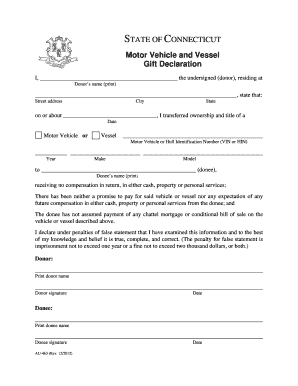
___________________________________________, state that: Street address City State on or about ________________________________, I transferred ownership and title of a Date Motor Vehicle or Vessel ________________________________________________ Motor Vehicle or Hull Identification Number (VIN or HIN) ___________ ________________________ _________________________________________ Year Make Model to _____________________________________________________ (donee), Donee’s name (print) re.

How it works

  1. Open form

    Open form follow the instructions

  2. Easily sign form

    Easily sign the form with your finger

  3. Share form

    Send filled & signed form or save

How to fill out the CT AU-463 online

The CT AU-463 form is essential for declaring the gift of a motor vehicle or vessel in Connecticut. This guide will help you navigate each section of the form online, ensuring that your declaration is clear and complete.

Follow the steps to successfully complete the CT AU-463 online.

  1. Press the ‘Get Form’ button to access the CT AU-463 declaration form. This will allow you to open the document for editing.
  2. In the first section, provide the donor’s full name. Ensure that this is printed clearly in the designated space.
  3. Next, fill in the donor's street address, city, and state. This information helps verify the donor's residency.
  4. Indicate the date on which the transfer of ownership took place. This should be the approximate date of the transaction.
  5. Specify whether the gift is for a motor vehicle or a vessel by selecting the appropriate option.
  6. Enter the motor vehicle or hull identification number (VIN or HIN) in the provided field to ensure accurate identification of the item.
  7. Fill in the year, make, and model of the vehicle or vessel. This information is crucial for proper registration.
  8. Provide the full name of the donee in the designated area. This should also be printed clearly.
  9. In the declaration section, make sure to read the statements regarding compensation and assumptions of payment. Confirm your understanding and agreement to these terms.
  10. Sign and date the donor section at the bottom of the form. This attests to the truthfulness of your declaration.
  11. Lastly, the donee must also print their name, sign, and date the form to complete the declaration process.

Complete your CT AU-463 declaration online today!

Get form

Experience a faster way to fill out and sign forms on the web. Access the most extensive library of templates available.
Get form

Related content

STATE OF CONNECTICUT - Gift Declaration
State. ZIP code. –. –. FEIN (if applicable). Email address. Daytime telephone number...
Learn more
CT FACULTY HANDBOOK 2024-25
Aug 28, 2024 — Emergency Calls – (860) 463-5062. Routine Calls – (860) 463-5062. •...
Learn more
INSTALLATION INSTRUCTIONS
CARBON-MONOXIDE POISONING HAZARD. FAILURE TO FOLLOW INSTRUCTIONS COULD RESULT IN SEVERE...
Learn more

Related links form

Graduate Admission Recommendation Form - University Of Iowa - Uiowa Figure 12-2. Evaluation Form (in Adobe Acrobat - Uiowa Vendor Change Form University Receipt

Questions & Answers

Get answers to your most pressing questions about US Legal Forms API.

Contact support

To fill out the back of a CT title, provide the information of the buyer, including their name and address, in the appropriate sections. Next, sign the title to complete the transfer of ownership. Remember, having the CT AU-463 handy can simplify this process by outlining the necessary steps.

When selling a car in Connecticut, to fill out the title correctly, you will need to enter the buyer's name and address in the designated sections. Do not forget to provide the odometer reading and sign where indicated, as this formalizes the transaction. Utilizing the CT AU-463 can guide you through this process efficiently.

To fill out a Connecticut registration and title application, you must first gather all necessary documents, including proof of identity and ownership. Next, complete the application accurately, ensuring all details align with your supporting documents. Remember to double-check that your vehicle identification number matches what is listed on the CT AU-463 form.

Gifting a car generally does not lead to tax deductions for the giver. In Connecticut, when you gift a vehicle, you perform a transfer using form CT AU-463, which also aids in notifying the DMV about the change in ownership. The recipient won't owe taxes when receiving the gift, but they should be aware of any potential state fees for registering the vehicle in their name. Remember, it's always wise to consult with a tax professional for personalized guidance.

Yes, AAA offers various DMV services in CT, including renewing registrations and providing forms. Their members can benefit from these streamlined services, making trips to the DMV less stressful. Always confirm if specific forms like the CT AU-463 are available through their services to save time.

When registering a vehicle in CT, you will need the completed application form, proof of identity, and any necessary fees. Additionally, check for specific forms associated with your type of vehicle, such as the CT AU-463, which might be needed for certain registrations. Being prepared with the correct paperwork will smooth the registration process.

To get a Q1 form in CT, visit the Connecticut DMV’s official website or a local office. The form is usually available as a downloadable PDF file, which you can fill out and submit either online or in-person. Remember, having the right forms like the CT AU-463 at hand will enhance your filing experience.

Yes, you can walk into a CT DMV office to complete transactions, but it is often best to check if you require an appointment beforehand. Since wait times can vary, arriving early might save you time. Always ensure you bring all necessary documents, including anything required for the CT AU-463, to avoid multiple trips.

CT tax forms are available on the Connecticut Department of Revenue Services website. You can easily access and download various tax forms, including those necessary for filing and claiming deductions. If you prefer a physical copy, you can pick these up at local tax offices. Don’t forget to check if any specific forms, like the CT AU-463, are required.

You can obtain CT DMV forms from the official Connecticut Department of Motor Vehicles website. They provide a comprehensive collection of forms you can download and print at your convenience. Alternatively, you can visit a local DMV office for physical copies. Ensuring you have the necessary forms, like the CT AU-463, speeds up your process.

Get This Form Now!

Use professional pre-built templates to fill in and sign documents online faster. Get access to thousands of forms.
Get form
If you believe that this page should be taken down, please follow our DMCA take down processhere.

Industry-leading security and compliance

US Legal Forms protects your data by complying with industry-specific security standards.
  • In businnes since 1997
    25+ years providing professional legal documents.
  • Accredited business
    Guarantees that a business meets BBB accreditation standards in the US and Canada.
  • Secured by Braintree
    Validated Level 1 PCI DSS compliant payment gateway that accepts most major credit and debit card brands from across the globe.
Get CT AU-463
Get form
  • Adoption
  • Bankruptcy
  • Contractors
  • Divorce
  • Home Sales
  • Employment
  • Identity Theft
  • Incorporation
  • Landlord Tenant
  • Living Trust
  • Name Change
  • Personal Planning
  • Small Business
  • Wills & Estates
  • Packages A-Z
  • Affidavits
  • Bankruptcy
  • Bill of Sale
  • Corporate - LLC
  • Divorce
  • Employment
  • Identity Theft
  • Internet Technology
  • Landlord Tenant
  • Living Wills
  • Name Change
  • Power of Attorney
  • Real Estate
  • Small Estates
  • Wills
  • All Forms
  • Forms A-Z
  • Form Library
  • Legal Hub
  • About Us
  • Help Portal
  • Legal Resources
  • Blog
  • Affiliates
  • Contact Us
  • Delete My Account
  • Site Map
  • Industries
  • Forms in Spanish
  • Localized Forms
  • State-specific Forms
  • Forms Kit
  • Real Estate Handbook
  • All Guides
  • Notarize
  • Incorporation services
  • For Consumers
  • For Small Business
  • For Attorneys
  • USLegal
  • FormsPass
  • pdfFiller
  • signNow
  • altaFlow
  • DocHub
  • Instapage
Form Packages
  • Adoption
  • Bankruptcy
  • Contractors
  • Divorce
  • Home Sales
  • Employment
  • Identity Theft
  • Incorporation
  • Landlord Tenant
  • Living Trust
  • Name Change
  • Personal Planning
  • Small Business
  • Wills & Estates
  • Packages A-Z
Form Categories
  • Affidavits
  • Bankruptcy
  • Bill of Sale
  • Corporate - LLC
  • Divorce
  • Employment
  • Identity Theft
  • Internet Technology
  • Landlord Tenant
  • Living Wills
  • Name Change
  • Power of Attorney
  • Real Estate
  • Small Estates
  • Wills
  • All Forms
  • Forms A-Z
  • Form Library
Customer Service
  • Legal Hub
  • About Us
  • Help Portal
  • Legal Resources
  • Blog
  • Affiliates
  • Contact Us
  • Delete My Account
  • Site Map
  • Industries
  • Forms in Spanish
  • Localized Forms
  • State-specific Forms
  • Forms Kit
Legal Guides
  • Real Estate Handbook
  • All Guides
Prepared for you
  • Notarize
  • Incorporation services
Our Customers
  • For Consumers
  • For Small Business
  • For Attorneys
Our Sites
  • USLegal
  • FormsPass
  • pdfFiller
  • signNow
  • altaFlow
  • DocHub
  • Instapage
Social Media
Call us now toll free:
+1 833 426 79 33
As seen in:
© Copyright 1999-2026 airSlate Legal Forms, Inc. 3720 Flowood Dr, Flowood, Mississippi 39232
  • Your Privacy Choices
  • Terms of Service
  • Privacy Notice
  • Content Takedown Policy
  • Bug Bounty Program