Loading
Get Co Dr 2183 2015
How it works
-

Open form follow the instructions
-

Easily sign the form with your finger
-

Send filled & signed form or save
How to fill out the CO DR 2183 online
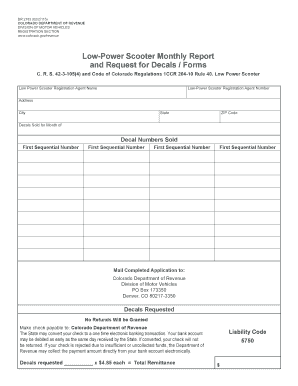
The CO DR 2183 form is essential for reporting low-power scooter decals sold and requesting additional decals from the Colorado Department of Revenue. This guide provides clear, step-by-step instructions to help users efficiently complete this form online.
Follow the steps to fill out the CO DR 2183 accurately.
- Click 'Get Form' button to obtain the CO DR 2183 form and open it in your preferred online editor.
- Enter the name of the low-power scooter registration agent in the designated field. This section identifies the individual or organization responsible for the decals.
- Provide the registration agent number, which is essential for the Department of Revenue to verify your registration status.
- Fill in the address fields: street address, city, state, and ZIP code. This information ensures that all correspondence reaches the correct location.
- Indicate the month for which you are reporting decal sales in the 'Decals Sold for Month of' field.
- List the decal numbers sold in sequential order. Make sure to enter each number accurately to maintain proper records.
- Calculate the total remittance by multiplying the number of decals requested by the set price of $4.85 each. Provide this total in the specified field.
- Review the section regarding payment processing. Understand that checks may be converted to electronic transactions and ensure your bank account will cover the payment.
- Complete the liability code field with the relevant code (5750). This is a necessary component of your submission.
- Once you have filled out all necessary fields, review the form for accuracy and completeness. After verification, you can save your changes, download, print, or share the completed form as needed.
Complete your CO DR 2183 form online today for a seamless filing experience.
Get form
Experience a faster way to fill out and sign forms on the web. Access the most extensive library of templates available.
You can determine if you owe Colorado use tax by reviewing your purchases made without sales tax, as well as any goods you may have brought into the state. You should keep detailed records of your transactions to evaluate your potential liability. For more clarity, CO DR 2183 provides tools and information to help you ascertain your use tax responsibilities.
Get This Form Now!
Use professional pre-built templates to fill in and sign documents online faster. Get access to thousands of forms.