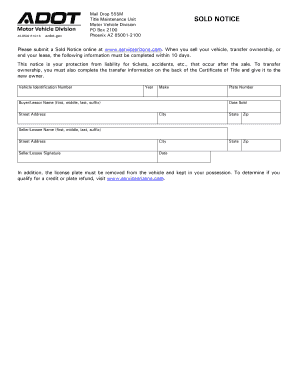
468502 R10/16azdot.govMail Drop 555M Title Maintenance Unit Motor Vehicle Division PO Box 2100 Phoenix AZ 850012100SOLD NOTICE Save time, skip this form and submit online!Sold Notice OnlineClearPlease.
Open form follow the instructions
Easily sign the form with your finger
Send filled & signed form or save
How to fill out the AZ ADOT 46-8502 online
Filling out the AZ ADOT 46-8502 form online is a crucial step when you sell your vehicle or transfer ownership. This guide provides clear and supportive instructions to help you complete the form correctly and efficiently.
Follow the steps to complete the form online effectively.
- Click ‘Get Form’ button to obtain the form and open it in the editor.
- Locate the 'Vehicle Identification Number' field. Carefully enter the VIN from the vehicle you are selling. Ensure it matches the one on the vehicle title to avoid any discrepancies.
- Fill in the 'Year' and 'Make' of the vehicle. These fields require you to provide the model year and the manufacturer of your vehicle accurately.
- Next, enter the buyer's or lessee's full name in the 'Buyer/Lessor Name' section, including their first, middle, last name, and suffix if applicable.
- Provide the 'Street Address' for where the buyer or lessee will reside. Make sure to include the city, state, and zip code for completeness.
- In the 'Plate Number' field, input the license plate number associated with the vehicle you are selling.
- Fill in the 'Date Sold.' This date should reflect the actual date the sale took place or ownership was transferred.
- After filling in the required fields, ensure that both the seller's or lessee's signature and the date are properly added to validate the document.
- Once all fields are completed and reviewed, you can save your changes, download the form, or print it for your records.
Submit your sold notice online to ensure compliance and protect yourself from future liabilities.
Experience a faster way to fill out and sign forms on the web. Access the most extensive library of templates available.
Related content
... , visit AZMVDNow.gov. SOLD NOTICE. Mail Drop 555M. Title Maintenance Unit. Motor...
Get answers to your most pressing questions about US Legal Forms API.
Can I get a copy of my car title online AZ?
Yes, you can obtain a copy of your car title online in Arizona by visiting the AZ MVD website. You will need to provide some personal details and vehicle information. By accessing the online services provided under AZ ADOT 46-8502, this process becomes straightforward and efficient.
How to complete a sold notice in Arizona?
Completing a sold notice in Arizona involves filling out the sold notice form with details about the vehicle and the new owner. Once you've completed the form, submit it to the Arizona Department of Transportation either online or by mail. Ensure you follow instructions from AZ ADOT 46-8502 to finalize this important step.
How to submit a sold notice in Arizona?
To submit a sold notice in Arizona, fill out the required form available on the ADOT website. You can submit the form online or by mail, ensuring you provide accurate vehicle and buyer information. This step is crucial to comply with AZ ADOT 46-8502 and protect yourself after the sale.
How do I transfer ownership of a car after death in AZ?
To transfer ownership of a car after a death in Arizona, you will need a copy of the death certificate, the decedent's title, and possibly a court document if the estate is being probated. If the title is not in probate, you may transfer it directly to the beneficiary. Familiarizing yourself with AZ ADOT 46-8502 can simplify this delicate process.
Is ADOT the same as MVD?
ADOT, or the Arizona Department of Transportation, oversees various transportation-related functions, while MVD, or the Motor Vehicle Division, is specifically responsible for vehicle titling and licensing. Though they work closely together, they are not the same entity. Understanding the distinction helps you navigate processes related to AZ ADOT 46-8502.
Do both parties need to be present to transfer title in Arizona?
In Arizona, it is not necessary for both the buyer and seller to be present to transfer the title. However, the seller must ensure that they have the title signed correctly before handing it over. By adhering to the requirements set forth in AZ ADOT 46-8502, you can facilitate the transfer process efficiently.
What paperwork is needed to sell a car in AZ?
To sell a car in Arizona, you need the vehicle title, a completed bill of sale, and an emissions compliance certificate if applicable. Ensure that the title is signed over to the buyer and that the odometer reading is recorded. By following the guidelines outlined in AZ ADOT 46-8502, you can smoothly complete your transaction.
How to release liability of a vehicle in Arizona?
To release liability for a vehicle in Arizona, you must submit a vehicle sold notice to the MVD, notifying them that you no longer own the vehicle. This document should include the VIN, your details, and the buyer's information. Adhering to the AZ ADOT 46-8502 directives will help protect you from any future responsibilities related to the sold vehicle.
Do both parties need to be present for a title transfer in Arizona?
In Arizona, for most title transfers, both parties need to be present to sign the title in person. However, there are exceptions for certain situations, such as a power of attorney. Following the AZ ADOT 46-8502 guidelines can help clarify requirements for both parties involved.
How do I submit a sold notice in Arizona?
To submit a sold notice in Arizona, simply visit the AZ ADOT 46-8502 page where you will find the online submission form. Fill in your vehicle’s details, along with the buyer's information, and submit the form for processing. Promptly submitting this notice is vital to protect you from any liability associated with the vehicle.
Use professional pre-built templates to fill in and sign documents online faster. Get access to thousands of forms.
If you believe that this page should be taken down, please follow our DMCA take down process here.
This form is available in several versions. Select the version you need from the drop-down list below.