Loading
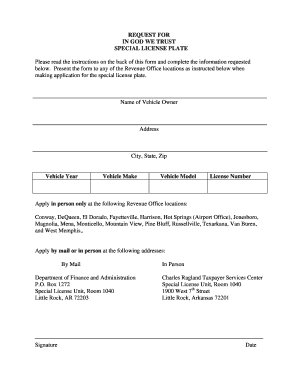
Get Ar Request For In God We Trust Special License Plate
How it works
-

Open form follow the instructions
-

Easily sign the form with your finger
-

Send filled & signed form or save
How to fill out the AR Request for In God We Trust Special License Plate online
Filling out the AR Request for In God We Trust Special License Plate form can be straightforward with the right guidance. This user-friendly guide will walk you through each step of the process to ensure your form is completed accurately.
Follow the steps to successfully complete the form.
- Click ‘Get Form’ button to obtain the form and open it in your editor.
- Enter the name of the vehicle owner in the designated field. Ensure that the name matches the registration documents for accuracy.
- Fill in the complete address of the owner, including street address, city, state, and zip code.
- Indicate the vehicle year by selecting the appropriate year from the dropdown menu or typing it in if applicable.
- Select the make of the vehicle from the provided options, ensuring it matches the information on the vehicle's title.
- Specify the vehicle model clearly, as it appears on the title.
- Input the current license number of the vehicle, ensuring that it is written correctly to avoid any delays.
- Review all entries for completeness and accuracy before proceeding.
- Sign the document in the designated area to validate the request.
- Indicate the date of filling out the form.
- Once all fields are completed, save your changes. You can choose to download, print, or share the form as per your need.
Complete your request for the special license plate online today!
Many individuals interpret signs from God as guidance in their daily lives. Signs could come in the form of coincidences, personal reflections, or even symbols like the AR Request for In God We Trust Special License Plate. These reminders can encourage positive decision-making and enhance personal faith journeys.