Loading
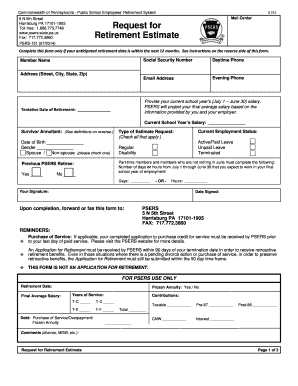
Get Pa Psrs-151 2014-2026
How it works
-

Open form follow the instructions
-

Easily sign the form with your finger
-

Send filled & signed form or save
How to fill out the PA PSRS-151 online
This guide provides a clear, step-by-step approach to completing the PA PSRS-151 form for retirement estimate requests. Whether you are familiar with digital forms or not, we aim to support you through each section and field of the form.
Follow the steps to complete the form accurately.
- Click the ‘Get Form’ button to access the PA PSRS-151 online form and open it in your preferred document editor.
- Begin by filling in your full name in the 'Member Name' field. Ensure that it matches your legal name as it appears on your identification documents.
- Next, enter your Social Security Number in the designated field. This information is crucial for identifying your records within the system.
- Provide your daytime phone number in the corresponding field, along with your email address, ensuring they are up to date for communication purposes.
- Fill in your evening phone number and current address including street, city, state, and zip code.
- Indicate your current school year’s salary (from July 1 to June 30). This figure is necessary for PSERS to project your final average salary accurately.
- Specify your tentative date of retirement in the available section. This is essential for processing your retirement estimate request.
- Identify your current employment status by selecting one of the options: Active/Paid Leave, Unpaid Leave, or Terminated, and specify if you are on Regular or Disability status.
- For part-time members or those not retiring in June, indicate the number of days or hours you expect to work in your final school year. You can fill in either the 'Days' or 'Hours' section.
- If applicable, confirm whether you are a Previous PSERS Retiree by checking the appropriate box.
- Select the type of estimate request by checking all relevant options.
- Sign and date the form at the bottom. Ensure that your signature matches the one on your identification documents.
- Once completed, forward or fax the form to the designated PSERS address. Ensure that all your information is correct to avoid delays.
Complete your PA PSRS-151 form online today to efficiently manage your retirement planning.
The formula for calculating teacher retirement benefits in Pennsylvania involves factors like your years of service, creditable service, and the average of your highest three years of salary. Specifically, the PA PSRS-151 highlights that benefits are usually calculated as 2.0% times your years of service times your average salary. Understanding this formula aids teachers in planning for their retirement effectively.