Loading
Form preview
  • US Legal Forms
  • Form Library
  • Social Forms
  • Pennsylvania Social Forms
  • Pa Psrs-1273 2015

Get Pa Psrs-1273 2015

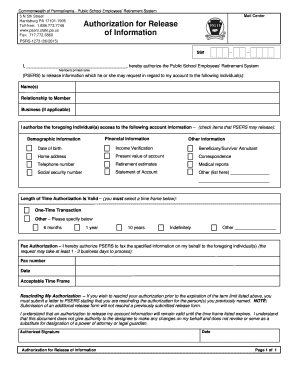
Ation for Release of Information PSRS-1273 (06/2015) SS# I, _________________________________________, hereby authorize the Public School Employees' Retirement System Member's printed name (PSERS) to release information which he or she may request in regard to my account to the following individual(s): Name(s) Relationship to Member Business (if applicable) I authorize the foregoing individual(s) access to the following account information – (check items that PSERS may release): Financial .

How it works

  1. Open form

    Open form follow the instructions

  2. Easily sign form

    Easily sign the form with your finger

  3. Share form

    Send filled & signed form or save

How to fill out the PA PSRS-1273 online

Filling out the PA PSRS-1273 form is an essential step for individuals seeking to authorize the Public School Employees' Retirement System to release account information. This guide provides clear, step-by-step instructions on how to complete the process efficiently and effectively, ensuring you provide the necessary details with ease.

Follow the steps to fill out the PA PSRS-1273 form online.

  1. Click the ‘Get Form’ button to access the form and open it in your preferred editor.
  2. In the first section, enter your printed name as the member authorizing the information release. Make sure to fill this out clearly.
  3. List the names of the individual(s) you are authorizing to access your account information in the provided area.
  4. Specify the relationship of each individual to you in the designated field to clarify their connection.
  5. Check the boxes next to the types of information you are allowing PSERS to release, including financial information, demographic information, and any other relevant details.
  6. Provide the length of time this authorization will remain valid by selecting one of the options, such as one-time transaction, six months, or indefinitely.
  7. If you wish PSERS to fax the requested information, indicate the fax number of the authorized individual(s) here.
  8. Sign and date the form at the bottom where indicated to confirm your authorization.
  9. After ensuring all information is accurate, save your changes to the completed form, and choose to download, print, or share the form as needed.

Complete your PA PSRS-1273 form online today to authorize the release of your information promptly.

Get form

Experience a faster way to fill out and sign forms on the web. Access the most extensive library of templates available.

Related content

Authorization for Release of Information
PSRS-1273 (09/2020). Commonwealth of Pennsylvania - Public School Employees' Retirement...
Learn more
PAUL BENJAMIN LOWRY, Ph.D.
Jul 25, 2025 — Prof. Lowry has 176 journal articles published or forthcoming in MIS...
Learn more

Related links form

Instrumental Jury Form - Southern Utah University - Suu Proctor Identification Form - Suu Citizenship Verification Form - Suu Approval Form For Tuition Remission - Southern Vermont College - Svc

Questions & Answers

Get answers to your most pressing questions about US Legal Forms API.

Contact support

To become vested in PSERS, you need to complete a minimum of five years of credited service. Once vested, you earn the right to receive a pension when you retire, regardless of whether you continue working. This aspect of the plan is essential for any educator considering long-term career planning. Therefore, it's beneficial to understand the vesting timeline as it relates to your PA PSRS-1273 benefits.

Changing your address with PSERS is essential for receiving timely communications about your retirement. You can easily update your address through your online PSERS account, or you can submit a written request directly to their office. Having accurate information helps ensure that your records related to PA PSRS-1273 stay up to date. Always check your account periodically for any necessary changes.

The PA teacher retirement multiplier is a formula used to calculate retirement benefits. It plays a crucial role in determining the pension amount you will receive based on your years of service and salary. The base multiplier is currently 2.0, but it can increase with additional service years. Familiarizing yourself with this multiplier allows you to better estimate your retirement income related to PA PSRS-1273.

Yes, a PSERS pension provides lifelong benefits to eligible retirees. Once you meet the necessary requirements, you can receive monthly pension payments for your lifetime. This reliable income source is part of the security offered by the pension plan. Understanding this aspect is vital for managing your finances, especially in context with PA PSRS-1273.

To update your address on a Commonwealth of Pennsylvania registration credential, go to the Pennsylvania Department of State's website. They provide a clear process for making this change online, by mail, or at a local office. Be sure to have the right identification and documentation handy. Keeping your information updated is essential for maintaining your access to benefits related to PA PSRS-1273.

Requesting a retirement estimate from PSERS is straightforward. You can log into your PSERS account online and complete the retirement estimate request form. If you prefer, you can also contact their office directly for assistance. Understanding your retirement options can make a significant difference as you approach important decisions regarding your PA PSRS-1273 benefits.

To change your address on a PA state ID, you can visit the Pennsylvania Department of Transportation (PennDOT) website. There, you will find instructions for updating your address online, by mail, or in person at a local office. Having the necessary documentation ready will help streamline this process. This change is crucial to ensure that all your details, including those related to PA PSRS-1273, remain current.

The amount of a state pension under the PA PSRS-1273 can greatly vary based on individual circumstances, including years of service and salary. Generally, many state employees receive adequate pensions that support their retirement living standards. For specific amounts, using pension calculators or consulting with experts through platforms like US Legal Forms can provide tailored insights to your situation.

The calculation of a PA state pension under the PA PSRS-1273 involves multiplying your years of credited service by a benefit factor, and then applying this to your final average salary. This method ensures that your pension reflects both your dedication and the financial contributions you have made. For a detailed understanding, many find it beneficial to use resources from platforms like US Legal Forms, where calculators and planning tools are available.

The average pension for a Pennsylvania state employee varies widely based on several factors, including years of service and final average salary under the PA PSRS-1273 guidelines. However, many employees report receiving pensions that provide a comfortable retirement income. By planning early and understanding your benefits through tools or resources like US Legal Forms, you can prepare a secure financial future.

Get This Form Now!

Use professional pre-built templates to fill in and sign documents online faster. Get access to thousands of forms.
If you believe that this page should be taken down, please follow our DMCA take down processhere.

Industry-leading security and compliance

US Legal Forms protects your data by complying with industry-specific security standards.
  • In businnes since 1997
    25+ years providing professional legal documents.
  • Accredited business
    Guarantees that a business meets BBB accreditation standards in the US and Canada.
  • Secured by Braintree
    Validated Level 1 PCI DSS compliant payment gateway that accepts most major credit and debit card brands from across the globe.
Get PA PSRS-1273
Form Packages
Adoption
Bankruptcy
Contractors
Divorce
Home Sales
Employment
Identity Theft
Incorporation
Landlord Tenant
Living Trust
Name Change
Personal Planning
Small Business
Wills & Estates
Packages A-Z
Form Categories
Affidavits
Bankruptcy
Bill of Sale
Corporate - LLC
Divorce
Employment
Identity Theft
Internet Technology
Landlord Tenant
Living Wills
Name Change
Power of Attorney
Real Estate
Small Estates
Wills
All Forms
Forms A-Z
Form Library
Customer Service
Your Privacy Choices
Terms of Service
Privacy Notice
Legal Hub
Content Takedown Policy
Bug Bounty Program
About Us
Help Portal
Legal Resources
Blog
Affiliates
Contact Us
Delete My Account
Site Map
Industries
Forms in Spanish
Localized Forms
State-specific Forms
Forms Kit
Legal Guides
Real Estate Handbook
All Guides
Prepared for You
Notarize
Incorporation services
Our Customers
For Consumers
For Small Business
For Attorneys
Our Sites
US Legal Forms
USLegal
FormsPass
pdfFiller
signNow
altaFlow
DocHub
Instapage
Social Media
Call us now toll free:
+1 833 426 79 33
As seen in:
  • USA Today logo picture
  • CBC News logo picture
  • LA Times logo picture
  • The Washington Post logo picture
  • AP logo picture
  • Forbes logo picture
© Copyright 1997-2026
airSlate Legal Forms, Inc.
3720 Flowood Dr, Flowood, Mississippi 39232
Form Packages
Adoption
Bankruptcy
Contractors
Divorce
Home Sales
Employment
Identity Theft
Incorporation
Landlord Tenant
Living Trust
Name Change
Personal Planning
Small Business
Wills & Estates
Packages A-Z
Form Categories
Affidavits
Bankruptcy
Bill of Sale
Corporate - LLC
Divorce
Employment
Identity Theft
Internet Technology
Landlord Tenant
Living Wills
Name Change
Power of Attorney
Real Estate
Small Estates
Wills
All Forms
Forms A-Z
Form Library
Customer Service
Your Privacy Choices
Terms of Service
Privacy Notice
Legal Hub
Content Takedown Policy
Bug Bounty Program
About Us
Help Portal
Legal Resources
Blog
Affiliates
Contact Us
Delete My Account
Site Map
Industries
Forms in Spanish
Localized Forms
State-specific Forms
Forms Kit
Legal Guides
Real Estate Handbook
All Guides
Prepared for You
Notarize
Incorporation services
Our Customers
For Consumers
For Small Business
For Attorneys
Our Sites
US Legal Forms
USLegal
FormsPass
pdfFiller
signNow
altaFlow
DocHub
Instapage
Social Media
Call us now toll free:
+1 833 426 79 33
As seen in:
  • USA Today logo picture
  • CBC News logo picture
  • LA Times logo picture
  • The Washington Post logo picture
  • AP logo picture
  • Forbes logo picture
© Copyright 1997-2026
airSlate Legal Forms, Inc.
3720 Flowood Dr, Flowood, Mississippi 39232
PA PSRS-1273
This form is available in several versions.
Select the version you need from the drop-down list below.
2016 PA PSRS-1273
Select form
  • 2016 PA PSRS-1273
  • 2015 PA PSRS-1273
Select form