Loading
Get Hi Dhs 8024 2003-2026
How it works
-

Open form follow the instructions
-

Easily sign the form with your finger
-

Send filled & signed form or save
How to fill out the HI DHS 8024 online
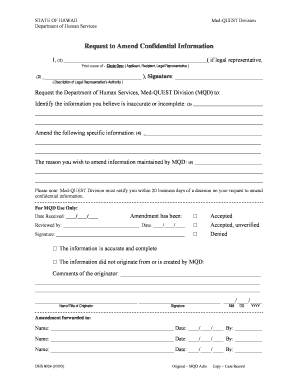
The HI DHS 8024 form, also known as the request to amend confidential information, is an important document for individuals seeking to make changes to their records with the Med-QUEST Division of the Department of Human Services in Hawaii. This guide will provide you with step-by-step instructions on how to navigate the online version of this form effectively.
Follow the steps to fill out the HI DHS 8024 online.
- Click ‘Get Form’ button to obtain the form and open it in the editor.
- Fill in your name in the first field, identifying yourself as the applicant, recipient, or legal representative by circling the appropriate option.
- In the next field, clearly describe your authority if you are a legal representative. This could include your relationship to the applicant or any legal documentation that grants you authority.
- You must indicate the specific information you believe is inaccurate or incomplete. Detail this clearly in the designated area to facilitate processing.
- Amend the specific information that needs correction in the next section. Ensure that this information is clearly articulated to avoid confusion.
- State the reason for your request to amend the information in the form. Be as detailed as possible to assist the Med-QUEST Division in their review.
- Once you have completed all sections, review the information for accuracy. After confirming that all details are correct, save your changes.
- You can then download the completed form, print it out, or share it as needed to submit your request.
Start the process of amending your confidential information by completing the HI DHS 8024 online today.