Loading
Get Fl Fm-2453 2019-2026
How it works
-

Open form follow the instructions
-

Easily sign the form with your finger
-

Send filled & signed form or save
How to fill out the FL FM-2453 online
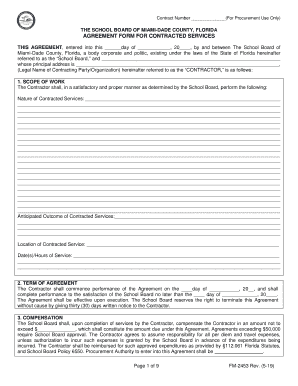
The FL FM-2453 is an agreement form used by the School Board of Miami-Dade County for contracted services. This guide provides clear, step-by-step instructions on how to complete the form online to ensure a smooth submission process.
Follow the steps to successfully fill out the FL FM-2453
- Click the ‘Get Form’ button to access the FL FM-2453 and open it in your preferred editor.
- Enter the contract number in the designated field labeled ‘Contract Number’ for procurement use.
- Fill in the date of the agreement in the section that states ‘THIS AGREEMENT, entered into this ______day of ____________, 20____.’ Ensure the date is recorded accurately.
- Provide the legal name of the contracting party or organization in the field labeled ‘Legal Name of Contracting Party/Organization’ followed by their principal address.
- Detail the scope of work section, including the nature of the contracted services and anticipated outcomes. Use clear and concise language to describe tasks and expectations.
- Indicate the date(s) and hours of service in the designated fields to clarify the timeframe of the agreement.
- Specify the term of the agreement by filling in the start and end dates. Note any conditions regarding termination of services.
- Complete the compensation section by entering an amount in the field provided, keeping in mind that agreements exceeding $50,000 will require additional approval.
- Choose the payment schedule that applies. Specify whether payment will be a lump sum or partial payments, and detail those amounts in the respective fields.
- Confirm compliance with confidentiality requirements by acknowledging the legal obligations regarding student records.
- Review your entries throughout the form for accuracy and clarity before proceeding.
- Once all sections are completed, save the changes to your document. You can then download, print, or share the completed form as per your needs.
Begin filling out the FL FM-2453 online today to streamline your agreement process.
Yes, you can fax form 2553 to the IRS. This option is available for those who prefer a quicker method of submission. Make sure to include your contact information and check the fax number specific to your state. Using uslegalforms can guide you in ensuring your FL FM-2453 is properly completed prior to faxing.