Get Wa Dshs 16-193 2016-2026
How it works
-

Open form follow the instructions
-

Easily sign the form with your finger
-

Send filled & signed form or save
How to fill out the WA DSHS 16-193 online
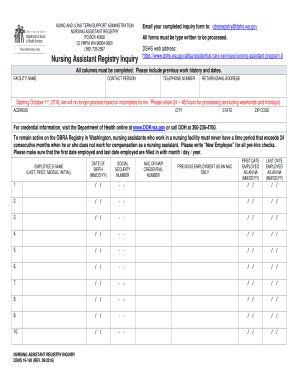
The WA DSHS 16-193 form is an essential document for nursing assistants seeking registration in Washington. This guide provides clear, step-by-step instructions to help users navigate the online process and ensure that all necessary information is correctly submitted.
Follow the steps to fill out the WA DSHS 16-193 form online
- Press the ‘Get Form’ button to access the form and open it in the editor.
- Begin by filling in the facility name at the top of the form. This information is crucial for identification.
- Next, complete the contact person field. Provide the name of the individual responsible for submitting the inquiry.
- Fill in the telephone number for the contact person to ensure easy communication regarding the inquiry.
- Enter a return email address where the completed inquiry can be sent.
- Provide the complete address, including the city, state, and ZIP code, where the facility is located.
- In the employee’s name section, enter the last name, first name, and middle initial as applicable.
- Input the employee's date of birth in the format MM/DD/YY.
- Fill in the employee's social security number. Ensure it is accurate as this information is sensitive.
- Enter the NAC or NAR credential number if applicable; this helps in verifying the credentials.
- Complete the previous employment section for up to ten entries. Use the format MM/DD/YY for both the first date employed and last date employed as an NA.
- Ensure that all columns are complete and review for accuracy before submission.
- Once all fields are filled out, save your changes, and prepare to submit the form electronically.
- Email the completed inquiry form to obraregistry@dshs.wa.gov as stated in the instructions.
Complete the WA DSHS 16-193 form online to ensure your registration is processed efficiently.
To submit documents to DSHS Washington State, you can follow the specific instructions provided on their website. Typically, you must gather all necessary paperwork, including any forms related to the WA DSHS 16-193 application process. Once you have your documents ready, you can submit them via mail or, in some cases, through online portals. For more streamlined solutions, consider using uslegalforms, which can assist you in preparing and submitting the required paperwork efficiently.