Loading
Get Uk Hmrc C&e1179 2017
How it works
-

Open form follow the instructions
-

Easily sign the form with your finger
-

Send filled & signed form or save
How to fill out the UK HMRC C&E1179 online
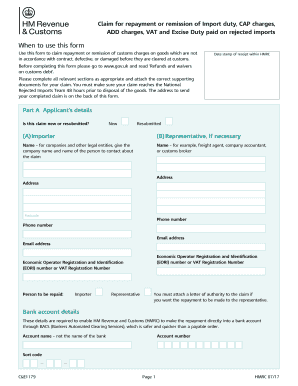
This guide provides a thorough overview on how to complete the UK HMRC C&E1179 form online for claiming repayment or remission of import duties and other associated charges. Whether you are a new applicant or resubmitting your claim, this step-by-step approach will help you navigate through each section with ease.
Follow the steps to complete your UK HMRC C&E1179 claim form online.
- Press the ‘Get Form’ button to access the C&E1179 form and open it in your browser.
- In Part A, specify whether your claim is new or resubmitted by selecting the appropriate option. Fill in your details as the importer and, if necessary, provide information for your representative.
- Complete all contact information, including your name, address, postcode, phone number, and email address, along with your Economic Operator Registration and Identification (EORI) number or VAT registration number.
- Indicate who should receive the repayment (importer or representative) and attach a letter of authority if the repayment is to go to a representative.
- Enter your bank account details to facilitate the repayment through BACS, including account name, number, and sort code.
- For Part B, provide details of the rejected goods, including the reason for rejection, method of disposal, and relevant commodity codes.
- In Part C, indicate which supporting documents you are including with your claim by marking an ‘X’ in the appropriate boxes.
- In Part D, specify the amounts being claimed for each category (import duty, CAP charges, ADD charges, import VAT, and excise duty) by filling in the corresponding fields.
- Finally, complete the declaration section by signing and dating the form, and ensure all required documents are ready to be sent.
- Save your changes, and then download, print, or share the completed form to send it to the National Duty Repayment Centre as instructed.
Start filling out your UK HMRC C&E1179 form online to efficiently process your claim for repayment.
Get form
Experience a faster way to fill out and sign forms on the web. Access the most extensive library of templates available.
To inform HMRC about leaving the UK, you should complete the appropriate form and provide any relevant details about your departure. This process helps ensure that your tax obligations are settled before you leave. Additionally, the UK HMRC C&E1179 outlines the steps required in this situation, allowing for a smoother transition.
Get This Form Now!
Use professional pre-built templates to fill in and sign documents online faster. Get access to thousands of forms.