Loading
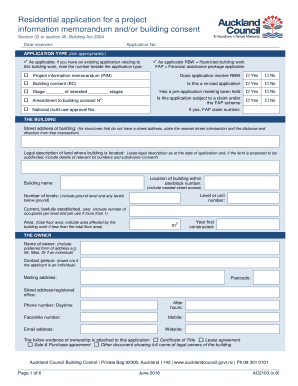
Get Nz Auckland Council Ac2103 2016
How it works
-

Open form follow the instructions
-

Easily sign the form with your finger
-

Send filled & signed form or save
How to fill out the NZ Auckland Council AC2103 online
Completing the NZ Auckland Council AC2103 form online can streamline the process of applying for a project information memorandum or building consent. This comprehensive guide provides clear, step-by-step instructions to help users navigate each section of the form effectively.
Follow the steps to complete your application online.
- Click ‘Get Form’ button to obtain the form and open it in the editor.
- Select the application type that applies to your situation by ticking the appropriate boxes, including options for restricted building work and financial assistance packages.
- Fill in the details related to the building, including the street address, legal description, building name, location within the site, level or unit number, number of levels, current use, area measurement, and the year it was first constructed.
- Provide the owner's information by filling in their name, preferred form of address, mailing address, phone number, email address, and other relevant contact details.
- If applicable, fill out the agent's section with the agent's information, including name, mailing address, relationship to the owner, and contact details.
- Complete the applicant's section only if a sale and purchase agreement is in place or the certificate of title has not been issued. Include the name and contact information.
- Designate the first point of contact for communication with the council, supplying full name, mailing address, phone number, and preferred method of correspondence.
- Indicate who will be billed for all consent-related invoices or refunds and specify the preferred billing method.
- In the signature section, ensure to sign and date the application as the owner, agent, or applicant, confirming the authorization to sign on behalf of the owner.
- Describe the project and indicate whether it will result in a change of use, providing the total estimated value of the building work.
- Provide any list of other approvals gained related to the project, attaching any necessary documentation.
- Include any means of compliance with the building code, specifying relevant clauses and compliance documents.
- If applicable, note any waivers or modifications required for the building code.
- For restricted building work, indicate whether it includes solid fuel heaters and provide details of all licensed building practitioners involved in the project.
- Review the entire form for accuracy and completeness before submitting. You can save any changes, download a copy, print the form, or share it as needed.
Complete your NZ Auckland Council AC2103 form online to ensure a smooth application process.
Get form
Experience a faster way to fill out and sign forms on the web. Access the most extensive library of templates available.
To email Auckland admissions, visit the Auckland Council's official page to find the appropriate email address. The NZ Auckland Council AC2103 site streamlines this process, directing you to the contact form and necessary details for a successful inquiry.
Get This Form Now!
Use professional pre-built templates to fill in and sign documents online faster. Get access to thousands of forms.