Get Canada Sc-emp5535 2012-2026
How it works
-

Open form follow the instructions
-

Easily sign the form with your finger
-

Send filled & signed form or save
How to fill out the Canada SC-EMP5535 online
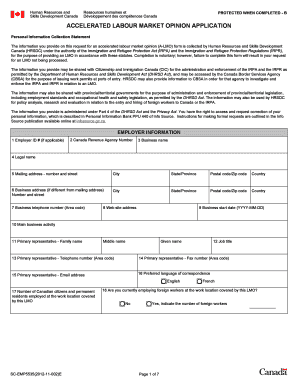
Filling out the Canada SC-EMP5535 form is an essential step in applying for an accelerated labour market opinion. This guide will provide clear and supportive instructions to help you complete the form with ease, ensuring that all necessary information is accurately submitted.
Follow the steps to effectively complete the Canada SC-EMP5535 online.
- Click the ‘Get Form’ button to access the Canada SC-EMP5535 form and open it in your preferred online editor.
- Begin by entering the employer information. Fill in the Employer ID # if applicable, along with the Canada Revenue Agency Number, business name, legal name, and mailing address (number and street, city, state/province, postal code, and country). Additionally, if your business address differs from the mailing address, provide that information as well.
- Continue by providing the business telephone number, website address, business start date, main business activity, and details about the primary representative, including their name, job title, telephone number, fax number, and email address. Also, select the preferred language of correspondence.
- Indicate the number of Canadian citizens and permanent residents employed at the work location covered by this LMO, and specify whether you are currently employing foreign workers at that location. If yes, indicate the number of foreign workers.
- If applicable, provide third party information by entering the third party ID #, Canada Revenue Agency Number, and details similar to employer information for the third party representative.
- For job offer information, state the number of foreign workers requested for the job offer and provide the job title. Specify if the job is temporary with intent to permanent, and detail the employment duration, start date, work address, and main duties of the job.
- Outline the educational requirements for the position, any experience or skills needed, language requirements, wage offered to the foreign worker, and any benefits provided.
- Address additional questions such as whether the job requires any certification, licensing, or registration, and state the potential benefits to the Canadian labour market for offering this job to a foreign worker.
- Fill out the foreign worker information by providing a separate sheet for each foreign worker you intend to hire, including their name, date of birth, gender, citizenship, and other relevant details if they are currently in Canada.
- Complete the employer declaration section by indicating whether you are incorporated or not, and provide your consent to share personal information with the appropriate authorities. Ensure that you understand the responsibilities outlined.
- Finally, review all the information for accuracy, sign where indicated, and submit the completed application to the nearest Service Canada Centre for processing. You can save changes, download a copy, or print the form as needed.
Complete your application for the Canada SC-EMP5535 online today and ensure to submit all the necessary documents for a smooth processing experience.
Filling out a declaration form for Canada involves providing honest and complete information regarding your background and intention. You will need to explain your reasons for moving to Canada and disclose any relevant details that might affect your application. Make sure to double-check all information for accuracy, as this ensures compliance with the Canada SC-EMP5535 requirements, facilitating a smoother application process.