Get Canada Emp5571 2018
How it works
-

Open form follow the instructions
-

Easily sign the form with your finger
-

Send filled & signed form or save
How to fill out the Canada EMP5571 online
Filling out the Canada EMP5571 form online can be a straightforward process if you follow the proper guidelines. This comprehensive guide will take you through each section of the form, ensuring you understand how to provide the necessary information accurately.
Follow the steps to successfully complete the EMP5571 form online.
- Click ‘Get Form’ button to obtain the form and open it in the editor.
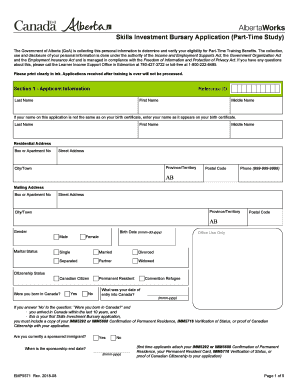
- Fill out Section 1 - Applicant Information. Start by entering your Reference ID, followed by your Last Name, First Name, and Middle Name. If your name differs from your birth certificate, provide the name as it appears on your birth certificate.
- Continue with your Residential Address by providing your Box or Apartment Number, Street Address, Province/Territory, City/Town, and Postal Code. Also, include your Phone Number.
- Next, complete the Mailing Address section if it differs from your Residential Address. If not applicable, you may leave it blank.
- Indicate your Gender and provide your Birth Date. Then, select your Marital Status and Citizenship Status, answering whether you were born in Canada.
- If applicable, provide details about your sponsorship as a permanent resident and your Social Insurance Number.
- In the Applicant's Training Program Information section, enter the Training Start Date, Name of Training Provider, Training End Date, and Course Name.
- Provide your Employment Information, listing your Employment Status, Employer Name (if employed), Start and End Date of employment, your Occupation, and the number of hours worked each week.
- Answer the Education Information questions about your time out of the K-12 school system and the highest grade completed in regular education.
- Complete subsequent sections including Section 2 - Contact Person Information, Section 3 - Information about Your Spouse/Partner, Section 4 - Dependent Children Information, and Section 5 - Income and Assets Information.
- In Section 6 - Expenses While in Training, list additional costs you anticipate like internet, transportation, and childcare.
- Read and understand the Declaration and Acknowledgement section before signing. Ensure all signatures are provided as necessary.
- Once completed, save your changes, download or print the form, and share it if required.
Start completing your Canada EMP5571 form online today to secure your Skills Investment Bursary.
Get form
Related links form
Yes, Americans can claim refugee status in Canada by demonstrating they face serious threats in their home country. The Canada EMP5571 outlines the application process, which requires applicants to present credible evidence. By utilizing the resources on USLegalForms, you can navigate the complexities of the application smoothly. Accessing this support may increase your chances of a successful claim.