Loading
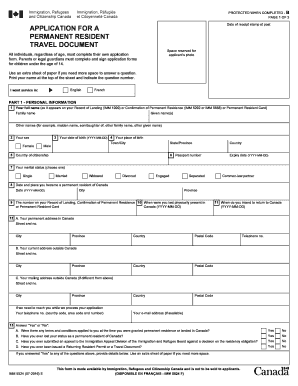
Get Canada Imm 5524 E 2012
How it works
-

Open form follow the instructions
-

Easily sign the form with your finger
-

Send filled & signed form or save
How to fill out the Canada IMM 5524 E online
This guide provides clear, step-by-step instructions for users on how to accurately complete the Canada IMM 5524 E form online. Ensuring the form is filled out correctly is crucial for the processing of your application for a permanent resident travel document.
Follow the steps to complete your application efficiently.
- Click ‘Get Form’ button to obtain the form and open it in the editor.
- Begin with Part 1 – Personal Information. Fill out your full name as it appears on your Record of Landing or Confirmation of Permanent Residence. Make sure to include your family name, given name(s), and any other names as applicable.
- Indicate your sex by selecting either 'Female' or 'Male.' Next, provide your date of birth in the YYYY-MM-DD format.
- Enter your country of citizenship and provide your passport number along with its expiry date.
- Select your marital status from the provided options, and include details regarding your permanent residence date and place.
- Complete your permanent address in Canada, current address outside Canada, and mailing address outside Canada, if different.
- Provide your contact details, including a telephone number and email address, if available.
- For questions related to previous conditions or status regarding your permanent residency, answer 'Yes' or 'No' and provide further details if necessary.
- In Part 2 – Residency Obligation, list your activities and employment over the past five years. Include periods of study or unemployment, and ensure the information is accurate.
- Document your time spent in Canada over the past five years. If you became a permanent resident less than five years ago, list this duration from your arrival.
- If applicable, detail any absences while accompanying a Canadian citizen or permanent resident outside Canada, including proof of the relationship and their Canadian status.
- Complete the declaration at the end of the form, certifying that the information provided is accurate and complete by signing and dating the form.
- Once all fields are completed, you can save changes, download the form, print it, or share it for further processing.
Start your online application today to ensure a smooth process for your permanent resident travel document.
Get form
Experience a faster way to fill out and sign forms on the web. Access the most extensive library of templates available.
If you do not have an electronic travel authorization (eTA) while traveling to Canada, you may face significant issues at the border. Without an eTA, you could be denied boarding by the airline or refused entry upon arrival. It is crucial to obtain your eTA before your trip. Canada IMM 5524 E guides you through obtaining your eTA smoothly.
Get This Form Now!
Use professional pre-built templates to fill in and sign documents online faster. Get access to thousands of forms.