We use cookies to improve security, personalize the user experience, enhance our marketing activities (including cooperating with our marketing partners) and for other business use.
Click "here" to read our Cookie Policy. By clicking "Accept" you agree to the use of cookies. Read less
Read more
Accept
Loading
Form preview
  • US Legal Forms
  • Form Library
  • Independent Agency Forms
  • Independent Agency USPS Forms
  • Usps Ps 3541-1 2012

Get Usps Ps 3541-1 2012

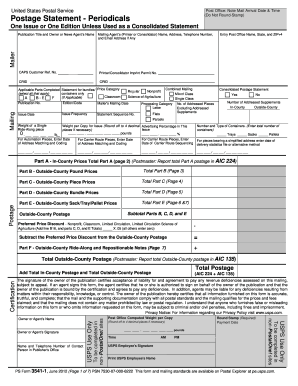
Used as a Consolidated Statement Mailing Agent's (Printer or Consolidator) Name, Address, Telephone Number, and Email Address if Any Entry Post Office Name, State, and ZIP+4 Mailer Publication Title and Owner or News Agent's Name CAPS Customer Ref. No. Printer/Consolidator Imprint Permit No. CRID CRID Mailing Applicable Parts Completed Statement for bundles/ Price Category (select all that apply) containers only Classroom (If Applicable) A B-E F Regular Nonprofit Science-of-Agricul.

How it works

  1. Open form

    Open form follow the instructions

  2. Easily sign form

    Easily sign the form with your finger

  3. Share form

    Send filled & signed form or save

How to fill out the USPS PS 3541-1 online

The USPS PS 3541-1 is an essential form for sending periodicals through the United States Postal Service. This guide provides clear, step-by-step instructions to help users navigate the completion of the form online.

Follow the steps to successfully complete the USPS PS 3541-1 online.

  1. Press the ‘Get Form’ button to access the USPS PS 3541-1 online. This will allow you to open the form in the online editor.
  2. Begin by completing the Mailer and Mailing sections located on page 1. Ensure you accurately fill in details such as the number and types of containers included in your mailing.
  3. Indicate whether you are using a Consolidated Postage Statement by selecting either Yes or No.
  4. Proceed to the Postage section. Complete only the relevant parts based on the type of mailing you are submitting.
  5. For In-County mailings, fill out Part A. For Outside-County mailings, complete Parts B through F, as applicable.
  6. After filling out the relevant sections, return to the Postage Section on page 1. Sum the totals for each completed part and enter them into the designated boxes.
  7. Review the Certification section and ensure you enter your telephone number. Sign in the appropriate area.
  8. Finally, save your changes and download the completed form. You can then print or share the document as needed.

Take the first step and complete your USPS PS 3541-1 form online today!

Get form

Experience a faster way to fill out and sign forms on the web. Access the most extensive library of templates available.

Related content

Refugio County Press (Refugio, Tex.), Vol. 52, No...
PS Form 3541 1 2. Free or Nominal Rate In-County Copies Included on PS Form 3541 3. Free...
Learn more

Related links form

MN Medical Faculty License Application Packet 2019 MN BOP 050507 2018 MN MN-3PL-003 MN MN-3PL-002

Questions & Answers

Get answers to your most pressing questions about US Legal Forms API.

Contact support

You have a specific timeframe to file a damage claim with the USPS. According to USPS PS 3541-1, claims for damaged packages should be initiated within 60 days from the date of delivery. It is crucial to act promptly, as delays can affect your claim status. Ensure you have all necessary information ready to streamline the process and improve the likelihood of a successful claim.

Filing a claim against the Postal Service requires specific steps that ensure your request is handled correctly. You can initiate this process through the USPS website, where resources like USPS PS 3541-1 provide detail on necessary documentation and procedures. Make sure to gather all relevant information about your package, such as receipts and tracking details. Then, follow the instructions to submit your claim, either online or by visiting your local post office.

If your mail is not delivered, first check the tracking information available on the USPS website to confirm its status. Sometimes, packages can be delayed due to various reasons, including insufficient address details or weather conditions. If the package is still missing after a thorough check, you may want to file a claim or reach out to USPS customer service for assistance. Tools like USPS PS 3541-1 can help you manage such situations more effectively.

Filing a claim with the United States Postal Service is essential when something goes wrong with your mail delivery. Start by visiting the USPS website, where you can access the claims section, and you will find information based on USPS PS 3541-1 that outlines the claim process. Ensure you have your tracking number and any other necessary documentation ready. Follow the prompts to complete the online claim form, or you can file a claim in person at your local post office.

Submitting USPS Form 1583 is a straightforward process. First, download the form from the United States Postal Service website or consider using USPS PS 3541-1 as a guide. Next, fill out the required fields and ensure you have the needed identification documents ready. Then, bring the completed form along with your ID to a local post office, where a postal worker will verify your identity and officially accept the form.

Filling out a USPS claim form involves providing accurate and thorough information. Begin with tracking details, then describe the lost or damaged item clearly. It is essential to keep USPS PS 3541-1 in mind, as it outlines the parameters for filing claims effectively and ensuring proper follow-up.

To fill out a USPS claim form, start by gathering necessary information such as tracking numbers and evidence of loss or damage. Complete all required sections including your contact information and a detailed description of the claim. Familiarizing yourself with USPS PS 3541-1 can enhance your understanding of this process and ensure proper submission.

Typically, the individual who encounters the issue files the USPS claim. This means a buyer usually submits the claim for lost or damaged items. However, both parties can collaborate to ensure the process aligns with USPS PS 3541-1, optimizing outcomes and communication.

To fill out a USPS hold mail form, start by entering your personal details such as name and address. Specify the dates you want your mail held, and indicate your preferences for package delivery. Utilizing the USPS hold mail form can streamline your mail management, aligning with USPS PS 3541-1 standards for seamless handling.

Filling out a USPS certified mail form involves providing essential details. Start by entering the recipient's name and address in the designated sections. Next, include your return address. Remember, this process helps ensure your mail reaches its destination securely, in line with USPS PS 3541-1 guidelines.

Get This Form Now!

Use professional pre-built templates to fill in and sign documents online faster. Get access to thousands of forms.
If you believe that this page should be taken down, please follow our DMCA take down processhere.

Industry-leading security and compliance

US Legal Forms protects your data by complying with industry-specific security standards.
  • In businnes since 1997
    25+ years providing professional legal documents.
  • Accredited business
    Guarantees that a business meets BBB accreditation standards in the US and Canada.
  • Secured by Braintree
    Validated Level 1 PCI DSS compliant payment gateway that accepts most major credit and debit card brands from across the globe.
Get USPS PS 3541-1
Form Packages
Adoption
Bankruptcy
Contractors
Divorce
Home Sales
Employment
Identity Theft
Incorporation
Landlord Tenant
Living Trust
Name Change
Personal Planning
Small Business
Wills & Estates
Packages A-Z
Form Categories
Affidavits
Bankruptcy
Bill of Sale
Corporate - LLC
Divorce
Employment
Identity Theft
Internet Technology
Landlord Tenant
Living Wills
Name Change
Power of Attorney
Real Estate
Small Estates
Wills
All Forms
Forms A-Z
Form Library
Customer Service
Terms of Service
Privacy Notice
Legal Hub
Content Takedown Policy
Bug Bounty Program
About Us
Help Portal
Legal Resources
Blog
Affiliates
Contact Us
Delete My Account
Site Map
Industries
Forms in Spanish
Localized Forms
State-specific Forms
Forms Kit
Legal Guides
Real Estate Handbook
All Guides
Prepared for You
Notarize
Incorporation services
Our Customers
For Consumers
For Small Business
For Attorneys
Our Sites
US Legal Forms
USLegal
FormsPass
pdfFiller
signNow
airSlate WorkFlow
DocHub
Instapage
Social Media
Call us now toll free:
+1 833 426 79 33
As seen in:
  • USA Today logo picture
  • CBC News logo picture
  • LA Times logo picture
  • The Washington Post logo picture
  • AP logo picture
  • Forbes logo picture
© Copyright 1997-2025
airSlate Legal Forms, Inc.
3720 Flowood Dr, Flowood, Mississippi 39232
Form Packages
Adoption
Bankruptcy
Contractors
Divorce
Home Sales
Employment
Identity Theft
Incorporation
Landlord Tenant
Living Trust
Name Change
Personal Planning
Small Business
Wills & Estates
Packages A-Z
Form Categories
Affidavits
Bankruptcy
Bill of Sale
Corporate - LLC
Divorce
Employment
Identity Theft
Internet Technology
Landlord Tenant
Living Wills
Name Change
Power of Attorney
Real Estate
Small Estates
Wills
All Forms
Forms A-Z
Form Library
Customer Service
Terms of Service
Privacy Notice
Legal Hub
Content Takedown Policy
Bug Bounty Program
About Us
Help Portal
Legal Resources
Blog
Affiliates
Contact Us
Delete My Account
Site Map
Industries
Forms in Spanish
Localized Forms
State-specific Forms
Forms Kit
Legal Guides
Real Estate Handbook
All Guides
Prepared for You
Notarize
Incorporation services
Our Customers
For Consumers
For Small Business
For Attorneys
Our Sites
US Legal Forms
USLegal
FormsPass
pdfFiller
signNow
airSlate WorkFlow
DocHub
Instapage
Social Media
Call us now toll free:
+1 833 426 79 33
As seen in:
  • USA Today logo picture
  • CBC News logo picture
  • LA Times logo picture
  • The Washington Post logo picture
  • AP logo picture
  • Forbes logo picture
© Copyright 1997-2025
airSlate Legal Forms, Inc.
3720 Flowood Dr, Flowood, Mississippi 39232
USPS PS 3541-1
This form is available in several versions.
Select the version you need from the drop-down list below.
2021 USPS PS 3541-1
Select form
  • 2021 USPS PS 3541-1
  • 2016 USPS PS 3541-1
  • 2015 USPS PS 3541-1
  • 2013 USPS PS 3541-1
  • 2012 USPS PS 3541-1
Select form