Get Molina Healthcare Pregnancy Notification Form 2016-2026
How it works
-

Open form follow the instructions
-

Easily sign the form with your finger
-

Send filled & signed form or save
How to fill out the Molina Healthcare Pregnancy Notification Form online
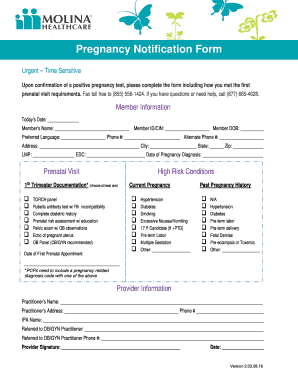
Filling out the Molina Healthcare Pregnancy Notification Form is an important step after confirming a positive pregnancy test. This guide will provide you with clear, step-by-step instructions to help you accurately complete the form online.
Follow the steps to complete the form with ease.
- Click ‘Get Form’ button to obtain the document and open it in an online editor.
- Begin by entering the member information, including today's date, member's name, member ID or CIN, and date of birth. Ensure all details are accurate for processing.
- Specify the preferred language and provide both primary and alternate phone numbers. It’s important for communication purposes.
- Fill out your address, including city, state, and zip code for verification.
- Document important pregnancy-related dates: Last Menstrual Period (LMP), Estimated Date of Confinement (EDC), and the Date of Pregnancy Diagnosis.
- For the Prenatal Visit section, check the relevant high-risk conditions present and document the date of the first prenatal appointment.
- In the Current Pregnancy section, indicate any conditions such as hypertension, diabetes, or smoking by checking the appropriate boxes.
- If applicable, provide information on past pregnancy history, including any previous complications.
- In the Provider Information section, enter the provider’s name, address, and phone number. Ensure to indicate the IPA name and if referred to an OB/GYN practitioner, include their details.
- Lastly, the provider needs to sign and date the form, ensuring all necessary entries are complete. Review the information for accuracy.
- Once you have filled out the form, you can save your changes, download a copy, print it, or share it as needed.
Complete your pregnancy notification form online to ensure timely processing of your healthcare needs.
To add your unborn baby to Medicaid, you typically need to inform them through the Molina Healthcare Pregnancy Notification Form. Once your pregnancy is reported, your unborn child automatically becomes eligible for Medicaid benefits. It’s important to follow up on your application to ensure all paperwork is processed correctly. You can rely on uslegalforms to assist with guidance and resources throughout this process.