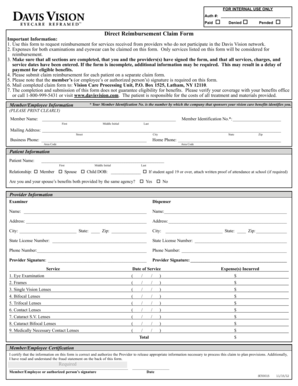
FOR INTERNAL USE ONLY Auth #: Paid De.
Open form follow the instructions
Easily sign the form with your finger
Send filled & signed form or save
How to fill out the Davis Vision Direct Reimbursement Claim Form online
This guide provides clear and supportive instructions for filling out the Davis Vision Direct Reimbursement Claim Form online. You will learn about each component of the form and the necessary steps to ensure accurate completion.
Follow the steps to complete your claim form effectively
- Click 'Get Form' button to obtain the form and open it for editing.
- Begin by filling in your member or employee information clearly. Include your full name, identification number, and mailing address in the specified fields. Ensure that all required sections are completed thoroughly.
- Enter your business and home phone numbers, using the appropriate area codes. This allows the processing unit to contact you if further information is needed.
- Provide patient information, including the patient’s name and their relationship to you. If the patient is a child and over the age of 19, attach written proof of their school attendance if required.
- Fill in the provider information for both the examiner and the dispenser. This includes their names, addresses, state license numbers, and phone numbers. Accurate details here help in verifying the services rendered.
- In the service section, list the date of service and the types of expenses incurred. Include all relevant items such as eye examinations, frames, and various lenses, ensuring that each item's cost is recorded correctly.
- Review all sections of the form for accuracy. Ensure that you and the provider have signed the document. Certification by the member/employee or an authorized person is necessary to validate the claim.
- Once the form is complete, save your changes. You may download, print, or share the form as needed to ensure you have a copy for your records.
Complete your Davis Vision Direct Reimbursement Claim Form online to facilitate timely processing of your reimbursement.
Experience a faster way to fill out and sign forms on the web. Access the most extensive library of templates available.
Related content
This form is for reimbursement for non-network services, including exams and eyewear. Mail...
Use this form to request reimbursement for services received from providers who do not...
Davis Vision. 4000000027. Vision Care Processing. P.O. Box 1525 Lat ham,. NY 12110. Visit...
Get answers to your most pressing questions about US Legal Forms API.
How do I submit a reimbursement claim?
Submitting a reimbursement claim involves completing a reimbursement claim form and compiling any supporting documents, such as receipts. For Davis Vision, use the specific Davis Vision Direct Reimbursement Claim Form, ensuring all sections are accurately filled. After preparation, submit your claim to the indicated address for prompt evaluation and reimbursement.
How do I submit for reimbursement for Davis Vision?
To submit for reimbursement with Davis Vision, you need to fill out the Davis Vision Direct Reimbursement Claim Form thoroughly. Attach the required documentation, such as receipts, to substantiate your claim. Once completed, send the form to the appropriate address outlined by Davis Vision for processing.
What is a direct member reimbursement form?
A direct member reimbursement form is a document that members use to request payment for eligible out-of-pocket expenses directly from their insurance provider. This form captures essential information to facilitate the reimbursement process. The Davis Vision Direct Reimbursement Claim Form serves this exact purpose, making it easy for you to reclaim expenses.
How to get reimbursed for an eye exam?
To get reimbursed for an eye exam, begin by paying for the service and collecting the receipt. Next, complete the Davis Vision Direct Reimbursement Claim Form, ensuring all required details are accurately filled in. Finally, submit both the form and the receipt to your insurance provider to receive your reimbursement.
What is a direct reimbursement?
Direct reimbursement refers to the process where you receive funds directly back to your account after submitting a claim for out-of-pocket expenses. This method simplifies transactions and enhances your financial flexibility. With the Davis Vision Direct Reimbursement Claim Form, you can easily initiate this process and access your reimbursement faster.
What is the purpose of a reimbursement form?
A reimbursement form allows you to request reimbursement for expenses incurred, such as medical or vision care. By providing necessary information and documentation, you can recover your costs efficiently. The Davis Vision Direct Reimbursement Claim Form is specifically designed for members to streamline this process, ensuring you receive your funds quickly.
How do I submit a receipt to insurance for reimbursement?
To submit a receipt for reimbursement to insurance, first complete the Davis Vision Direct Reimbursement Claim Form. Ensure that you attach the receipt that reflects the payment made for the service. Once everything is ready, mail the documents to your insurance provider as directed.
How do I submit a bill to insurance for reimbursement?
You can submit a bill to insurance for reimbursement by using the Davis Vision Direct Reimbursement Claim Form. Provide clear details of the bill you received and attach it with the form. Follow the instructions on where to send your submission, ensuring to keep copies for your records.
How do I submit a bill to insurance reimbursement?
To submit a bill for insurance reimbursement, complete the Davis Vision Direct Reimbursement Claim Form. Attach the bill that outlines all charges for services received. Make sure to send these documents to your insurance company promptly to facilitate timely reimbursement.
How do I submit a superbill to insurance?
Submitting a superbill to insurance can be done through the Davis Vision Direct Reimbursement Claim Form. Include the superbill as your primary documentation, ensuring all services rendered are detailed. After attaching the superbill, send the entire package to your insurance company for reimbursement.
Use professional pre-built templates to fill in and sign documents online faster. Get access to thousands of forms.
If you believe that this page should be taken down, please follow our DMCA take down process here.
This form is available in several versions. Select the version you need from the drop-down list below.