Loading
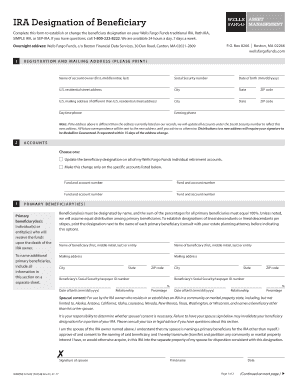
Get Wells Fargo Irabene 2017
How it works
-

Open form follow the instructions
-

Easily sign the form with your finger
-

Send filled & signed form or save
How to fill out the Wells Fargo IRABENE online
Completing the Wells Fargo IRABENE is essential for establishing or changing beneficiary designations on your individual retirement accounts. This guide provides clear, step-by-step instructions to assist users through the online process effectively.
Follow the steps to complete the Wells Fargo IRABENE form online.
- Click 'Get Form' button to obtain the Wells Fargo IRABENE and open it for editing.
- In section 1, fill in the name of the account owner, their Social Security number, and date of birth. Enter the residential address, city, state, and ZIP code. If there is a different mailing address, complete that section as well with the corresponding city, state, and ZIP code.
- In section 2, choose whether to update the beneficiary designation for all Wells Fargo Funds individual retirement accounts or specify which accounts to change. List the fund and account numbers for those accounts.
- Proceed to section 3 to name the primary beneficiary or beneficiaries. Provide the full name, mailing address, Social Security or taxpayer ID number, date of birth, relationship to the account owner, and percentage of the account each beneficiary will receive. Ensure the total percentage equals 100%.
- If applicable, complete the spousal consent section for community or marital property states. The spouse must sign and date to consent to the designation of a beneficiary other than themselves.
- Move to section 4 to designate any secondary beneficiaries. Similar to the primary beneficiaries, provide their full name, mailing address, Social Security or taxpayer ID number, date of birth, relationship, and percentage distribution, ensuring the total equals 100%.
- In section 5, sign and date the form to acknowledge that the beneficiary designation replaces any previous designations for the specified accounts. This signature authorizes the transfer agent to process the changes.
- Once all sections are completed, save changes to the document. You may download, print, or share the form as necessary.
Complete the Wells Fargo IRABENE online today to ensure your beneficiary designations are current.
Get form
Experience a faster way to fill out and sign forms on the web. Access the most extensive library of templates available.
To determine if you are part of the Wells Fargo settlement, you should review the eligibility criteria provided on the Wells Fargo IRABENE platform. You may also receive specific notifications if you are eligible. If in doubt, contacting the claims administrator can clarify your status regarding the settlement.
Get This Form Now!
Use professional pre-built templates to fill in and sign documents online faster. Get access to thousands of forms.