Loading
Form preview
  • US Legal Forms
  • Form Library
  • Industry Forms
  • Industry Bank & Financial Forms
  • Becu 5161 2018

Get Becu 5161 2018

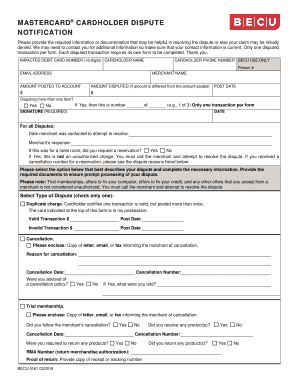
You should have been charged Authorized amount: Amount charged/posted: Credit did not post to my account. Please enclose: Copy of the dated credit slip or Notice of credit from the merchant and attach a detailed explanation of your dispute. Paid by other means. You must provide proof of paid by other means, such as a copy of the cancelled check (front and back), a cash receipt, or a billing statement from another credit card. Charged for a hotel room, which I cancelled. Cancellation number is .

How it works

  1. Open form

    Open form follow the instructions

  2. Easily sign form

    Easily sign the form with your finger

  3. Share form

    Send filled & signed form or save

How to fill out the BECU 5161 online

This guide provides users with a comprehensive overview of how to fill out the BECU 5161 form effectively online. It offers step-by-step instructions to ensure that each section of the form is completed accurately and efficiently.

Follow the steps to complete the BECU 5161 form online.

  1. Click 'Get Form' button to obtain the form and open it in the online editor.
  2. Enter the impacted debit card number, ensuring that it consists of 16 digits. This number identifies the card linked to the disputed transaction.
  3. Provide the cardholder's full name as it appears on the card. Ensure this is correct to avoid delays.
  4. Fill in the cardholder's phone number, ensuring it is current, as BECU may need to reach you for additional information.
  5. Input the cardholder's email address. This will help in communication regarding the dispute.
  6. Specify the merchant name involved in the transaction dispute.
  7. Record the amount posted to the account. This is the full amount that was charged.
  8. Enter the amount you are disputing if it differs from the amount posted.
  9. Input the post date of the transaction to give context to the dispute.
  10. Indicate whether you are disputing more than one item. If yes, note the order of this dispute (e.g., 1 of 3).
  11. Provide your signature where indicated, followed by the date to validate the dispute.
  12. For all disputes, enter the date you attempted to contact the merchant to resolve the issue.
  13. Document the merchant’s response to your contact.
  14. Select the type of dispute that best describes your situation. Provide all necessary information or documentation as required for each type.
  15. Attach any additional documents required for processing the dispute, such as receipts or correspondence with the merchant.
  16. Once all sections are completed, review the form for accuracy, and then save your changes. You may download, print, or share the completed form as needed.

Complete your BECU 5161 form online today to ensure prompt processing of your dispute!

Get form

Experience a faster way to fill out and sign forms on the web. Access the most extensive library of templates available.

Related content

Antisense oligonucleotides targeting the...
by CA Lamb · 2005 · Cited by 41 — We demonstrate, for the first time, inhibition of...
Learn more
Results of Observations Made with the...
by FW Dyson · 1913 — ADS Classic is now deprecated. It will be completely retired in...
Learn more
DANIELS
Apr 24, 2003 — 5161 ....... 30.00625. 5162 ....... 30.01250. 5163 ....... 30.01875. 5164...
Learn more

Related links form

Dhs Universal Fillable Transfer Form Mn Dhs 6037 RFP Contractor Provide Web, Webinar, Online Instruction And Video Production In American Sign Daanes

Questions & Answers

Get answers to your most pressing questions about US Legal Forms API.

Contact support

Filing a dispute with BECU can be done easily through their online banking platform or by contacting customer service. It is recommended to gather all relevant transaction details before initiating the dispute. BECU takes disputes seriously and will assist you in resolving them quickly. This is a vital service that helps ensure your banking experience remains seamless and secure.

The bank code for BECU is essential for various transactions, including direct deposits and electronic transfers. You can find the exact code in your online banking profile or by contacting BECU support. Having this code handy can streamline your banking experience with BECU significantly. Always check BECU’s official website for the most current information.

Yes, the number 888 918 7313 is associated with BECU customer service. You can use this number to contact them for inquiries related to your account. It is crucial, however, to verify the authenticity of any number in context with their official communications. Always use secure methods to communicate sensitive information.

Reporting a transaction on BECU is straightforward. You can either use the BECU mobile app to secure your report or call their customer service for real-time assistance. Make sure to provide all necessary transaction details for a faster resolution. This service ensures your transactions reflect accurately and securely.

To inquire about a wire transfer, you can contact BECU's customer service team. They are available to provide you with specific details regarding the wire transfer process. Consider having your account information handy to facilitate the conversation. This will ensure that you get the most accurate information related to BECU services.

You can turn off your overdraft protection by logging into your BECU online account or mobile app. Navigate to the account settings and locate the overdraft settings. If you prefer, you can also call BECU customer service for assistance. Turning off the overdraft feature will help you manage your funds more effectively.

To report a BECU code, you can contact BECU's customer service directly. They will guide you through the process and ensure your report is handled swiftly. Make sure to have any relevant information ready to expedite the reporting. Utilizing online banking features might also provide you with additional options to report codes.

To obtain BECU tax documents, log into your BECU online account. Once there, navigate to the tax documents section where your 1099 forms are accessible for download. This makes accessing your tax information convenient and efficient.

Yes, you receive tax documents from BECU if you have earned interest on your accounts. BECU provides these documents, such as the 1099 INT, usually by the end of January. Ensure you check your online statement or reach out to customer service if you need any clarification.

You can find your BECU referral code by logging into your BECU account. Look for a section dedicated to referrals, which will display your unique code. If you need assistance, don’t hesitate to contact BECU support for help.

Get This Form Now!

Use professional pre-built templates to fill in and sign documents online faster. Get access to thousands of forms.
If you believe that this page should be taken down, please follow our DMCA take down processhere.

Industry-leading security and compliance

US Legal Forms protects your data by complying with industry-specific security standards.
  • In businnes since 1997
    25+ years providing professional legal documents.
  • Accredited business
    Guarantees that a business meets BBB accreditation standards in the US and Canada.
  • Secured by Braintree
    Validated Level 1 PCI DSS compliant payment gateway that accepts most major credit and debit card brands from across the globe.
Get BECU 5161
  • Adoption
  • Bankruptcy
  • Contractors
  • Divorce
  • Home Sales
  • Employment
  • Identity Theft
  • Incorporation
  • Landlord Tenant
  • Living Trust
  • Name Change
  • Personal Planning
  • Small Business
  • Wills & Estates
  • Packages A-Z
  • Affidavits
  • Bankruptcy
  • Bill of Sale
  • Corporate - LLC
  • Divorce
  • Employment
  • Identity Theft
  • Internet Technology
  • Landlord Tenant
  • Living Wills
  • Name Change
  • Power of Attorney
  • Real Estate
  • Small Estates
  • Wills
  • All Forms
  • Forms A-Z
  • Form Library
  • Legal Hub
  • About Us
  • Help Portal
  • Legal Resources
  • Blog
  • Affiliates
  • Contact Us
  • Delete My Account
  • Site Map
  • Industries
  • Forms in Spanish
  • Localized Forms
  • State-specific Forms
  • Forms Kit
  • Real Estate Handbook
  • All Guides
  • Notarize
  • Incorporation services
  • For Consumers
  • For Small Business
  • For Attorneys
  • USLegal
  • FormsPass
  • pdfFiller
  • signNow
  • altaFlow
  • DocHub
  • Instapage
Form Packages
  • Adoption
  • Bankruptcy
  • Contractors
  • Divorce
  • Home Sales
  • Employment
  • Identity Theft
  • Incorporation
  • Landlord Tenant
  • Living Trust
  • Name Change
  • Personal Planning
  • Small Business
  • Wills & Estates
  • Packages A-Z
Form Categories
  • Affidavits
  • Bankruptcy
  • Bill of Sale
  • Corporate - LLC
  • Divorce
  • Employment
  • Identity Theft
  • Internet Technology
  • Landlord Tenant
  • Living Wills
  • Name Change
  • Power of Attorney
  • Real Estate
  • Small Estates
  • Wills
  • All Forms
  • Forms A-Z
  • Form Library
Customer Service
  • Legal Hub
  • About Us
  • Help Portal
  • Legal Resources
  • Blog
  • Affiliates
  • Contact Us
  • Delete My Account
  • Site Map
  • Industries
  • Forms in Spanish
  • Localized Forms
  • State-specific Forms
  • Forms Kit
Legal Guides
  • Real Estate Handbook
  • All Guides
Prepared for you
  • Notarize
  • Incorporation services
Our Customers
  • For Consumers
  • For Small Business
  • For Attorneys
Our Sites
  • USLegal
  • FormsPass
  • pdfFiller
  • signNow
  • altaFlow
  • DocHub
  • Instapage
Social Media
Call us now toll free:
+1 833 426 79 33
As seen in:
© Copyright 1999-2026 airSlate Legal Forms, Inc. 3720 Flowood Dr, Flowood, Mississippi 39232
  • Your Privacy Choices
  • Terms of Service
  • Privacy Notice
  • Content Takedown Policy
  • Bug Bounty Program
BECU 5161
This form is available in several versions.
Select the version you need from the drop-down list below.
2019 BECU 5161
Select form
  • 2019 BECU 5161
  • 2018 BECU 5161
  • 2012 BECU 5161
Select form